

Thiết Lập Phương Thức Lấy Hàng
09/06/2025

Thiết lập phương thức lấy hàng là gì?

Truy cập vào Thiết lập phương thức lấy hàng
- Trên Trung tâm nhà bán hàng, đi đến Đơn hàng > Quản lý đơn hàng. Di chuột lên biểu tượng có ba dấu chấm (...) và chọn Thiết lập phương thức lấy hàng, hoặc truy cập thông qua link này.
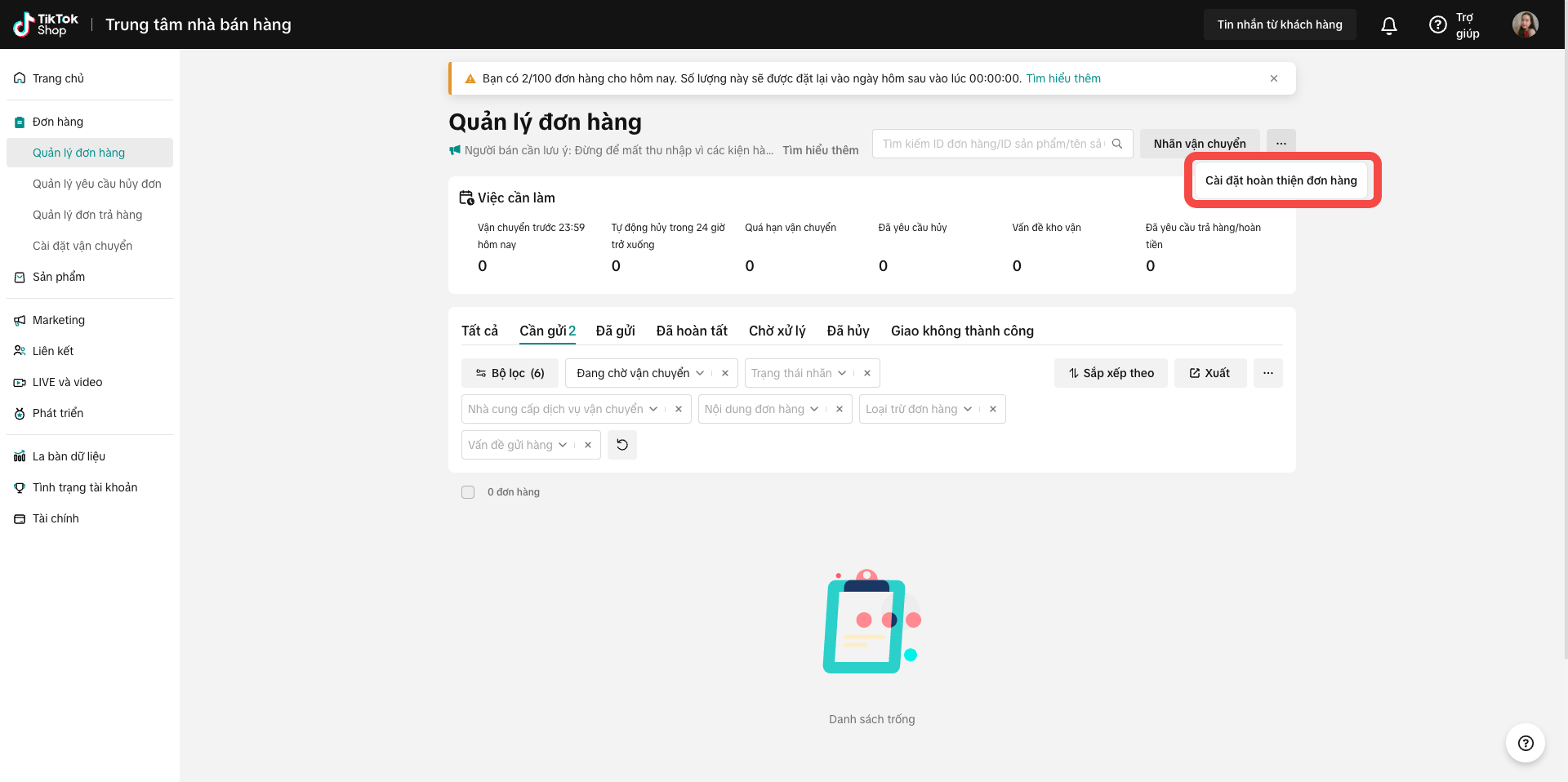
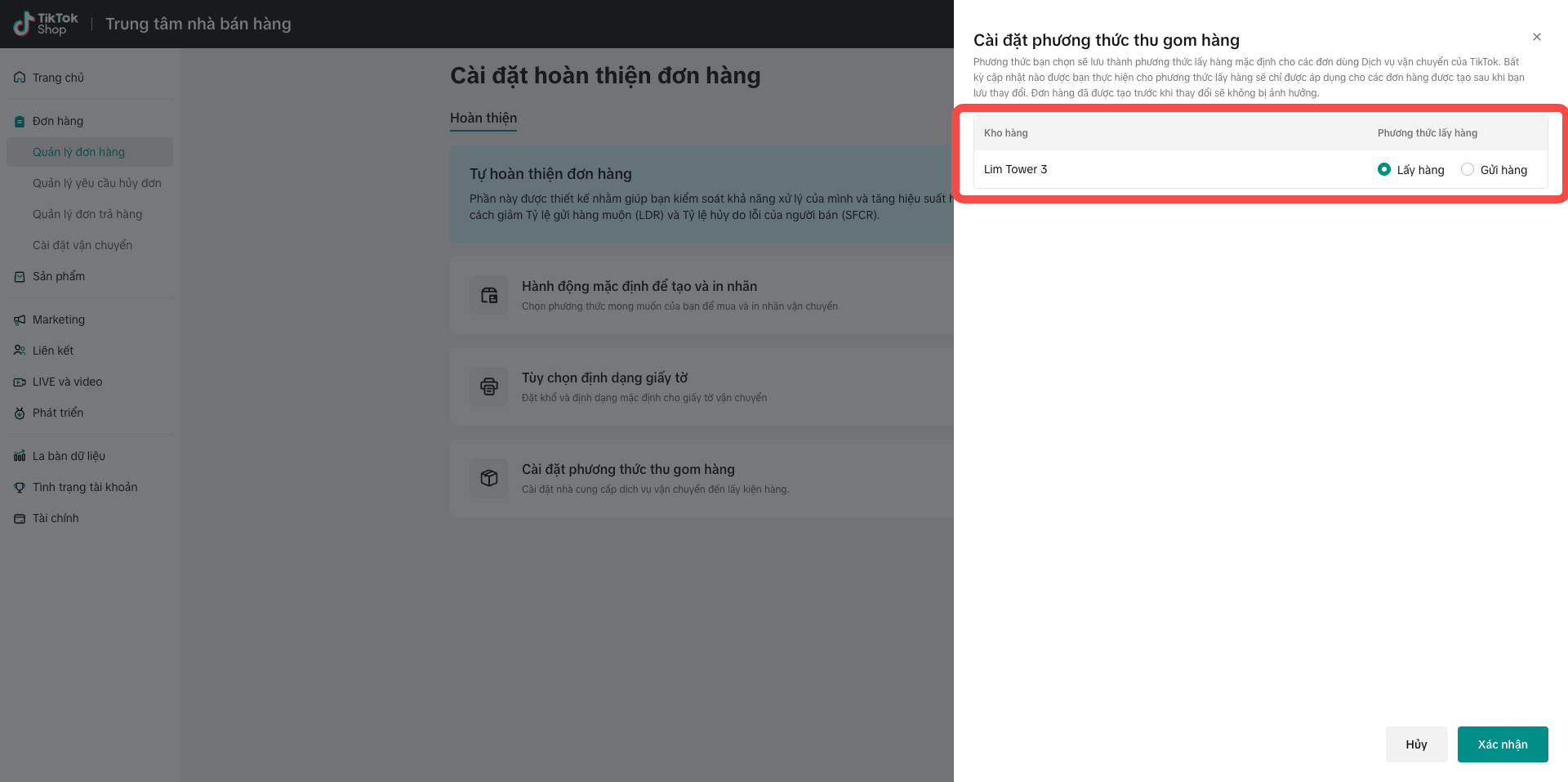
- Đi đến mục Thiết lập phương thức lấy hàng và nhấp vào biểu tượng chỉnh sửa để bắt đầu chỉnh sửa thiết lập của bạn.

- Trên trang này, bạn có thể chọn phương thức lấy hàng mặc định, sau đó nhấp vào "Lưu". Lựa chọn này sẽ trở thành phương thức lấy hàng mặc định, và bạn có thể quay lại cài đặt này để sửa phương thức mặc định bất kỳ lúc nào.

Câu hỏi thường gặp
- Tôi có thể thay đổi phương thức lấy hàng mặc định sau khi thiết lập không?
- Khi nào phương thức lấy hàng mới có hiệu lực nếu tôi thay đổi thiết lập của mình?
You may also be interested in
Giới Thiệu Về Các Đơn Vị Vận Chuyển Trên TikTok Shop
Mô tả: Bài viết giới thiệu các Đơn vị vận chuyển đang hợp tác với TikTok Shop, bao gồm thông tin liê…
Tính Năng Người Bán Tự Vận Chuyển (Seller Own Fleet - SOF) T…
Tính năng Người bán tự vận chuyển (Seller Own Fleet - SOF) là gì? Tính năng Người bán tự vận chuyển…

Hướng Dẫn Về Phí Vận Chuyển Nền Tảng Việt Nam
TikTok Shop tính phí vận chuyển do Người bán thanh toán như thế nào? Phí vận chuyển do Người bán tha…

Tách Đơn Hàng Thành Nhiều Kiện Hàng
Bài viết này cung cấp hướng dẫn đơn giản về cách tách đơn hàng thành nhiều kiện hàng, giúp bạn quản…
Vận chuyển bởi người bán
Tôi cần thực hiện những bước gì khi hoàn thành đơn hàng theo hình thức Vận chuyển bởi người bán? Bướ…
Lạm dụng nền tảng
Những hành động nào được coi là "Lạm dụng nền tảng" trên TikTok Shop? Bán hàng bỏ qua khâu vận chuyể…
Vận chuyển bởi TikTok
Tôi cần thực hiện những bước gì khi hoàn thành đơn hàng theo hình thức Vận chuyển bởi TikTok? Bước 1…
Lịch Gia Hạn Đơn Hàng & Làm Việc Của Đơn Vị Vận Chuyển Dịp T…

Cách liên hệ trực tiếp với đơn vị vận chuyển
Bài viết này cung cấp hướng dẫn ngắn gọn về cách liên hệ hiệu quả với đơn vị vận chuyển để hỏi về tì…
Hoàn tất đơn hàng của bạn trên Ứng dụng Người bán
Menu cài đặt quy trình hoàn thiện mới Giới thiệu menu mới giúp người bán quản lý thiết lập quy trình…