

Seller-Fault Return/Refund Rate
03/02/2026
What is the Seller-Fault Return/Refund Rate?
The Seller-Fault Return/Refund Rate is the percentage of all orders over the last 30 calendar days that have been returned by the customer due to seller-related reasons.What's included:Examples of orders that count toward this metric:
- Returned orders with verified product quality problems
- Returns raised due to defective or damaged products, empty packages, irrelevant products in the packages, inconsistent or incorrect products, wrong or missing items packages, and lost and damaged packages
- Return/Refund requests that are cancelled by the buyer
- Return requests where the buyer did not send the item back within the return window
- Return/refund requests where the seller won arbitration
- Returns due to reasons such as "No longer needed" (applies only to certain product categories). See the Returns & Refunds article for full details.
Where can I find my Seller-Fault Return/Refund Rate?
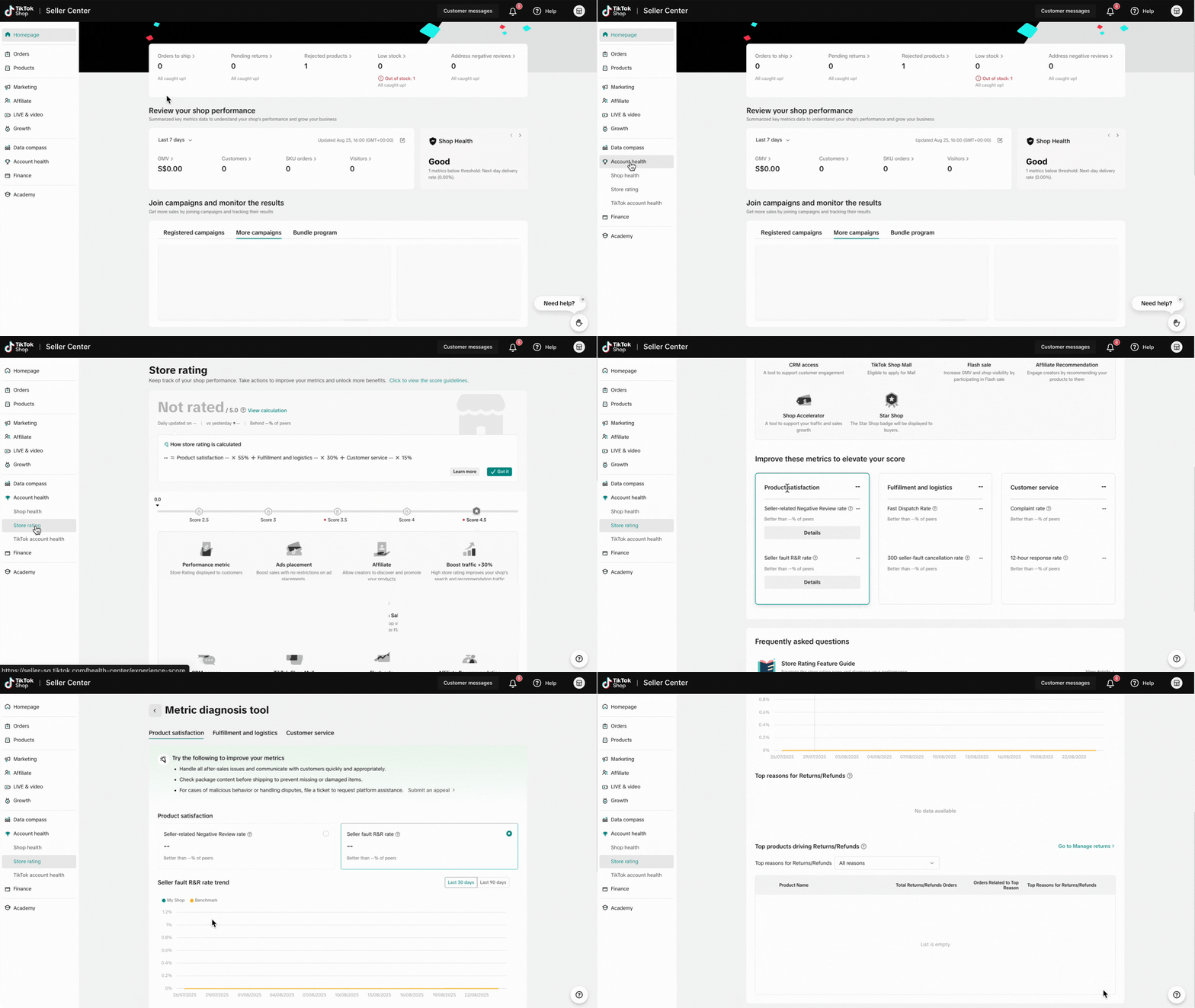
You can find your Seller-Fault Return/Refund Rate in the Account Health section of the Seller Center.- Go to Seller Center
- Click on Account Health > Store Rating on the left-hand panel
- Scroll down to the Product Satisfaction section
- Under Seller fault R&R rate, click Details
- View a breakdown of top reasons and top products driving returns/refunds
What would happen if I do not meet the target above?
No direct enforcement action will be taken if your Seller-Fault Return/Refund Rate exceeds the target. However, having performance below the target may impact your overall Store Rating and access to affiliate marketing.Please see our Seller Performance Evaluation Policy and Seller Terms of Service for more information. If you think an enforcement action has been taken against you in error, appeal via the Seller Center. Please read our Seller Appeal Guidelines article for more information.
You may also be interested in
Failed Return Package
Note: this rule applies only to local-to-local transactions. What is a failed return package? A fail…
Offering Refunds to Customers
This article provides a quick guide on how to initiate a refund to customers for minor inconvenience…

Required Evidence for Rejecting Buyer's Aftersale Requests
This article aims to provide a comprehensive guide on how to effectively reject a buyer's return, re…
Initiating an Appeal for Return/Refund Requests
This article aims to improve seller's understanding regarding appeal management on Seller Center fro…

Managing Refund-Only Request
This article provides a clear overview of the refund-only process, giving you the tools to respond e…

Why can't I locate the Appeal button on the "Manage Returns/…
If you're unable to find the Appeal button on the "Manage Returns/Refunds" page, it could be due to…

When can a buyer raise a return/refund request?
Timeframe for return/refund requests: Buyers can submit a return/refund request within fifteen (15)…

What if the buyer returns incomplete, used, or incorrect ite…
No compensation for incorrect items returned by buyer: Buyers must ensure that they enclose the corr…
Auto Rule Settings for Returnless Refunds
This comprehensive guide will assist you in setting up automated rules for return/refund requests, s…
Auto Rule Settings for Cancellation Requests
This article will provide you with a quick walkthrough on how to set up automated rules for acceptin…