

Pre-Orders
06/18/2025
How do I qualify for the right to mark my products as "pre-order" products?
If this is the first shop for which you are seeking the right to mark your products as "pre-order" products:- That shop must be selling customised or handmade products, and
- You will need to receive an invitation from us to obtain this right.
- The second shop must be selling customised or handmade products, and
- The Seller-fault Cancellation Rate (SFCR) for your previous pre-orders must be less than 10%, and
- You must have less than 15 cancelled pre-orders over a 30 calendar day period.
How do I mark a product as a "pre-order" product?
If you have the ability to mark your product as a "pre-order" product, you can do so by navigating the Seller Center as follows: Products > Manage Products > Edit > Sales Information > Pre-order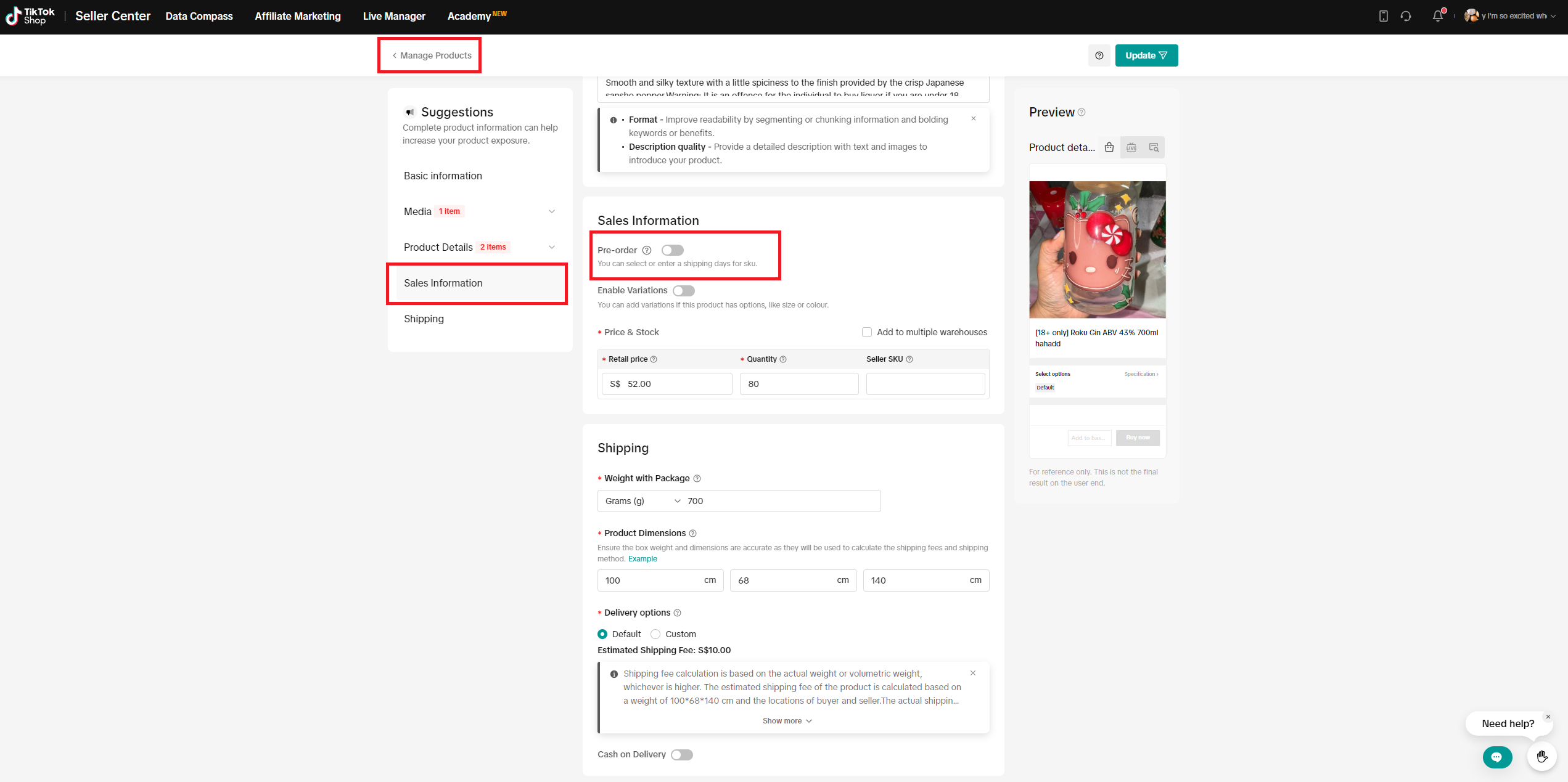
What do I need to do to maintain my access to this right?
Both your shop and products that have been marked as "pre-order" products must meet certain conditions for you to maintain your access to this right.Shop-level Criteria:
- The SFCR for the pre-orders received by your shop must be less than 10%, and
- Your shop must have less than 15 cancelled pre-orders over a 30-calendar-day period.
- The SFCR for your "pre-order" product must be less than 10%, and
- Your "pre-order" product must have less than 5 cancelled pre-orders over a 30-calendar-day period.
What happens if I do not meet the criteria above?
- If your shop does not meet the above shop-level criteria, you will not be able to list "pre-order" products.
- If your products do not meet the product-level criteria, they will be delisted if they are "pre-order" products. However, you can re-list them as standard orders.
Please click here to read our TikTok Shop Pre-Order Qualification Guidelines.
Có thể bạn cũng quan tâm về
- 4 lessons
Order Management
The order management system at Seller Center is extremely streamlined and easy to use for new seller…
- 1 lesson
Shipping Orders done right! (Infographic)
Create a smooth delivery process for enhanced customer satisfaction.
Batch Check Tool
In this article, we will introduce you to the Batch Check tool on the Seller Center app. This tool i…
Order Fulfilment - Overview
Effective and efficient order fulfilment is key to satisfying and retaining customers. Here are the…
What if my package gets lost, damaged, or scrapped?
Overview Scenarios If your package was lost or damaged, you can raise a ticket with the order ID and…
Combining Orders into a Single Package
This article provides a simple guideline on combining multiple orders into a single package, giving…
TikTok Shop Platform Abuse Policy
Overview This Platform Abuse Policy (hereafter referred to as "this Policy") outlines the Seller &…

Appeal Guidelines for IPR Penalties
Appealing Intellectual Property Rights (IPR) Violations At TikTok Shop, we work hard to create a se…
What do I do if the buyer didn't receive the order but the s…
If an order is marked as delivered but the buyer never received the order, your course of action dep…

TikTok Shop Packaging Guidelines
Packaging-related Responsibilities: In order to reduce the risk of damage or leakage during transpor…