

Order Cancellation
01/28/2026
When can my customer cancel an order?
Ship-By-TikTok Orders
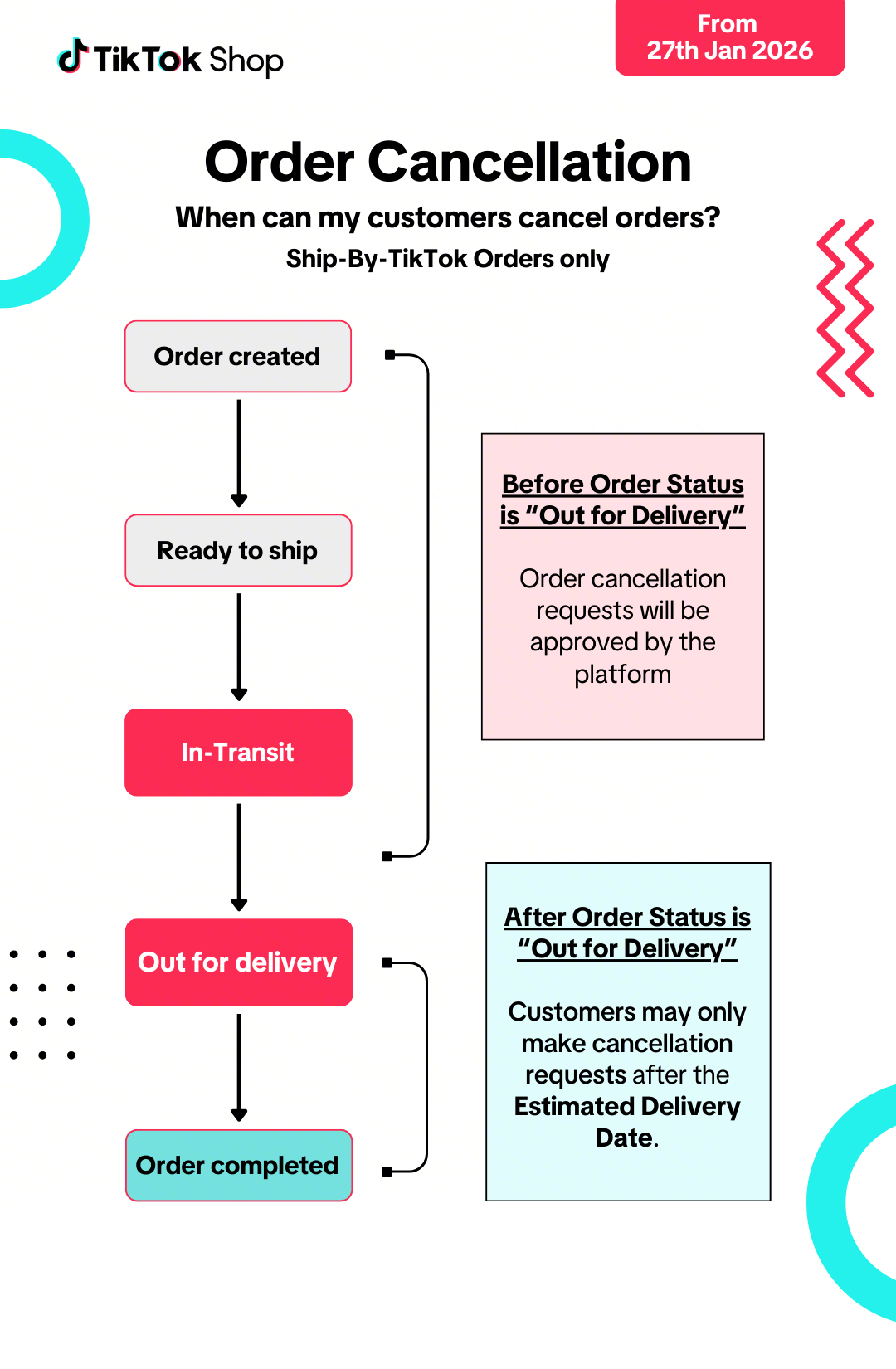
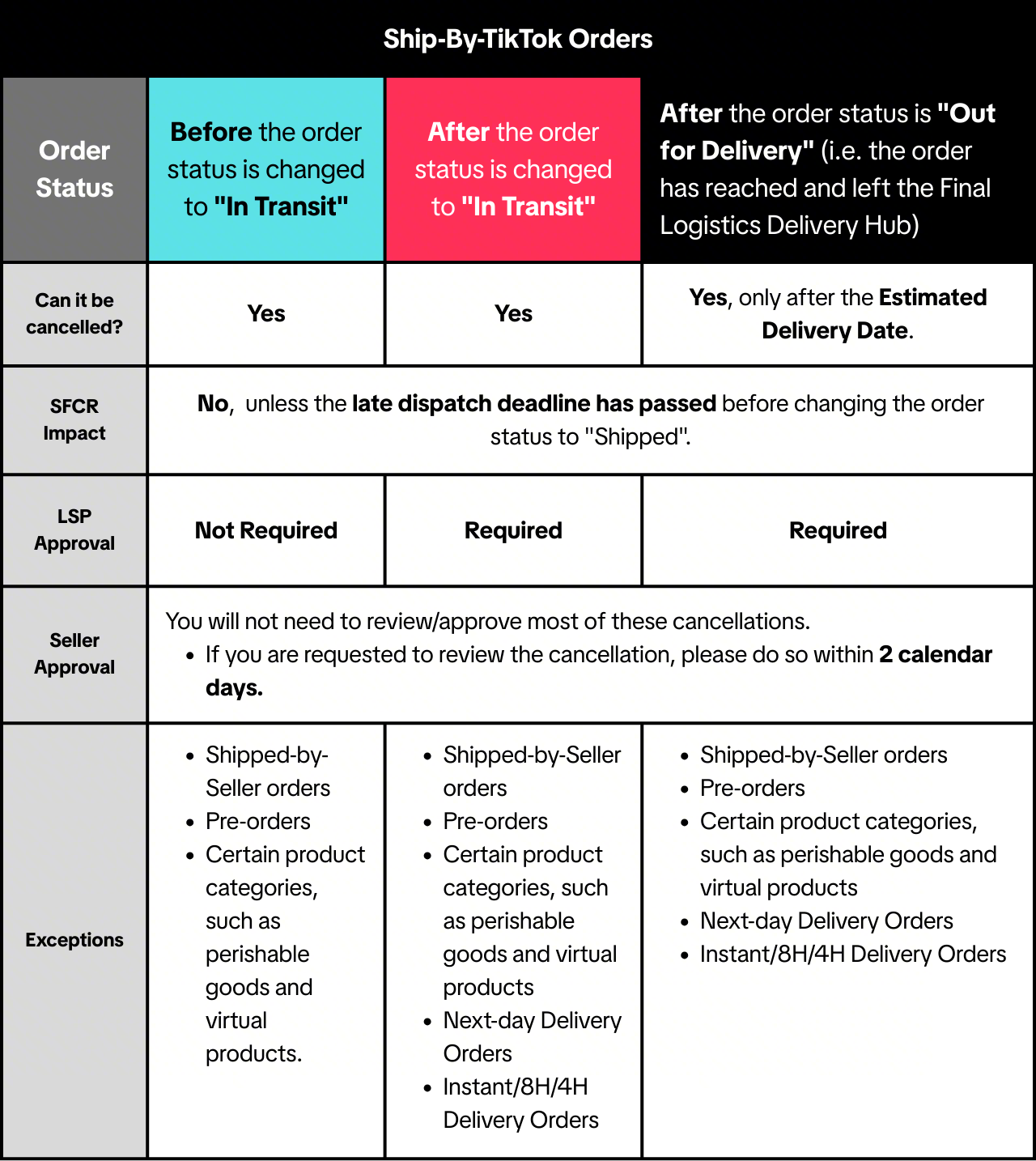
- For products cancelled after pick-up, the products will be returned to sellers by the LSP.
- Sellers will bear the shipping cost for failed deliveries. For more information, please click here
- If your order was mistakenly picked up by the Logistics Service Provider after order cancellation, please raise an appeal through the Seller Center.
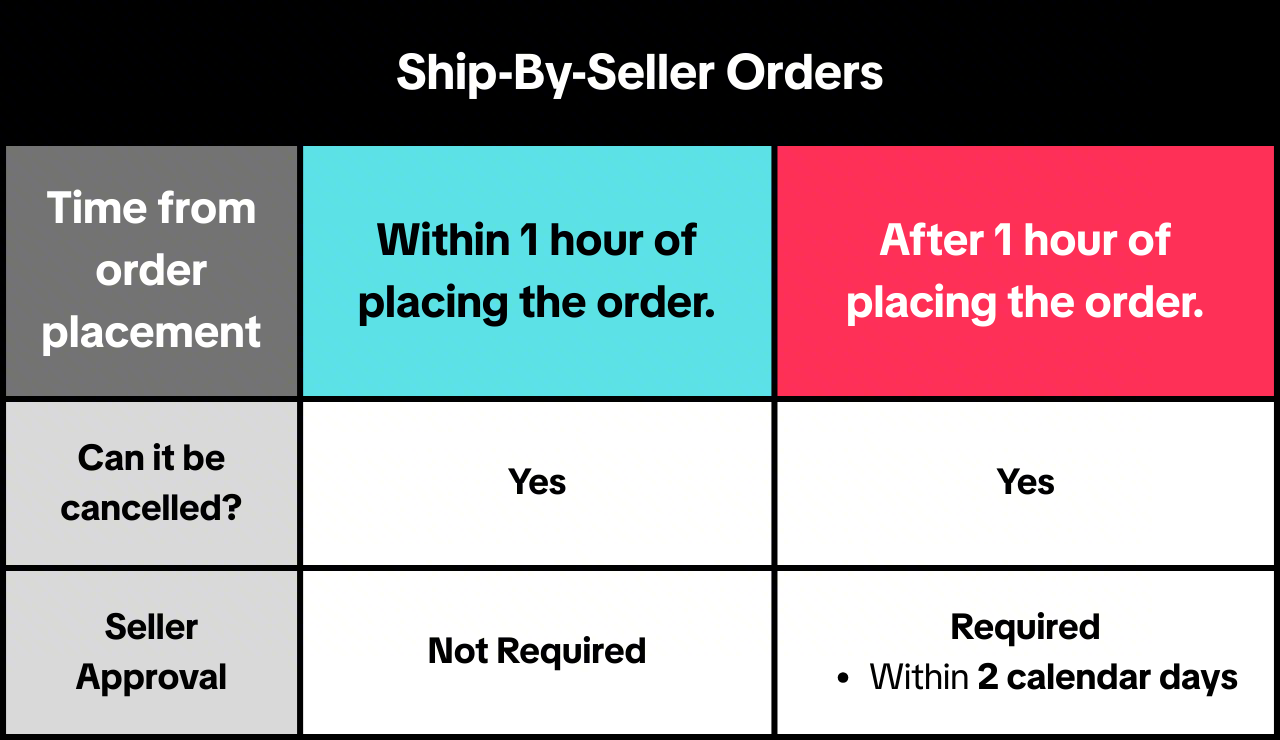
Ship-By-Seller Orders
Cash-on-Delivery: Customer Inspection & Rejections
Important notes:- This policy only applies to Sellers using J&T as their shipping service and shipping to following regions:
- An Giang, Bac Lieu, Ben Tre, Ca Mau, Can Tho, Dong Thap, Hau Giang, Kien Giang, Long An, Soc Trang, Tien Giang, Tra Vinh and Vinh Long
- This policy is in the testing phase. The terms of the policy may change. Sellers will be given notice before any changes take effect.
Customer Inspection & Rejection Process
- Upon delivery, the customer may express interest in inspecting the product
- The courier will explain that a video must be taken. Customers must consent to being videoed before proceeding.
- Following this, the customer may unbox the package. The courier must record the entire unboxing process.
- Customers may then decide if they wish to accept or reject the delivery.
- If they wish to reject the delivery, couriers will retain the parcel, and will not take payment.
- If they wish to accept the delivery, they may make payment and keep the parcel.
❗If you find any issues with these returns (such as product damage or missing products), you may raise an appeal.
Unboxing Terms and Conditions
- Customers may only unbox the outer packaging to inspect the product
- Customers may not try or test the products
- Original product packaging (including manufacturer's seals) must remain intact
- Customers must agree to accept the package if they have damaged or broken the original packaging or seals. Customers may still raise return/refund requests via the platform if necessary.
- If customers have multiple products in the same delivery, they must either accept or reject the entire delivery. They may not reject a portion of the delivery (e.g., 1 or 2 products).
Auto-Approval Tool Activation
To help sellers improve customer experience, we may activate the "Auto-Approval Tool" in certain cases (as below). The tool helps to speed up return/refund request approvals.How will this work?
- If sellers do not review >90% of received return and refund requests in time for 1 month, the auto-approval tool will be activated.
- Only requests meeting the following criteria will be auto-approved using the tool:
- Total value of all products in the request < 790,000VND (Can be adjusted)
- Any reason except "Suspected Counterfeit"
- Customers may only trigger the tool up to 3 times per month.
- Requests approved by the tool will be labelled as "Auto-approved by seller rules" on the Manage Returns/Refunds page.
- The tool will be activated for a minimum of 15 calendar days, but can be deactivated after 15 calendar days through the Fulfillment Settings page.
- For return requests, after the product is received, you may reject the request or submit an appeal if necessary. Click here to learn more.
- If you disagree with an auto-approved refund-only request, please reach out to the Customer Service team to submit an appeal.
Scenario 1: Single high-value request
| Result
|
Scenario 2: Multiple low-value requests from the same customer
| Result
|
When will the platform cancel orders?
For information on when we may cancel orders, please read our Order Fullfillment Timelines article.When can I cancel orders?
- If you have not shipped the order or updated the order status to "Shipped" yet
- If you are unable to fulfill the order because you have insufficient stock or the relevant product suffered unforeseen damage
- Promptly inform your customer of the cancellation via an in-app notification
- Provide the reason(s) for the cancellation in English or your customer's language, whichever is applicable
- Not ask your customer to cancel the order instead
- Issue your customer a full refund for the order
Please see our Violation Reasons, Points & Enforcement Actions for Sellers article and Seller Terms of Service for more information. If you think an enforcement action has been taken against you in error, appeal via the Seller Center. Please read our Seller Appeal Guidelines article for more information.
Where can I view my Order Cancellations?
You may view your cancelled orders by navigating to Seller Center > Manage Orders > Canceled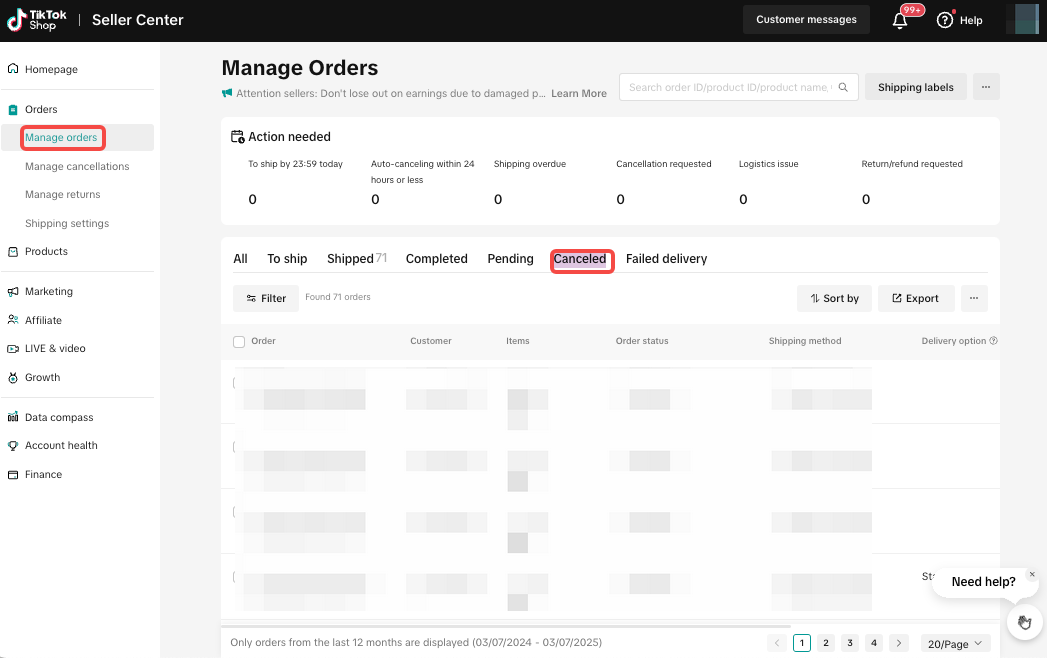
How can I track logistics status of cancelled orders after the orders are in-transit?
You may track the logistics status of your cancelled orders by navigating to Seller Center > Manage Orders > Failed Delivery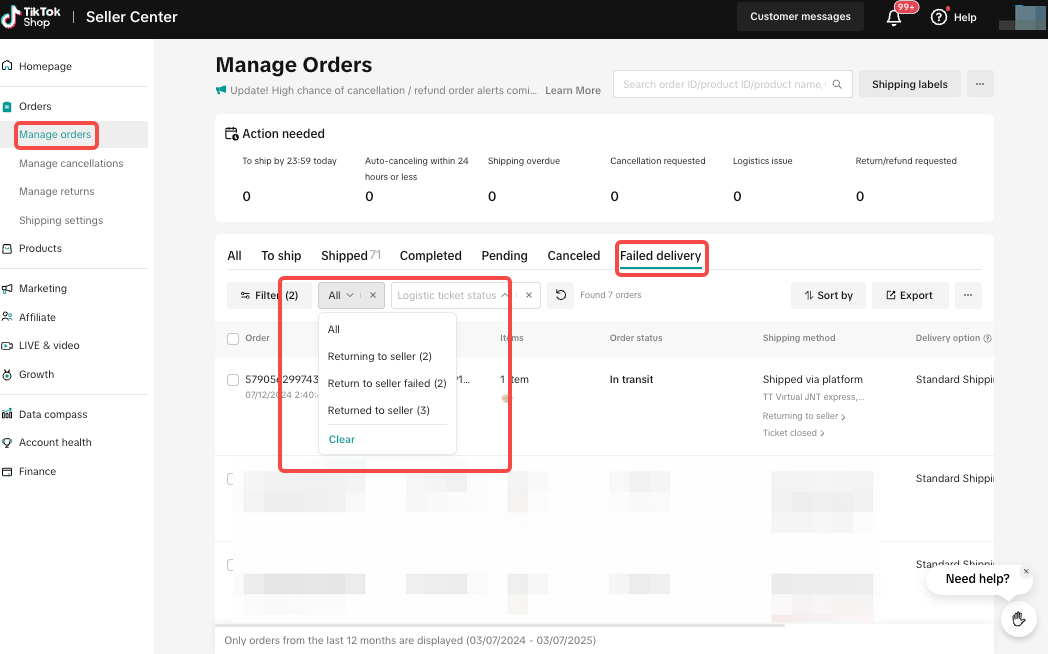
What can I do if my returned cancellation is damaged or missing?
- You may file an appeal via Seller Center > Orders > Manage Orders.
- Click "Appeal"
- Select "I didn't receive the return package" if your order was not returned
- Attach proof that you had handed over your package to the LSP.
- Select "Product is damaged or used" if the product is damaged.
- Attach relevant evidence. Learn more here.
- You may contact the LSP via the LSP hotline, or directly in the Seller Center if this option is available to you.
- You may reach out to the Customer Service team.
Best Practices for Preventing Order Cancellation-related Issues
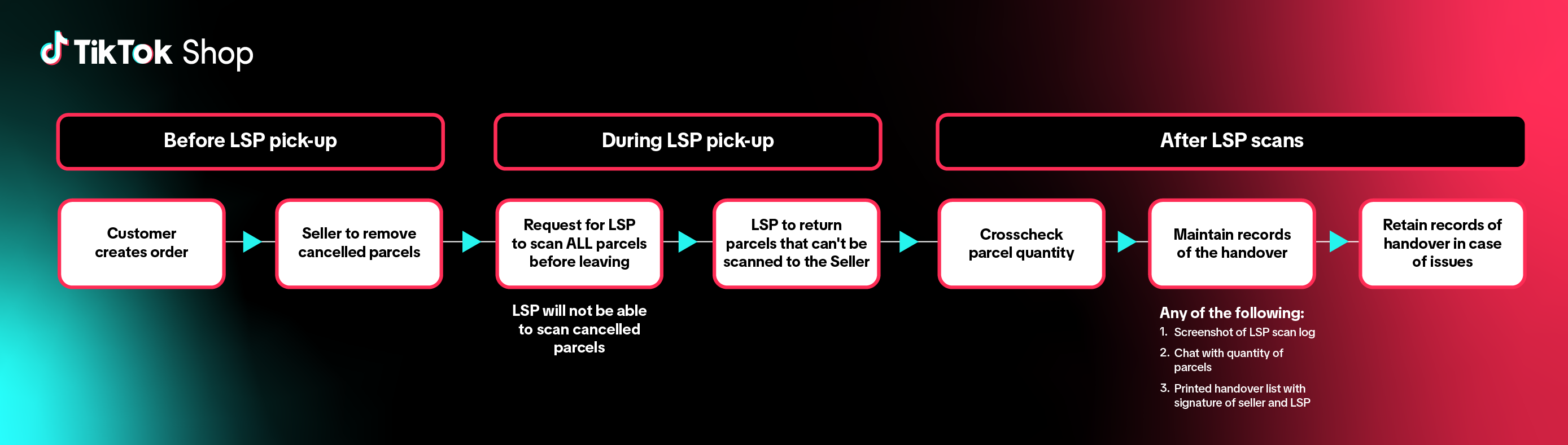
- Remove the cancelled orders before LSP pick up or dropoff. Do not hand over the cancelled orders to LSP to avoid any potential loss as the cancelled parcels will be untrackable.
- If there is operational difficulty taking out the cancelled orders, please make sure that the courier scans all parcels on-site. The courier will be able to identify the cancelled parcels and remove them before LSP pick-up.
- When the courier scans parcels for pick-up, sellers need to cross check the actual handover quantity by sellers with the quantity recorded by LSP courier.
- Collect the proof of parcel handover in your daily operations. This includes:
- Taking a photo of the LSP scan log (this refers to the log reflected on the LSP's device) displaying the quantity of parcels scanned.
- Records of chats with LSP stating clear quantity of parcels scanned
- Printed handover list with parcel quantity, tracking number and signature of both seller and LSP courier
- The following details in your handover list will aid in the process of potential escalations:
- Shop name
- Shop warehouse telephone number
- Handover date
- Handover address
- Handover parcel quantity
- Parcel tracking number list
- Signature of both seller and LSP
You may also be interested in
- 1 lesson
Seller-Fault Cancellation Rate (SFCR)
Learn more about Seller-Fault Cancellation Rate, how to calculate it & how to maintain a low SFCR

What should I do if I wish to initiate an order cancellation…
Below are important guidelines for seller-initiated cancellations: Sellers must provide prompt notic…

Managing Cancellations
This article offers a quick and easy guide to effective cancellation request management. How to Vi…