

Updating Personal Details via Seller Qualification Center
12/20/2023
Introduction
The Seller Qualification Center is a one-stop page displaying the personal details that are linked with your seller account. These are the details that you used to register a seller account on TikTok Shop.Accessing the Seller Qualification Center
The Seller Qualification Center can be accessed via the following:[My Account] >> [Account Settings] >> [Qualification Centre] >> [Seller Qualification]
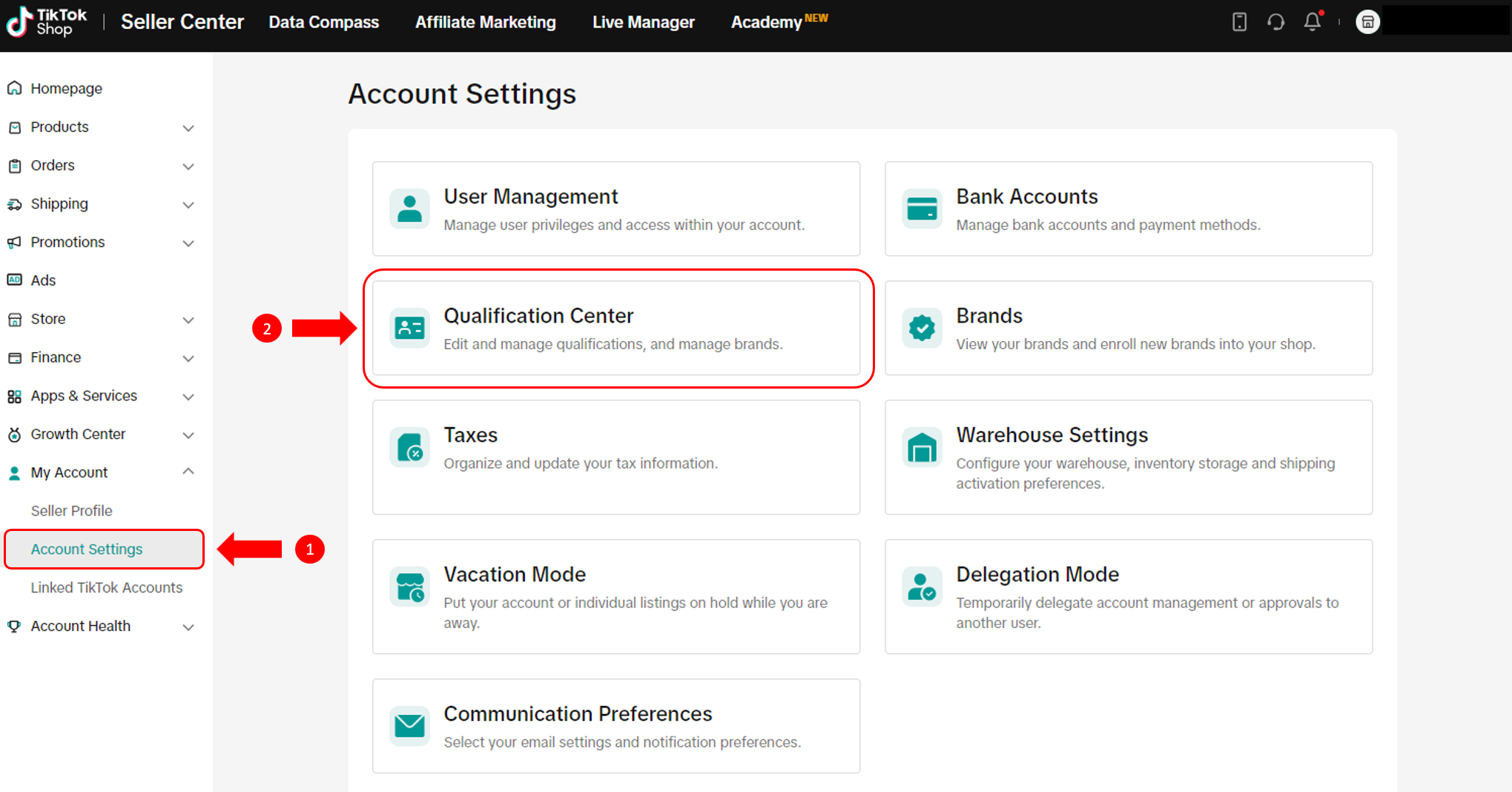
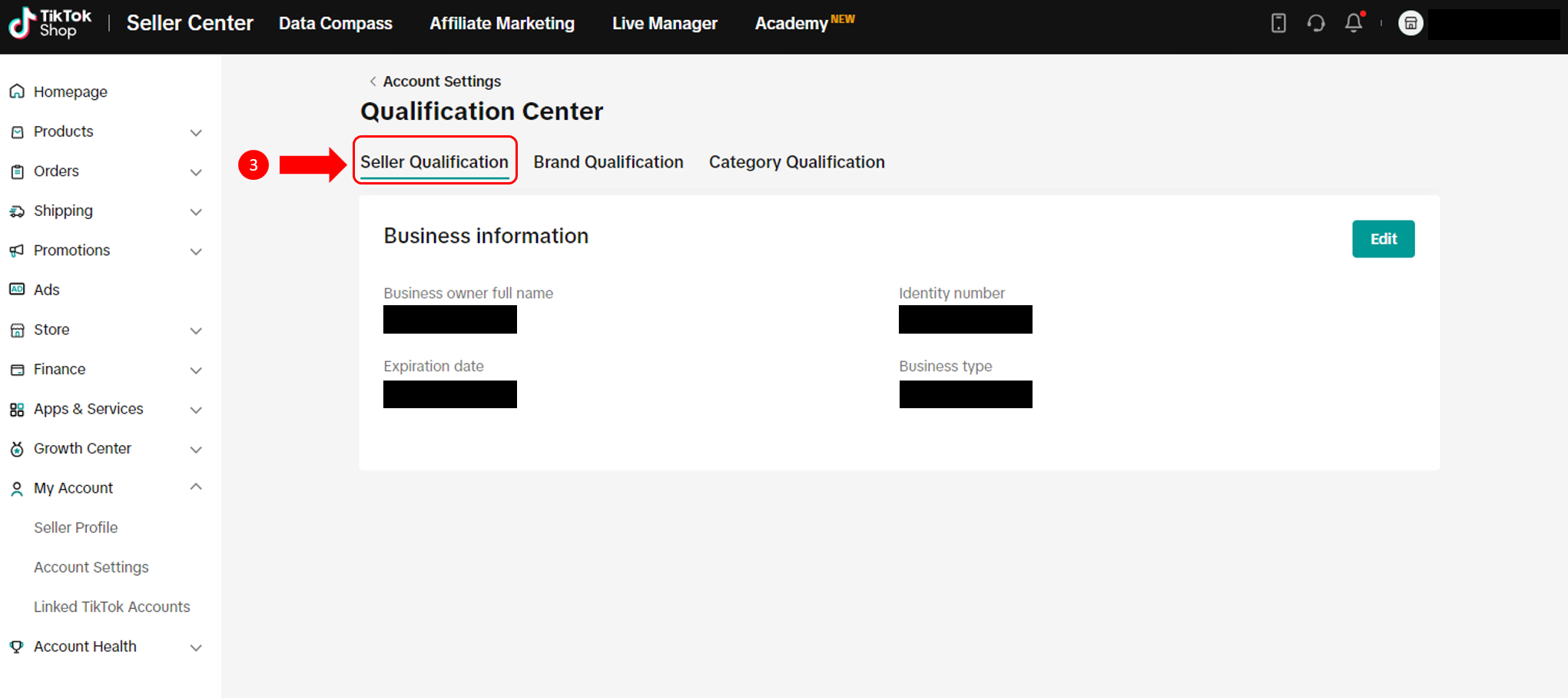
Editing Personal Details
In order to prevent any disruptions to your shop operations on TikTok Shop, it is important to keep us updated on any changes in your personal details.On the Seller Qualification page, click on the "Edit" button to start. Please remember to have your supporting documents ready.
What Details Can I Edit?
| Business type | What can you edit? | Supporting document required |
| Personal Seller |
| Identity document |
| Corporate Seller |
| Business registration document |
What Happens After I Submit?
After submitting, we will review the changes before updating your information. You will receive a notification once this is done.Supporting Document Requirements
Similar to your previous experience when you first registered for a seller account, the supporting documents that you upload need to meet the following requirements so that we can verify the details.General Document Format Requirements
- Supporting documents uploaded must be of high quality, coloured and unobstructed. Angled, blurry, black-and-white, or cropped screenshots are also not allowed.
- Supporting documents must be government-issued, and valid at the time of submission (i.e. not expired).
Personal Sellers
- Supporting documents must be in either PNG or JPG format.
- The name on your identity document must match the name that you are editing to.
- The identity document you upload must be of the same type as what you used during seller registration (e.g. if you registered using an ID card, please provide your ID card this time as well).
Corporate Sellers
- Supporting documents must be in either PNG, JPG or PDF format.
- The company name on your business registration document must match the name that you are editing to.
You may also be interested in
- 9 lessons
Manage Seller Center
Start setting up your profile with the basic and necessary information for a seller at TikTok Shop

Seller Sharing - Underme Vietnam
Underme Vietnam specializes in providing sporty lingerie for women on the TikTok Shop platform. Desp…

Shop Ownership Change Process
Note: You will only be able to change ownership from to individual to corporate/household sellers or…

Violation Points & Milestones for Sellers
What are Violation Points? Violation Points are points issued to sellers who breach our policies an…

How can I change my login email address or phone number asso…
To update your email address/phone number, please follow the steps below: Login to your TikTok Shop…

【Video】Homepage - All you need to check
Find your daily important information and action needed items on homepage. 2.1 Let's Start Your Busi…
Scam Prevention: Cash on Delivery (COD) Scam Orders
Scam Prevention - Cash on Delivery (COD) Scam Orders TikTok Shop strives to provide a shopping exper…
TikTok e-commerce short video music selection guide
For the purpose of upholding music copyright law, we recommend that everyone uses music with commerc…
Adjustment Period for New Shops
New Shop Adjustment Period All new shops on TikTok Shop start in the Shop Adjustment Period. During…

Seller Sharing - Socomo Shop
Socomo is a brand specializing in Korean-style women's fashion, a rising star with a commendable tra…