

Bảo mật tài khoản của bạn thông qua tính năng xác minh hai bước
16/01/2026
 Từ ngày 5 tháng 2 năm 2026, một số người bán nhất định sẽ phải bật tính năng Xác minh hai bước, nếu không, tài khoản của họ sẽ bị hạn chế. Những người bán bị ảnh hưởng sẽ nhận được thông báo qua Hộp thư đến của người bán, Email hoặc Thông báo bật lên trong Trung tâm nhà bán hàng. Nhấp vào đây để đọc thêm.
Xác minh hai bước
Để hỗ trợ bảo vệ tài khoản của bạn và tăng cường bảo mật tổng thể cho nền tảng, chúng tôi khuyến khích tất cả người bán bật Xác minh hai bước. Biện pháp bảo mật này bổ sung thêm một lớp bảo vệ để ngăn chặn truy cập trái phép và luôn đảm bảo an toàn cho cửa hàng, dữ liệu và thu nhập của bạn.Lưu ý: Với một số người bán, xác minh hai bước là yêu cầu bắt buộc của nền tảng. Nhấp vào đây để đọc thêm.
Lợi ích của Xác minh hai bước
Chúng tôi đặc biệt khuyến khích người bán hoàn tất thiết lập nhanh chóng để tránh bị gián đoạn và hưởng lợi tối đa từ các biện pháp bảo vệ của tính năng này:- Tăng cường khả năng chống truy cập trái phép
- Hỗ trợ bảo mật các giao dịch tài chính và dữ liệu kinh doanh nhạy cảm
- Giảm nguy cơ bị chiếm đoạt hoặc gián đoạn tài khoản
- Đảm bảo quyền truy cập không gián đoạn vào các công cụ và tính năng dành cho người bán
- Đem lại sự yên tâm và tin tưởng cho bạn và doanh nghiệp của bạn
Cách bật tính năng Xác minh hai bước
Tính năng Xác minh hai bước bổ sung thêm một lớp bảo vệ tài khoản bằng cách yêu cầu cả mật khẩu và mã xác minh một lần để đăng nhập. Hãy thực hiện theo các bước sau đây để bật tính năng này trên tài khoản của bạn:- Đăng nhập vào Trung tâm nhà bán hàng.
- Nhấp vào biểu tượng hồ sơ cửa hàng (góc trên cùng bên phải), chọn Tài khoản của tôi, sau đó vào Hồ sơ người bán.

- Trong tab Thông tin tài khoản, hãy thêm số điện thoại của bạn (nếu bạn chưa có). Trước tiên, bạn có thể cần xác minh email.
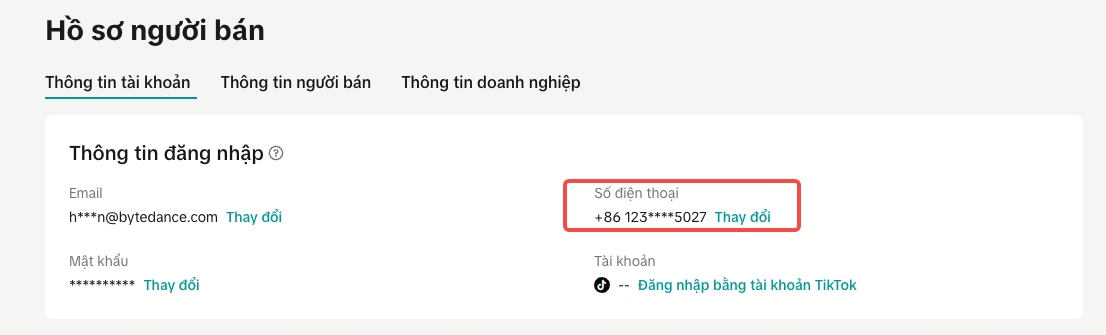
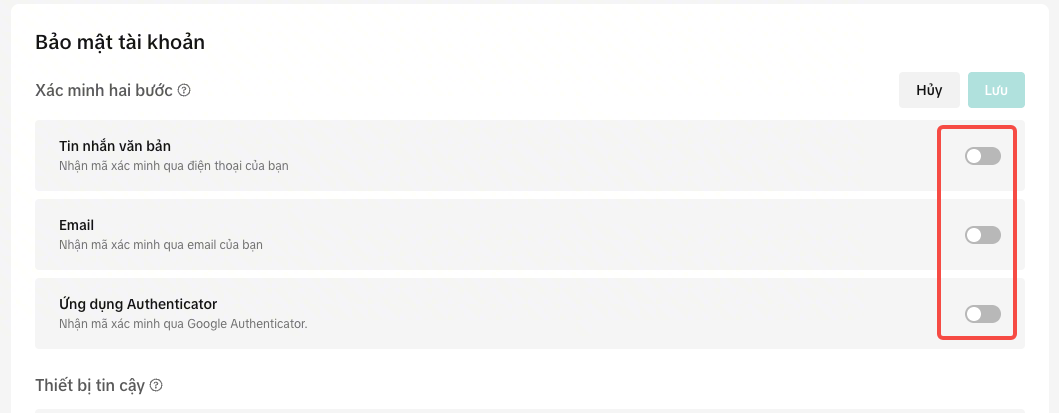
- Cuộn đến phần Bảo mật tài khoản > Xác minh hai bước. Bật phương thức bạn mong muốn. Chúng tôi khuyên bạn nên bật ít nhất hai phương thức.
Câu hỏi thường gặp
Tôi đã được yêu cầu thiết lập Xác minh hai bước. Điều gì sẽ xảy ra nếu tôi không thiết lập?
- Bạn sẽ có khoảng thời gian 30 ngày để thiết lập Xác minh hai bước.
- Nếu bạn không hoàn tất thiết lập trong vòng 30 ngày kể từ khi nhận được thông báo, tài khoản của bạn có thể bị hạn chế rút tiền.
- Bạn phải chọn ít nhất 2 phương thức xác minh.
- Biện pháp hạn chế áp dụng đối với bạn sẽ được gỡ bỏ ngay sau khi bạn thiết lập Xác minh hai bước.
Tôi đã thử thêm phương thức Xác minh hai bước nhưng không thực hiện được – tôi phải làm gì?
- Bạn có thể gửi Khiếu nại thông qua thông báo vi phạm bạn nhận được.
You may also be interested in
- 9 lessons
Quản Lý Trung Tâm Nhà Bán Hàng
Bắt đầu cài đặt hồ sơ của bạn với những thông tin cơ bản và cần thiết cho một nhà nhà bán hàng tại T…

Câu Chuyện Nhà Bán Hàng - Underme Vietnam
Underme Vietnam chuyên cung cấp quần áo lót thể thao dành cho nữ trên cửa hàng TikTok Shop. Tuy là g…
Quy trình thay đổi Quyền sở hữu cửa hàng
Lưu ý: Bạn sẽ chỉ có thể thay đổi quyền sở hữu sang từ Nhà bán hàng cá nhân sang Hộ kinh doanh/Doanh…

Điểm vi phạm và cột mốc dành cho người bán
Điểm vi phạm là gì? Điểm vi phạm là điểm số được cấp cho những người bán vi phạm chính sách và nguy…
Làm sao để tôi thay đổi email hoặc số điện thoại đăng ký tài…
Để cập nhật địa chỉ email/số điện thoại, vui lòng làm theo các bước sau: Đăng nhập vào tài khoản ngư…

Trang Chủ - Tất Cả Những Gì Cần Kiểm Tra
Tìm thông tin quan trọng hàng ngày của bạn và các mục cần hành động trên trang chủ. 2.1 Hãy bắt…
Phòng chống lừa đảo: Đơn hàng lừa đảo Giao hàng thu tiền hộ…
Phòng chống lừa đảo - Đơn hàng lừa đảo Giao hàng thu tiền hộ (COD) TikTok Shop nỗ lực cung cấp trải…

Hướng dẫn chọn nhạc cho video ngắn trên sàn thương mại điện…
Để đảm bảo tuân thủ luật bản quyền nhạc, chúng tôi khuyến khích mọi người sử dụng nhạc có quyền nhạc…
Giai đoạn điều chỉnh của cửa hàng mới
Tất cả các cửa hàng mới trên TikTok Shop đều bắt đầu trong Giai đoạn điều chỉnh cửa hàng. Trong giai…

Câu Chuyện Nhà Bán Hàng - Socomo Shop
✨👗 SHOP THỜI TRANG NỮ PHONG CÁCH VÀ TINH THẦN HỌC HỎI SIÊU NHIỆT HUYẾT TRÊN HÀNH TRÌNH BÁN HÀNG TẠI…