

Adjustment Period for New Shops
03/04/2026
New Shop Adjustment Period
All new shops on TikTok Shop start in the Shop Adjustment Period. During this period, your shop will have temporary limits on orders and listings while you get started and build your shop. These limits are adjusted automatically as your shop meets the criteria to progress through each tier.Why Shops Start in the Adjustment Period
The Shop Adjustment Period helps new shops get started smoothly on TikTok Shop. It sets temporary limits to ensure:- Product listings are accurate
- Orders are fulfilled on time
- Customers have a good shopping experience
What Each Tier Allows
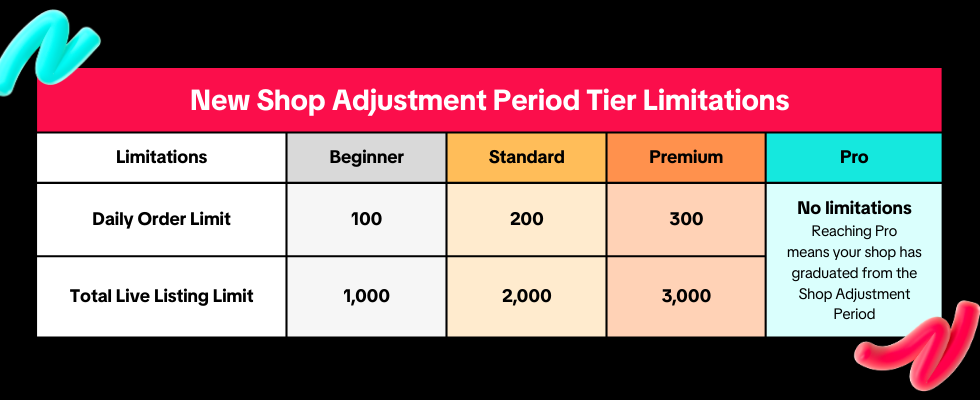
- Beginner: You can receive up to 100 orders per day and upload up to 1,000 products.
- Standard: You can receive up to 200 orders per day and upload up to 2,000 products.
- Premium: You can receive up to 300 orders per day and upload up to 3,000 products.
- Pro: Your shop has graduated from the Shop Adjustment Period and is no longer subject to daily order or product listing limits under this program.
How to Progress Through Tiers
Your shop will progress through tiers based on its performance. Tier upgrades are automatic and do not require manual application.Once your shop meets all the criteria for a specific tier, it will remain in that tier until it moves to a higher tier or completes the Shop Adjustment Period. Shops do not need to progress through every tier in sequence, meeting the Pro tier criteria completes the Shop Adjustment Period.
Beginner
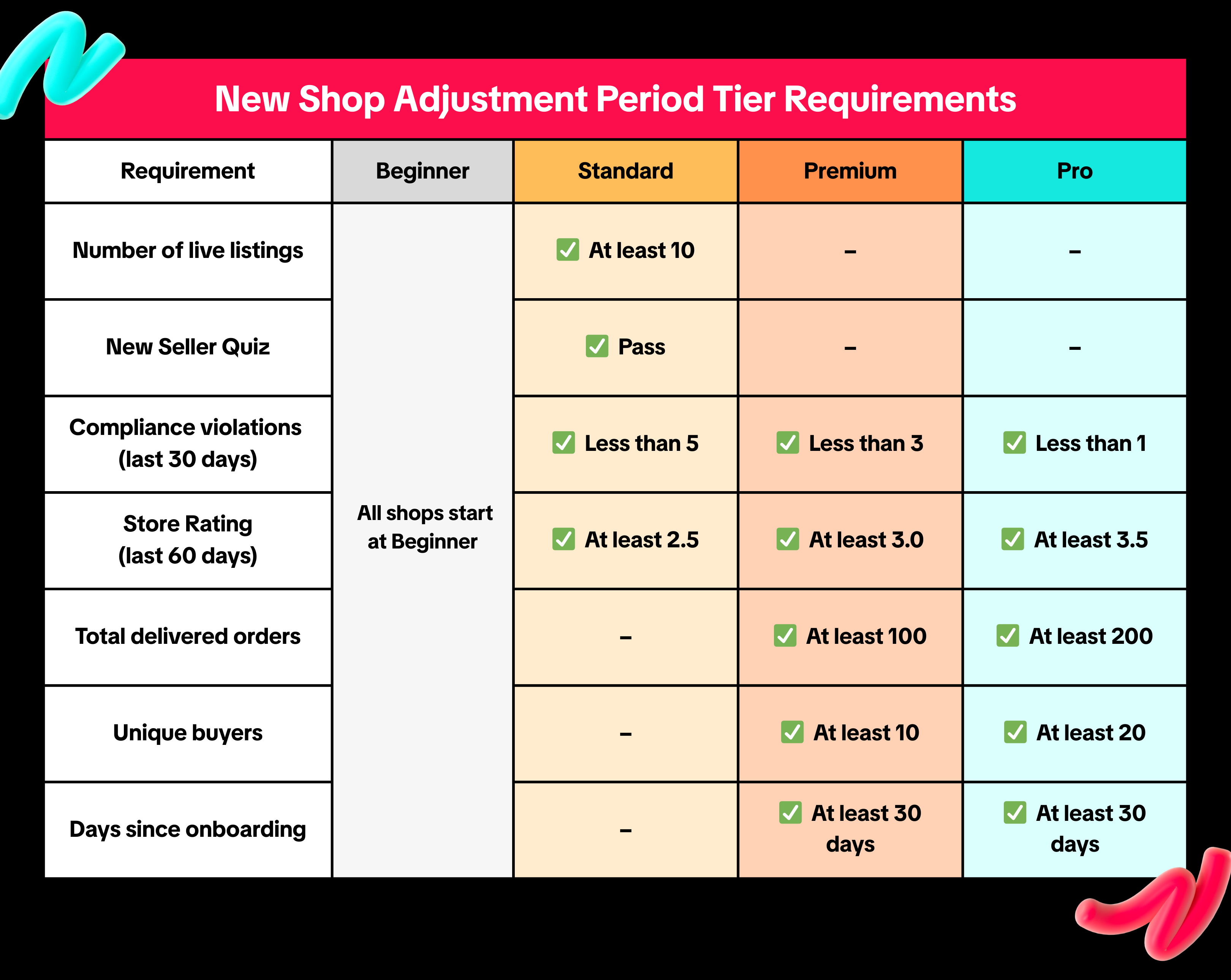
All new shops automatically start at the Beginner tier after completing shop onboarding. No additional action is required.Standard
Your shop can progress from Beginner to Standard once all of the following are met:- At least 10 live listings
- Pass the required New Seller Quiz
- Fewer than 5 compliance violations in the last 30 days
- Store Rating is at least 2.5 in the last 60 days
Premium
Your shop can progress to Premium once all of the following are met:- Fewer than 3 compliance violations in the last 30 days
- At least 30 days since shop onboarding
- Store Rating is at least 3.0 in the last 60 days
- At least 100 delivered orders in total
- At least 10 unique buyers in total
Pro
Your shop can progress to Pro once all of the following are met:- Fewer than 1 compliance violation in the last 30 days
- At least 30 days since shop onboarding
- Store Rating is at least 3.5 in the last 60 days
- At least 200 delivered orders in total
- At least 20 unique buyers in total
Important Notes
- Delivered orders refer to orders that are successfully completed. Orders that are cancelled before delivery are not counted.
- Compliance violations refer to breaches of TikTok Shop policies, including selling counterfeit or IPR-infringing products, or listing prohibited products.
- Store Rating reflects your shop's overall performance and customer experience. It is displayed on your shop page as a score from 0 to 5. For more details, refer to the Store Rating guide.
How to Track Your Shop Status
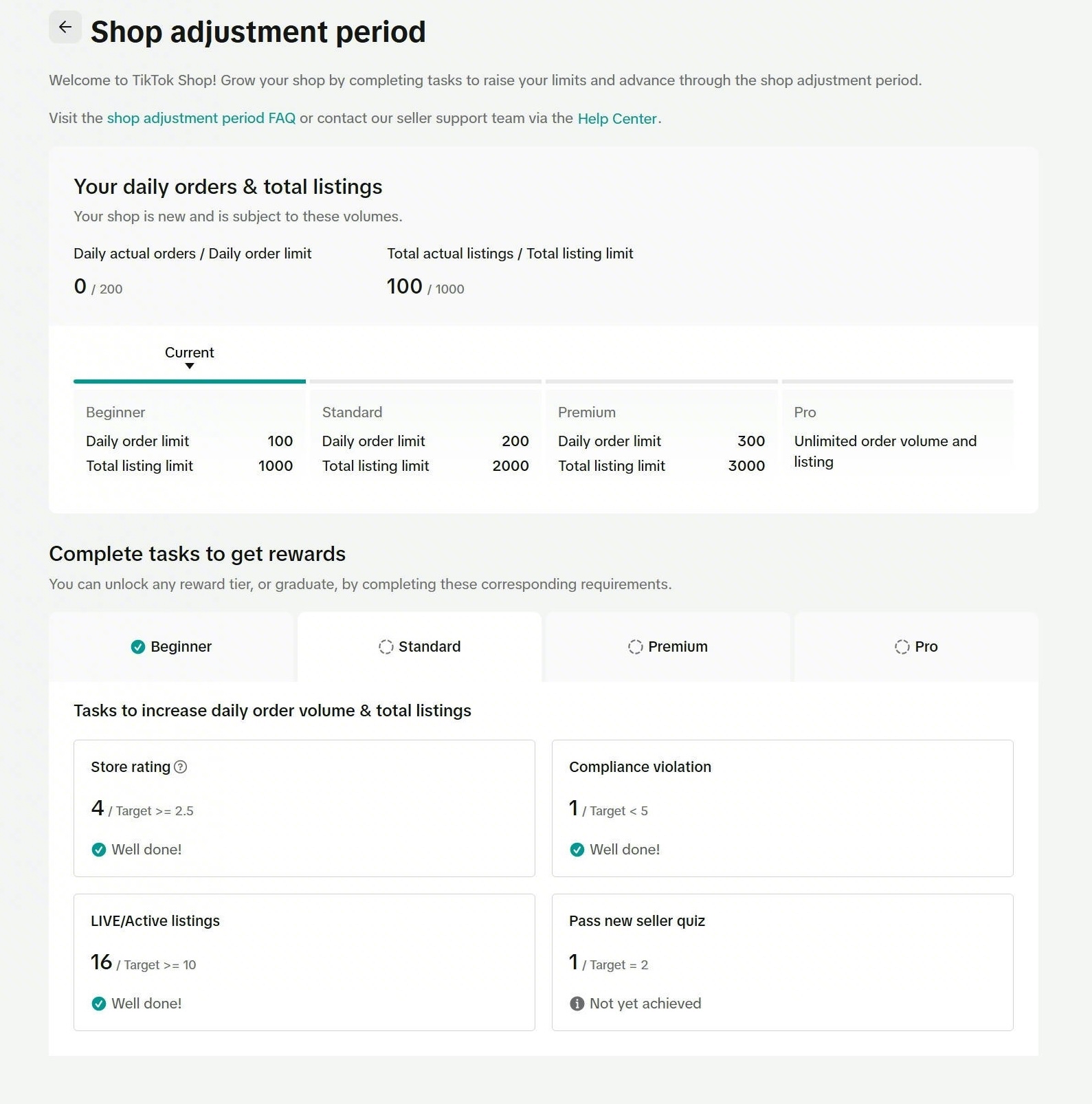
You can track your current tier and limits in Seller Center.- Go to Seller Center
- Click on the Shop Adjustment Program widget in the top-right corner
- On the page, you can view your:
- Current tier
- Daily order limit
- Listing limit
Frequently Asked Questions
How long does the Shop Adjustment Period last?
Does the Shop Adjustment Period negatively impact my shop?
When can I start receiving orders on TikTok Shop?
Where can I find the New Seller Quiz?
How can I check if I have received any violations?
- Seller Center > Account Health > Shop Health
How can I check my violation records?
For more details, refer to the Store Rating guide.
Why can't I find my Store Rating?
For more details, refer to the Store Rating guide.
You may also be interested in
- 9 lessons
Manage Seller Center
Start setting up your profile with the basic and necessary information for a seller at TikTok Shop

Seller Sharing - Underme Vietnam
Underme Vietnam specializes in providing sporty lingerie for women on the TikTok Shop platform. Desp…

Shop Ownership Change Process
Note: You will only be able to change ownership from to individual to corporate/household sellers or…

Violation Points & Milestones for Sellers
What are Violation Points? Violation Points are points issued to sellers who breach our policies an…
How can I change my login email address or phone number asso…
To update your email address/phone number, please follow the steps below: Login to your TikTok Shop…

【Video】Homepage - All you need to check
Find your daily important information and action needed items on homepage. 2.1 Let's Start Your Busi…
Scam Prevention: Cash on Delivery (COD) Scam Orders
Scam Prevention - Cash on Delivery (COD) Scam Orders TikTok Shop strives to provide a shopping exper…
TikTok e-commerce short video music selection guide
For the purpose of upholding music copyright law, we recommend that everyone uses music with commerc…

Seller Sharing - Socomo Shop
Socomo is a brand specializing in Korean-style women's fashion, a rising star with a commendable tra…
Seller Sharing - Tú Trinh Food
Tu Trinh Food is a brand that combines the essence of cuisine and technology with its main product b…