

What do I do if the logistics status of my order is stuck or not updated accurately?
07/18/2024
- Locate the affected Order ID in the To ship or Shipped tab.
- Hover over the Order ID and click View logistics. You can view any logistics updates under Tracking results.
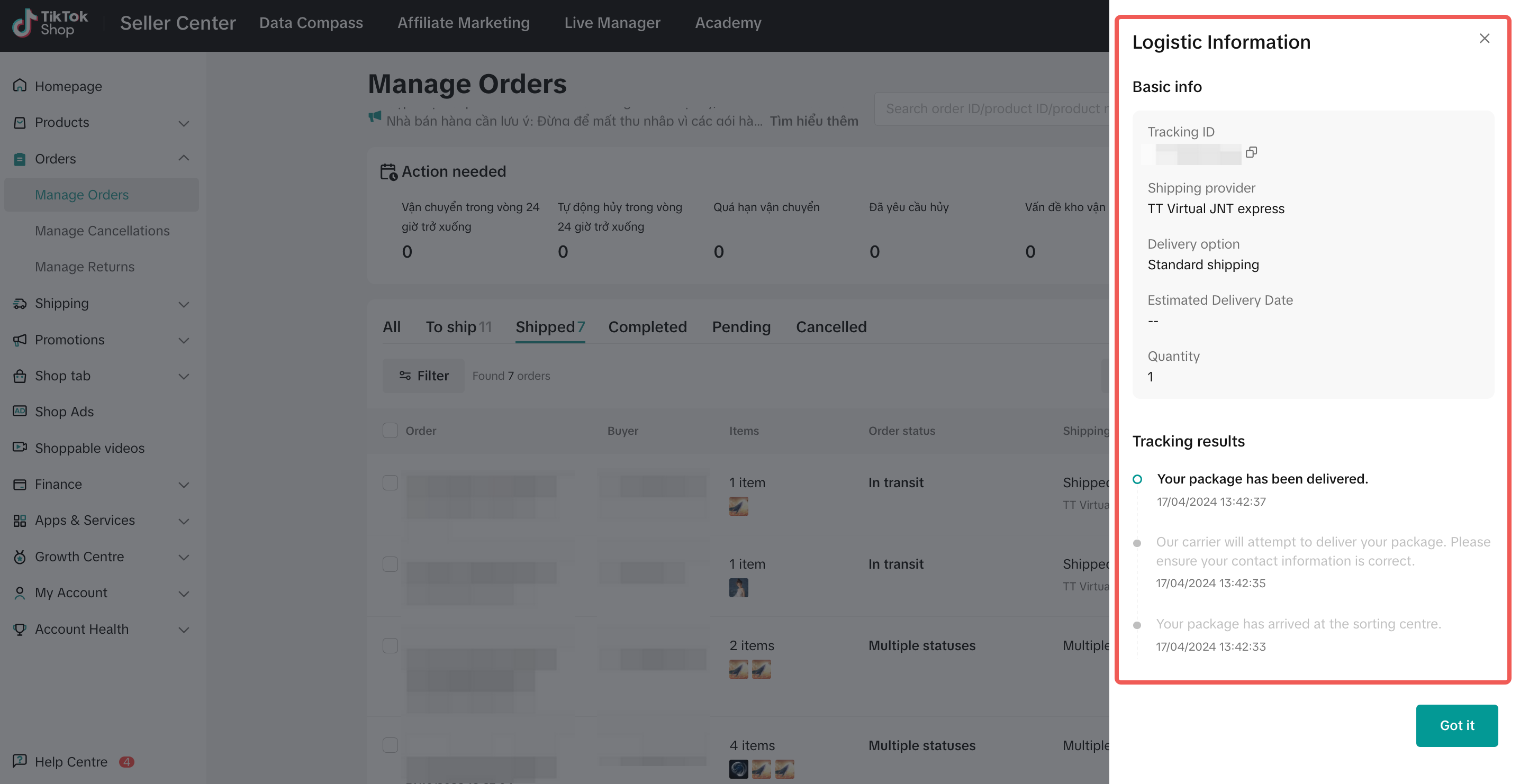
If your shipping method is Shipped via Platform:
- You can first check on the logistics service provider's website to confirm if the tracking status matches the platform's tracking status.
- The order is within the normal delivery timeline. We appreciate your patience and if the status is still not updated within 2 business days, you can contact our seller support for further assistance.
- If it's been more than 24 hours since your order was picked up and the status has not been updated to "Shipped," you can create a ticket under Complaints & Dispute (Logistic related) > Pick up Issues > Picked up but logistics status not updated with the Order ID*. Be sure to include evidence so we can verify and update to the correct status.
- You can create a ticket* via Complaints & Dispute (Logistic related) > Delivery process inquiry > Unmoved tracking event. Our support team will follow up with the logistics service provider for a status update.
- If the buyer contacted you to confirm that they've received the order, but the logistics status still does not update, you can create a ticket under Complaints & Dispute (Logistic related) > Logistic Issue > Delivered but logistics not updated with the Order ID*. Be sure to include relevant evidence for us to verify and update the status.
If your shipping method is Shipped by Seller:
- You can check directly with your chosen logistics service provider for an update on the tracking status.
- You have to manually update your orders' delivery status and upload Proof of Delivery (POD).
You may also be interested in
- 4 lessons
Order Management
The order management system at Seller Center is extremely streamlined and easy to use for new seller…
- 1 lesson
Shipping Orders done right! (Infographic)
Create a smooth delivery process for enhanced customer satisfaction.
Batch Check Tool
In this article, we will introduce you to the Batch Check tool on the Seller Center app. This tool i…
Pre-Orders
How do I qualify for the right to mark my products as "pre-order" products? If this is the first sho…
Order Fulfilment - Overview
Effective and efficient order fulfilment is key to satisfying and retaining customers. Here are the…

What if my package gets lost, damaged, or scrapped?
Overview Scenarios If your package was lost or damaged, you can raise a ticket with the order ID and…
Combining Orders into a Single Package
This article provides a simple guideline on combining multiple orders into a single package, giving…
TikTok Shop Platform Abuse Policy
Overview This Platform Abuse Policy (hereafter referred to as "this Policy") outlines the Seller &…

Appeal Guidelines for IPR Penalties
Appealing Intellectual Property Rights (IPR) Violations At TikTok Shop, we work hard to create a se…

What do I do if the buyer didn't receive the order but the s…
If an order is marked as delivered but the buyer never received the order, your course of action dep…