

Giờ hoạt động của kho cho dịch vụ giao hàng Hỏa tốc (Instant)
05/02/2026
Hướng dẫn này sẽ giải thích về cách cài đặt tính năng giờ hoạt động của kho cho dịch vụ giao hàng Hỏa tốc (Instant).
Để biết thêm thông tin về SLA và cách thiết lập các tùy chọn vận chuyển, bạn có thể tham khảo các bài viết sau.

⚠️ Quan trọng:

2. Đối với "Ngày nghỉ", hãy làm theo các bước dưới đây

Để biết thêm thông tin về SLA và cách thiết lập các tùy chọn vận chuyển, bạn có thể tham khảo các bài viết sau.
Hiểu rõ Giờ hoạt động của kho ảnh hưởng đến cửa hàng của bạn như thế nào
Tính năng này cho phép bạn thiết lập giờ làm việc của mình. Vui lòng đảm bảo giờ bạn thiết lập phản ánh đúng hoạt động kinh doanh thực tế của bạn. Sau khi hoàn tất thiết lập, dịch vụ Hỏa tốc sẽ tự động bị ẩn đối với người mua vào những khoảng thời gian nhất định.⚠️ Quan trọng:
- Các thay đổi sẽ chỉ có hiệu lực bắt đầu từ ngày hôm sau. Ví dụ, nếu bạn đặt Thứ Bảy là ngày nghỉ vào hôm Thứ Bảy, thì cài đặt này sẽ chỉ áp dụng từ Thứ Bảy tuần sau.
- Hệ thống sẽ tự động ẩn các dịch vụ này khỏi người mua trong từng khung giờ cụ thể, KHÔNG phải trong toàn bộ thời gian ngoài giờ làm việc. Điều này đảm bảo bạn có thể liên tục đáp ứng SLA bàn giao đơn hàng mà không mất đơn hàng trong giờ mở cửa.
| Giờ làm việc | Trạng thái Tính khả dụng của Dịch vụ | Khoảng thời gian dịch vụ Hỏa tốc (Instant) sẽ bị ẩn |
| Đóng cửa(Chỉ cho phép vào Thứ Bảy, Chủ Nhật và ngày lễ) | 🛑 Hoàn toàn không khả dụng | 18:00 ngày hôm trước (D-1) đến 18:00 hôm nay (D+0) |
| 08:00 - 11:00 | 🟠 Một phần không khả dụng | 🟠 09:30 hôm nay (D+0) đến 18:00 hôm nay (D+0) |
| 08:00 - 12:00 | 🟠 10:30 hôm nay (D+0) đến 18:00 hôm nay (D+0) | |
| 08:00 - 13:00 | 🟠 11:30 hôm nay (D+0) đến 18:00 hôm nay (D+0) | |
| 08:00 - 14:00 | 🟠 12:30 hôm nay (D+0) đến 18:00 hôm nay (D+0) | |
| 08:00 - 15:00 | 🟠 13:30 hôm nay (D+0) đến 18:00 hôm nay (D+0) | |
| 08:00 - 16:00 | 🟠 14:30 hôm nay (D+0) đến 18:00 hôm nay (D+0) | |
| 08:00 - 17:00 | 🟠 15:30 hôm nay (D+0) đến 18:00 hôm nay (D+0) | |
| 08:00 - 18:00 | 🟠 16:30 hôm nay (D+0) đến 18:00 hôm nay (D+0) | |
| 08:00 - 19:00 | 🟠 17:30 hôm nay (D+0) đến 18:00 hôm nay (D+0) | |
| 08:00 - 20:00 | ✅ Hoàn toàn khả dụng | ✅ Không có thời gian ẩn |
| 08:00 - 21:00 | ✅ Không có thời gian ẩn |
Cách thiết lập giờ hoạt động của kho
- Bạn có thể thiết lập giờ hoạt động qua các trang sau
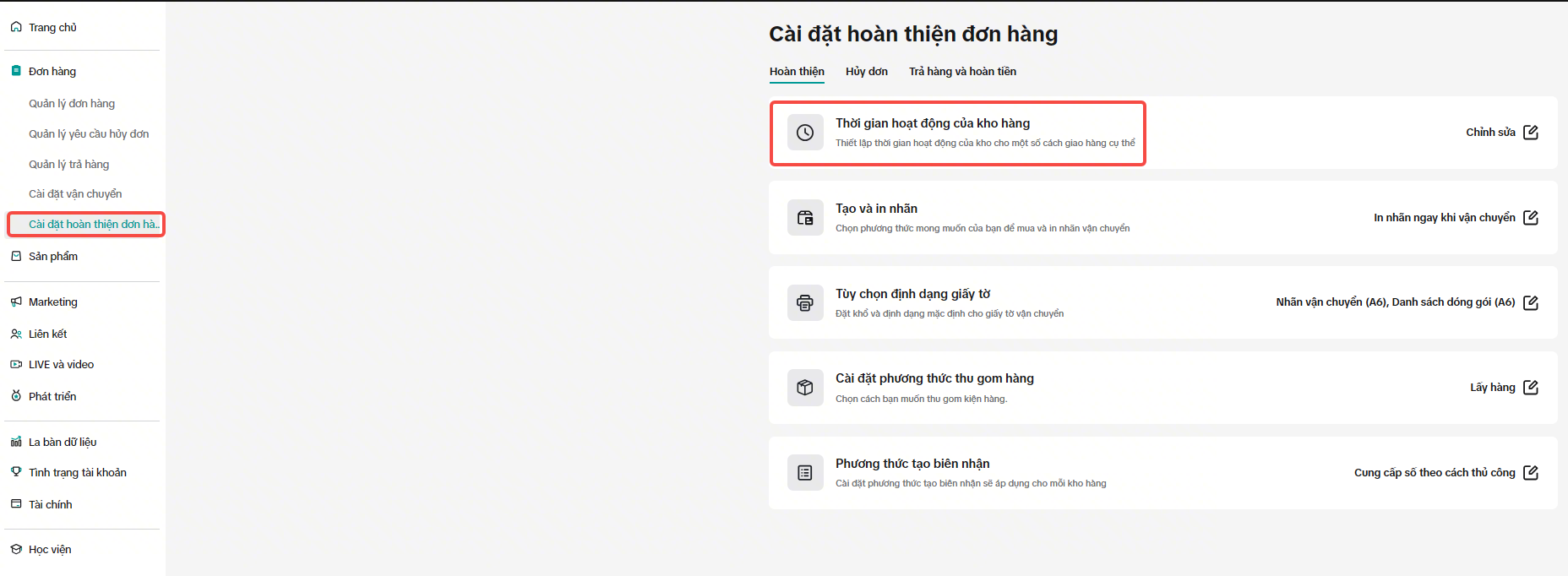
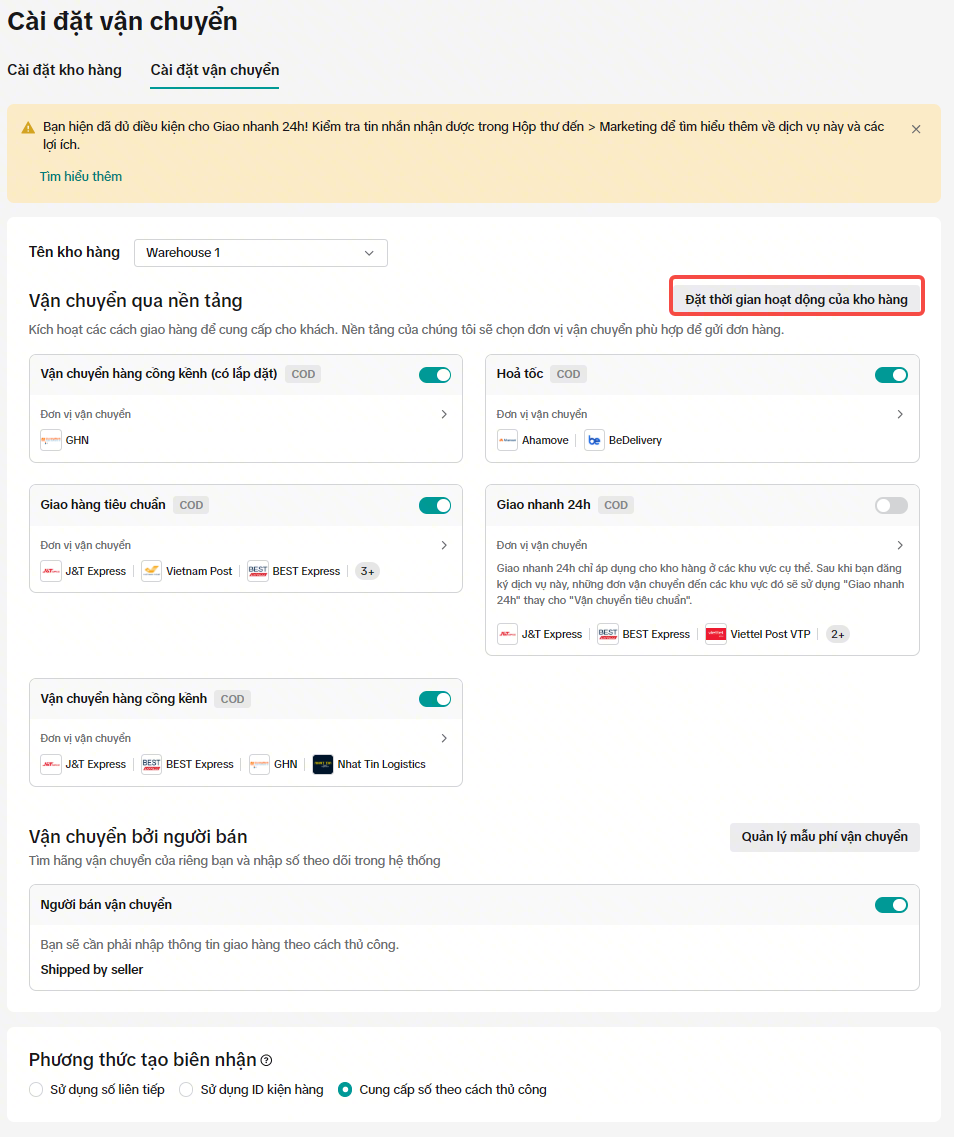
- Trên trang "Giờ hoạt động của kho", bạn sẽ thấy 2 mục; "Ngày làm việc" và "Ngày nghỉ".Lưu ý quan trọng: Theo mặc định, hệ thống giả định cửa hàng của bạn hoạt động vào cuối tuần (Thứ Bảy và Chủ Nhật) và ngày lễ. Bạn sẽ cần phải tự điều chỉnh các cài đặt này nếu bạn muốn đặt kho của mình là đóng cửa vào những ngày này.
- Đối với "Ngày làm việc", hãy làm theo các bước dưới đây
| Bước | Ảnh chụp màn hình |
| 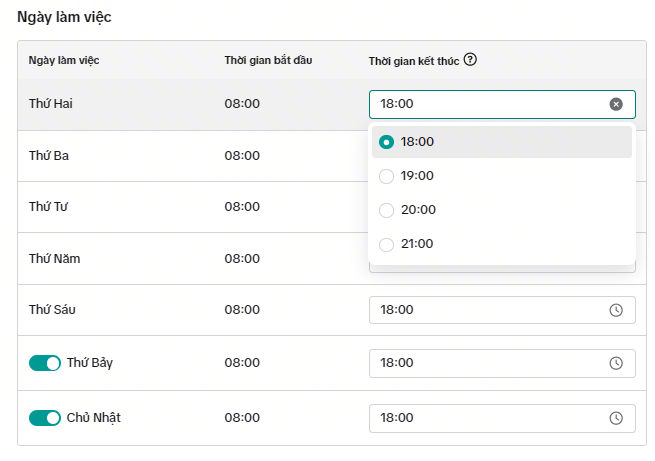 |
| 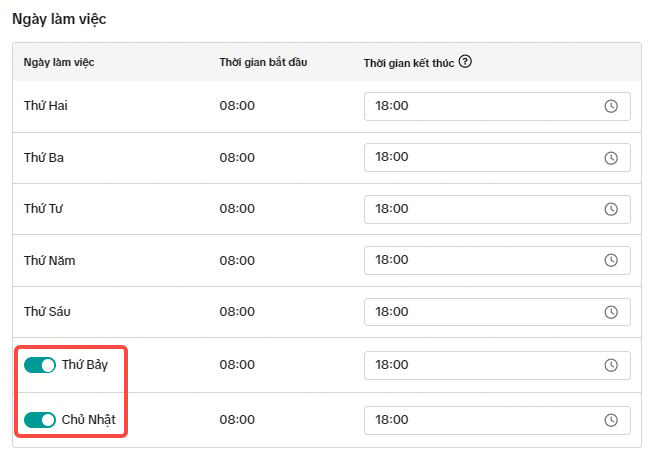 |
| 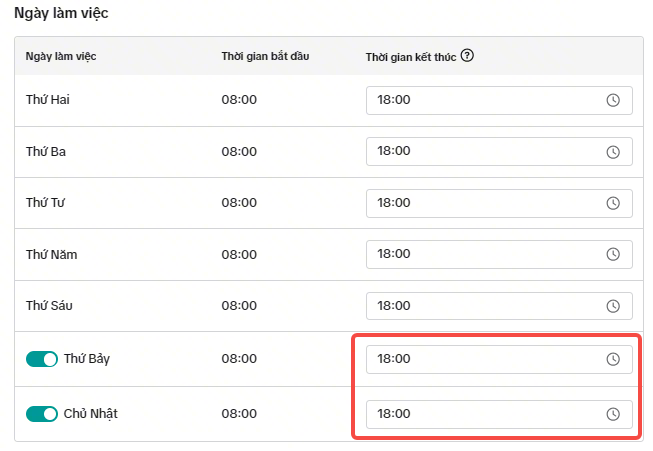 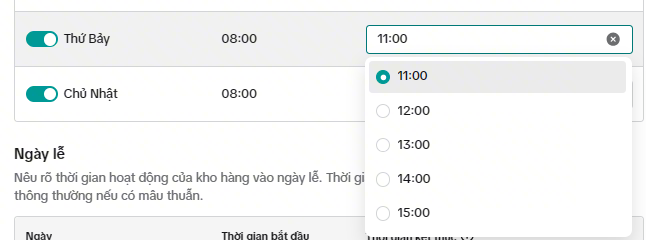 |
| 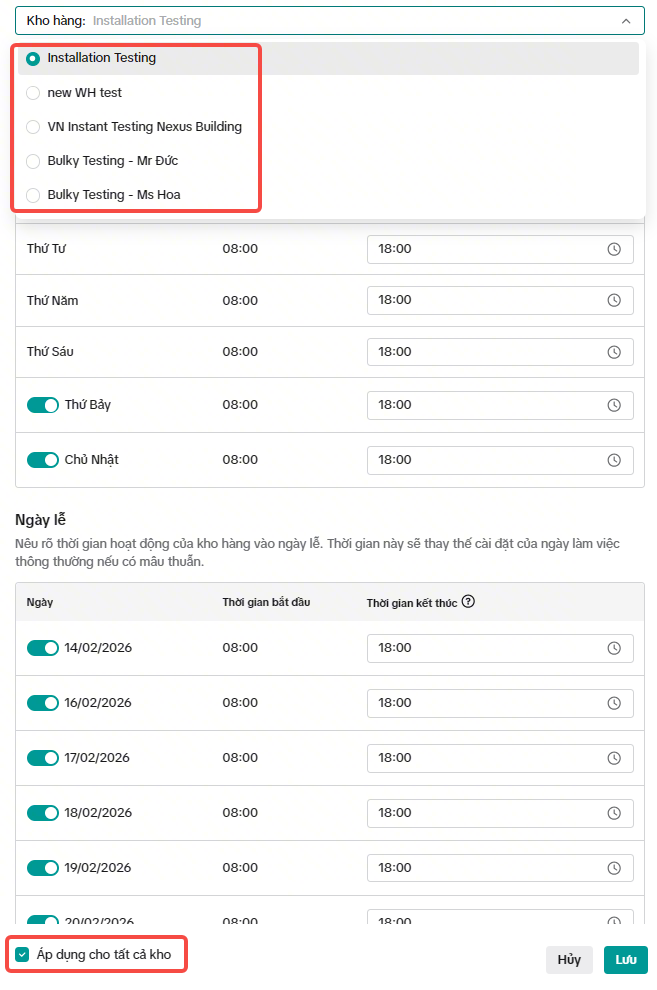 |
| Bước | Ảnh chụp màn hình |
| 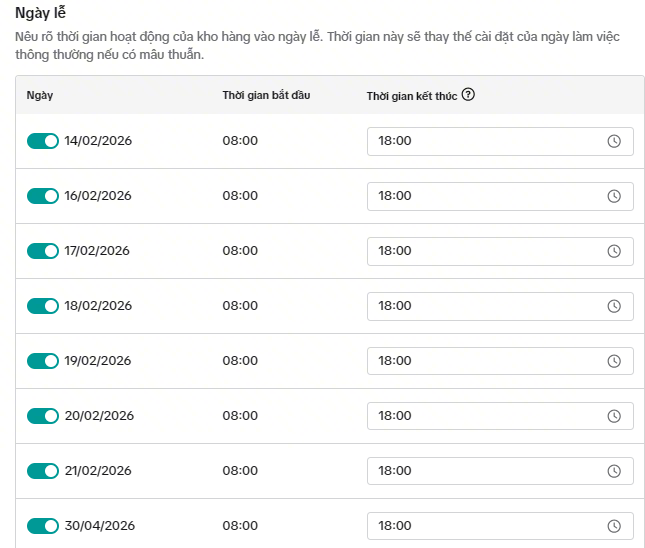 |
|
FAQ
- Câu hỏi: Điều gì sẽ xảy ra nếu tôi đặt giờ hoạt động của kho là 'Đóng cửa'?
- Câu hỏi: Điều gì sẽ xảy ra nếu tôi chỉ có dịch vụ Hỏa tốc (Instant service) làm tùy chọn giao hàng?
- Câu hỏi: Tại sao tôi thấy "Yêu cầu quyền" khi cập nhật giờ hoạt động của kho?