

Creator Health Rating Policy
12/04/2025
📌 Important Note: The Creator Health Rating system will roll out gradually from January 12 to January 19, 2026. This will replace the Violation Points system. Your account will begin with 200 points once it transitions to CHR. After CHR is launched for your account, point additions and deductions will start based on your activity.
It helps you understand how well you're doing in terms of content quality and policy compliance on TikTok Shop.
You can view your Creator Health Rating by going to TikTok Shop for Creators.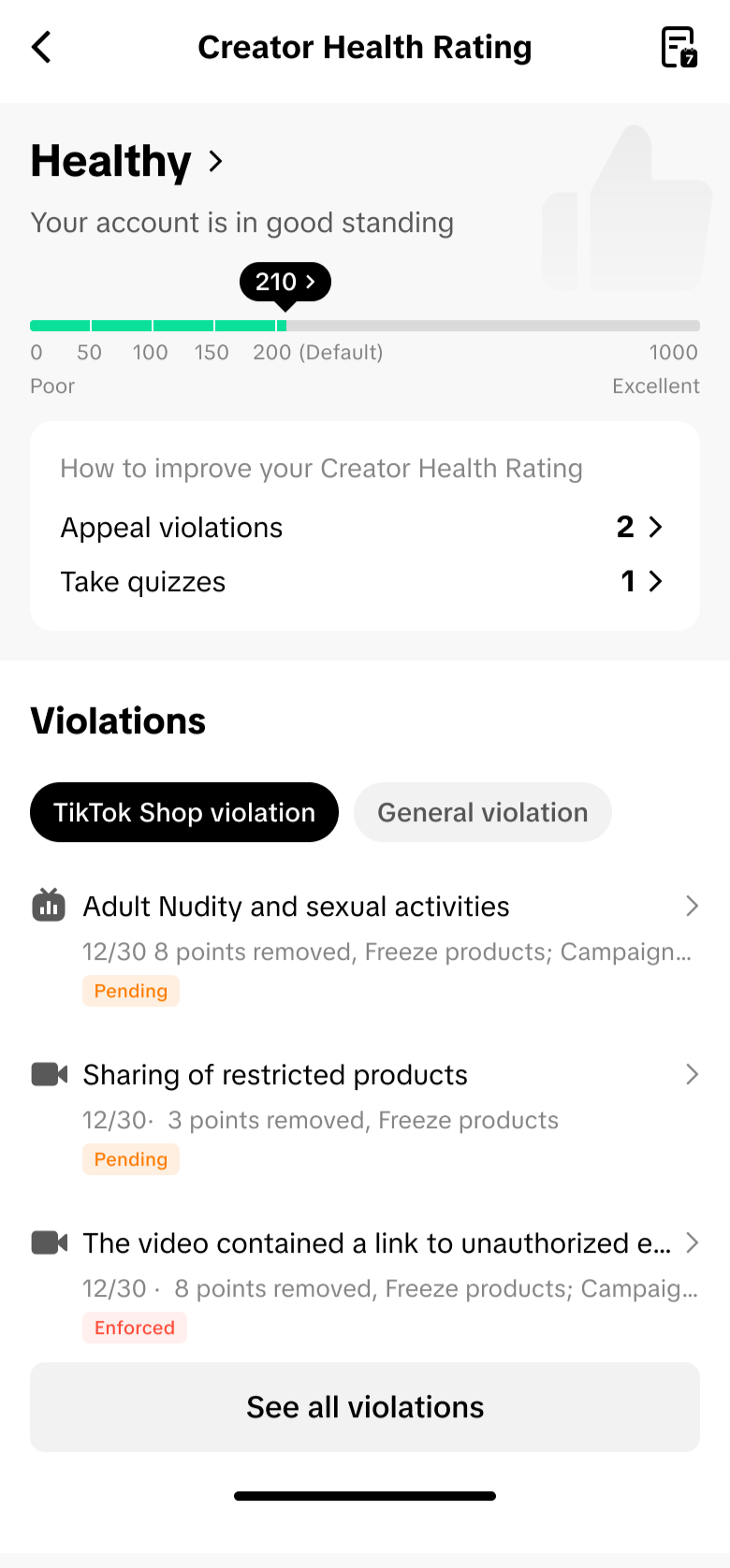
 CHR Score Levels
All deductions automatically reset after 90 days.
In serious or repeated cases, TikTok Shop may take extra enforcement actions in accordance with our policies and applicable laws, such as suspension or fund freezing and deduction.
Here are some policy violations that can cause point deductions in your Creator Health Rating. This list is not exhaustive.
If an appeal or corrective action is approved, any previously deducted points will be restored.
For more information, see the Creator Enforcement Policy.
If an appeal or corrective action is approved, any previously deducted points will be restored.
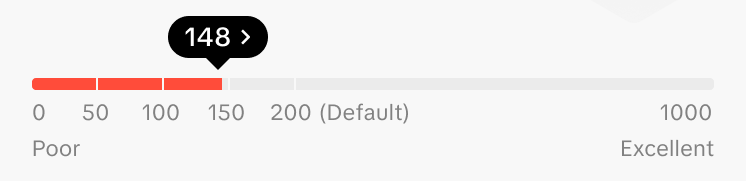
For example, if your CHR falls to 175 points, you'll receive a notification letting you know that you're getting close to the 150-point milestone.
 Enforcements by Milestone
See the Creator Enforcement Policy for details on how violations are managed. The Creator Enforcement Policy also includes an Appeals section, which explains how to submit an appeal if you believe an enforcement was made in error.
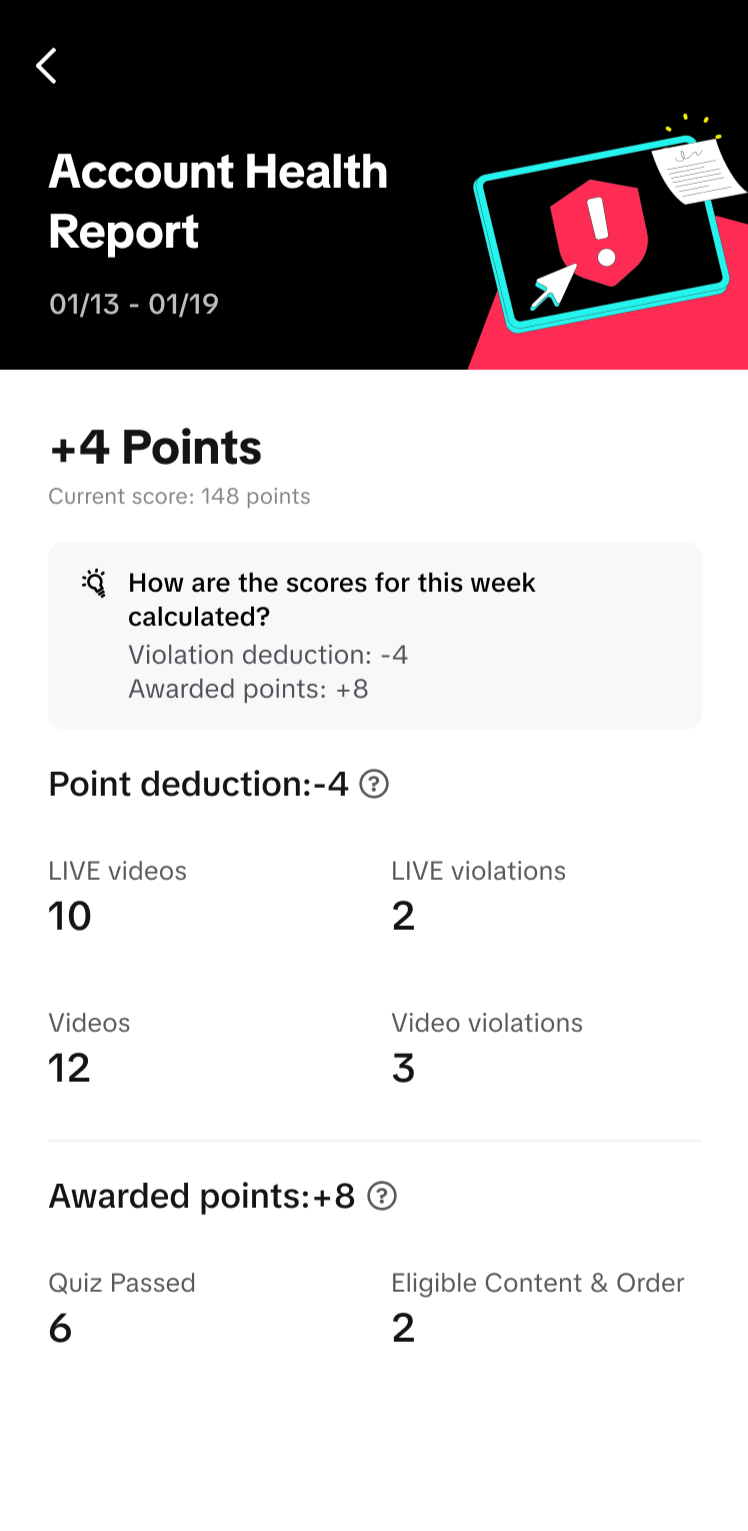 The Personalized Account Health Report helps you track changes in your CHR week by week. You can access it from the top-right corner of your CHR page.
This report shows your overall total points gained or lost over the past week, with a breakdown of both points deducted and earned.
What's in the Account Health Report
Common examples of TikTok Shop violations: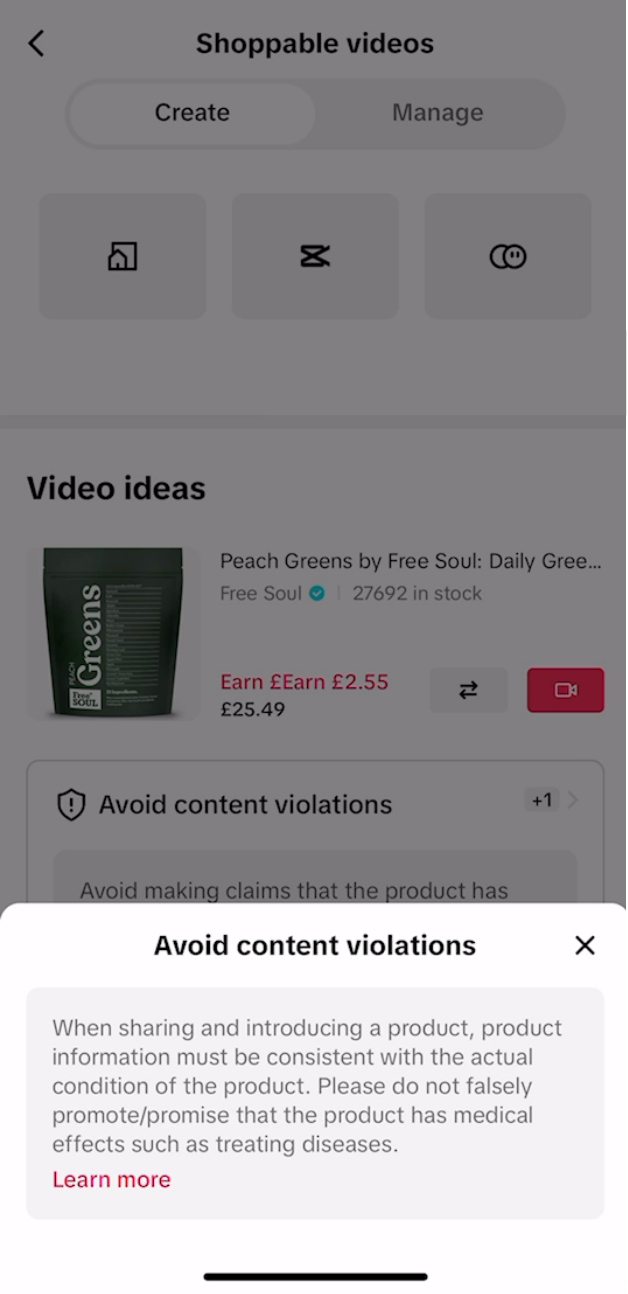
What is the Creator Health Rating?
The Creator Health Rating (CHR) is a 0-1,000-point system that reflects your overall creator health on TikTok Shop.It helps you understand how well you're doing in terms of content quality and policy compliance on TikTok Shop.
- Earn points for posting high-quality, compliant content and generating successful orders.
- Lost points for policy violations or poor performance.
- Received a violation? Take the related policy quiz – you can earn points by scoring a perfect result.
You can view your Creator Health Rating by going to TikTok Shop for Creators.
CHR Score Levels- 🟢 200–1,000 points: Your account is healthy.
- 🟠 151–199 points: Your account needs improvement
- 🔴 1–150 points: Your account is at risk of deactivation.
- ⚫ 0 points: Your TikTok Shop e-commerce access will be permanently removed.
How Points Are Deducted
Points are deducted when you violate TikTok Shop policies, Content Policy, or Creator Terms of Use. The number of points lost depends on how serious or frequent the violation is.All deductions automatically reset after 90 days.
In serious or repeated cases, TikTok Shop may take extra enforcement actions in accordance with our policies and applicable laws, such as suspension or fund freezing and deduction.
Here are some policy violations that can cause point deductions in your Creator Health Rating. This list is not exhaustive.
| Violation Type | Creator Health Rating Deduction (Per Content) |
| Up to 40 points | |
| Up to 40 points | |
| Up to 40 points | |
| Up to 40 points | |
| Up to 40 points | |
| Up to 40 points | |
| Up to 40 points | |
| Up to 40 points | |
| Up to 20 points | |
| Up to 20 points | |
| Up to 20 points | |
| Up to 20 points | |
| Up to 20 points | |
| Up to 20 points | |
| Up to 20 points | |
| Up to 20 points | |
| Up to 20 points | |
| Up to 20 points | |
| Up to 20 points | |
| Up to 20 points | |
| Up to 20 points | |
| Up to 20 points | |
| Up to 20 points | |
| Up to 10 points | |
| Up to 10 points | |
| Up to 10 points |
For more information, see the Creator Enforcement Policy.
How to Earn Points
You can regain or earn points by showing positive, policy-compliant performance:- Eligible Content
- Earn 1 point each time you post a LIVE or short video that follows TikTok Shop policies and generates at least one eligible order within 180 days.
- Earn a maximum of 5 points per week.
- Points earned are added weekly every Monday.
- Eligible Orders
- Earn 1 point for every 50 completed orders from your content within 180 days.
- Earn a maximum of 5 points per week.
- Points earned are added weekly every Monday.
- Policy Quizzes
- Earn 5 points for each perfect score on the Creator Policy Quiz linked to your specific violation.
- Quizzes are only available after a violation. For example, if you violate the content policy, you'll receive the corresponding Content Policy Quiz.
- Points earned will be added to your CHR upon completion of the quiz.
If an appeal or corrective action is approved, any previously deducted points will be restored.
Milestone Enforcements
When your CHR drops to 150, 100, 50, or 0 points, milestone enforcement actions are automatically applied. You'll also receive a warning notification in your TikTok Inbox when you are 25 points away from any milestone.For example, if your CHR falls to 175 points, you'll receive a notification letting you know that you're getting close to the 150-point milestone.
Enforcements by Milestone- 150 points and below:
- Lose access to shoppable videos, LIVEs, and Product Showcase for 3 days
- Not eligible for campaigns
- 100 points and below:
- Lose access to shoppable videos, LIVEs, and Product Showcase for 7 days
- Not eligible for campaigns
- 50 points and below:
- Lose access to shoppable videos, LIVEs, and Product Showcase for 14 days
- Not eligible for campaigns
- 0 points: Permanent removal of all e-commerce creator permissions
Enforcements and Appeals
You can view your account health, violations, and related enforcement records on the Creator Health Rating (CHR) page.See the Creator Enforcement Policy for details on how violations are managed. The Creator Enforcement Policy also includes an Appeals section, which explains how to submit an appeal if you believe an enforcement was made in error.
Personalized Account Health Report
The Personalized Account Health Report helps you track changes in your CHR week by week. You can access it from the top-right corner of your CHR page. This report shows your overall total points gained or lost over the past week, with a breakdown of both points deducted and earned.
What's in the Account Health Report
- Bonus Points Overview – See how many points you earned through eligible content, orders, and quizzes.
- Adjustable Date Range – Filter by week (within the past 90 days) to track progress over time.
- Top 3 Violated Policies – Access direct links to TikTok Shop Academy articles that address your most common violations.
- Feedback Survey – Share your experience to help us improve the report.
How to Avoid Violations?
To maintain a healthy creator account, avoid behaviors that commonly result in violations.Common examples of TikTok Shop violations:
- Creating low-quality content: How to Create High-Quality Videos and Livestreams
- Creating misleading content: How to Avoid Misleading Content
- Promoting products using irrelevant or unoriginal content: How to Avoid Irrelevant Promotional Content
- Redirecting viewers of your content away from TikTok Shop: How to Avoid Redirecting Traffic
- Hosting gambling, auctions, or gamification activities in your content: Avoid Posting Gambling Content
- Creating violent or hateful content: Violent and Criminal Behavior
- Using dangerous activities as clickbait: Sensitive and Mature Themes
- Creating prohibited weight management content: Mental and Behavioral Health
Review the Policy Risk Reminder before posting
- When you bind certain types of products to your content, a short reminder may appear to flag some common policy risks for the product type.
- You don't need to take any extra action – it's simply a quick checkpoint to help you stay compliant before your content goes live.
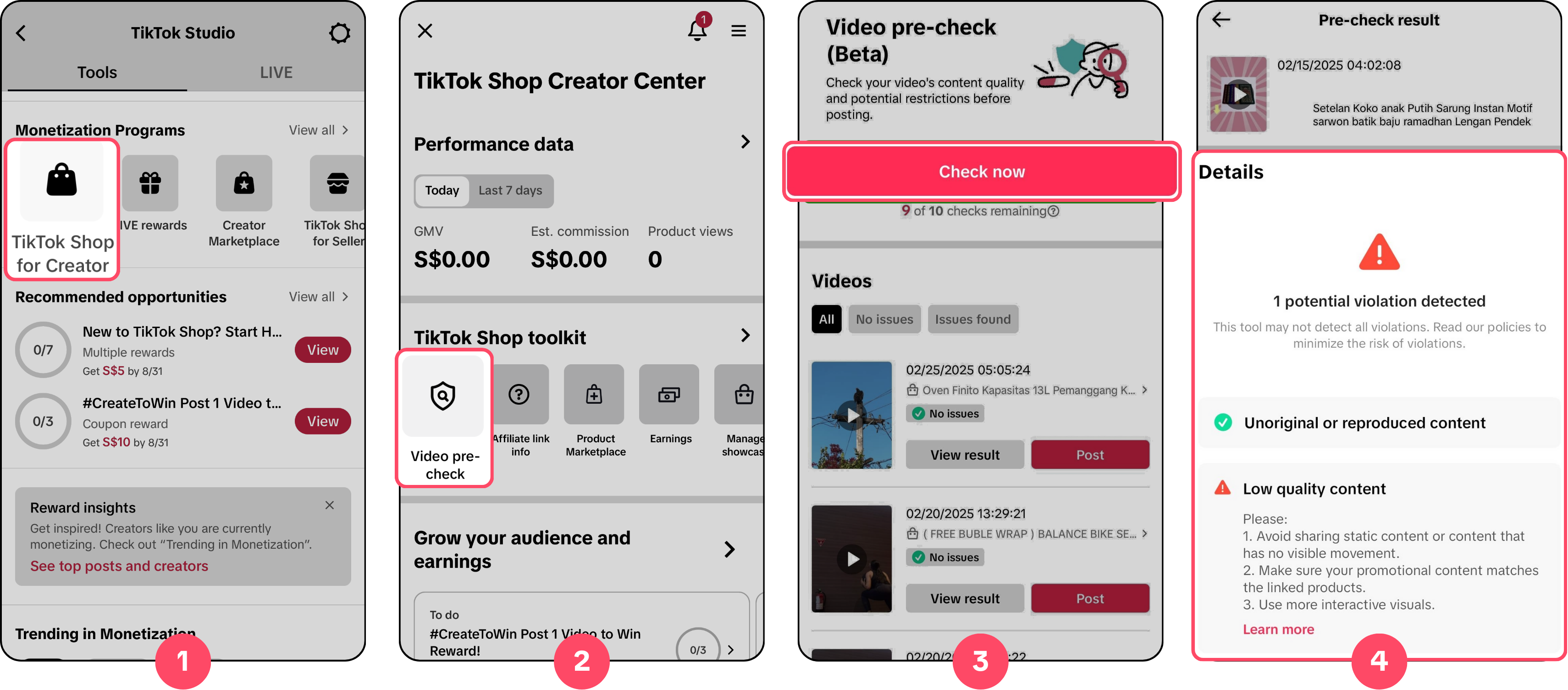
Run your content through the Video Pre-Check
Feature- Upload your video to the Video Pre-Check Feature before posting to get alerts on possible policy risks within minutes, plus tips to fix them.
- Find it in TikTok Studio > TikTok Shop Creator Center > TikTok Shop Toolkits > Video Pre-Check
- ⚠️ Note: This feature may not catch every violation. Always review our policies to to stay fully compliant.
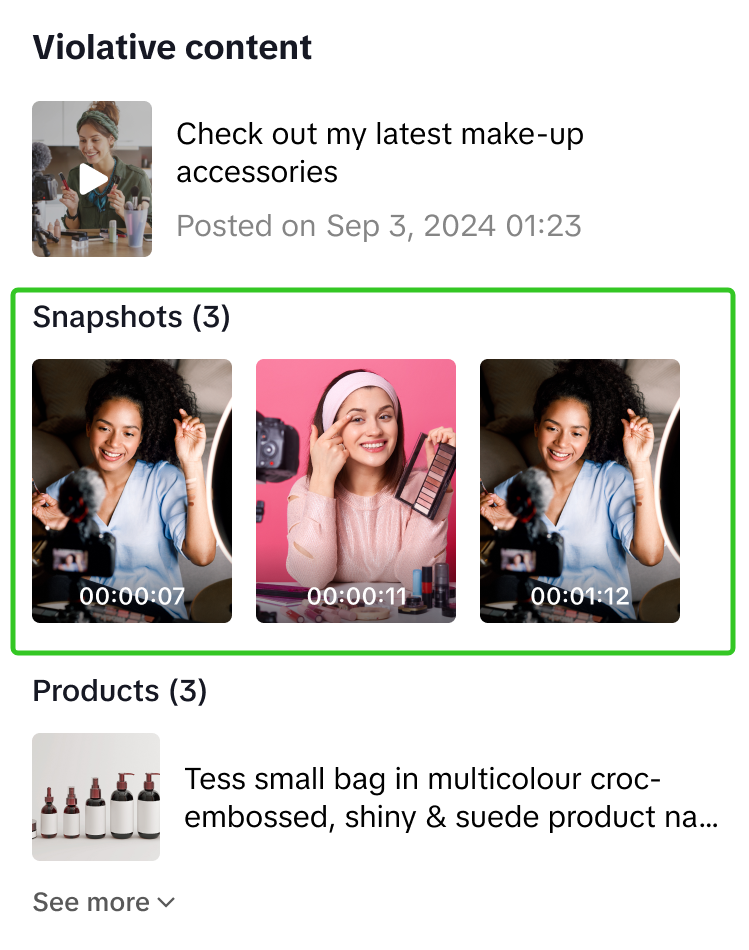
Learn from Violation Snapshots
- Each violation ticket includes the reason, along with snapshots of your content and timestamps. This helps you understand exactly what went wrong and avoid repeat mistakes.
Remove violation points with Policy Quiz
- If you receive a violation, take the related Policy Quiz to show you understand the policy and how to avoid future mistakes. Score 100% and 1 violation point will be removed.
- Find it in TikTok Studio > TikTok Shop Creator Center > Account Health > Take a Quiz
Frequently Asked Questions (FAQ)
Is my Creator Health Rating visible to others?
No. Your Creator Health Rating (CHR) is only visible to you.
Do all TikTok Shop creators have a Creator Health Rating?
Yes. All TikTok Shop creators have a CHR. New creators start with 200 points.
How do I find my Creator Health Rating?
On the TikTok app, open Creator Center > TikTok Shop for Creator, then scroll to the bottom of the page to find your Creator Health Rating.
What can I see on my CHR page?
- Your account health status and CHR score
- Recommended actions to improve
- Violation history
- Link to your Personalized Account Health Report
Will I be notified about changes in my CHR score?
Yes. You'll receive notifications in your TikTok app when:
- You receive a point deduction due to a violation ticket
- You are 25 points away from a milestone (150, 100, 50, or 0) – we'll send a warning notification so you know you're getting close.
- You cross a milestone (150, 100, 50, or 0).
Are all my violations included in Creator Health Rating?
No. The CHR only includes TikTok Shop–related violations. Other types of violations, such as those under TikTok's Community Guidelines, don't affect your CHR and are excluded from its calculation.
How can I access my other non-TikTok Shop violations from the CHR page?
You can find non–TikTok Shop violations, such as Community Guidelines violations, under the General Violations tab on your CHR page. These are shown for reference only and don't affect your CHR score.
END