

Thông số kỹ thuật biểu đồ kích cỡ
27/06/2023
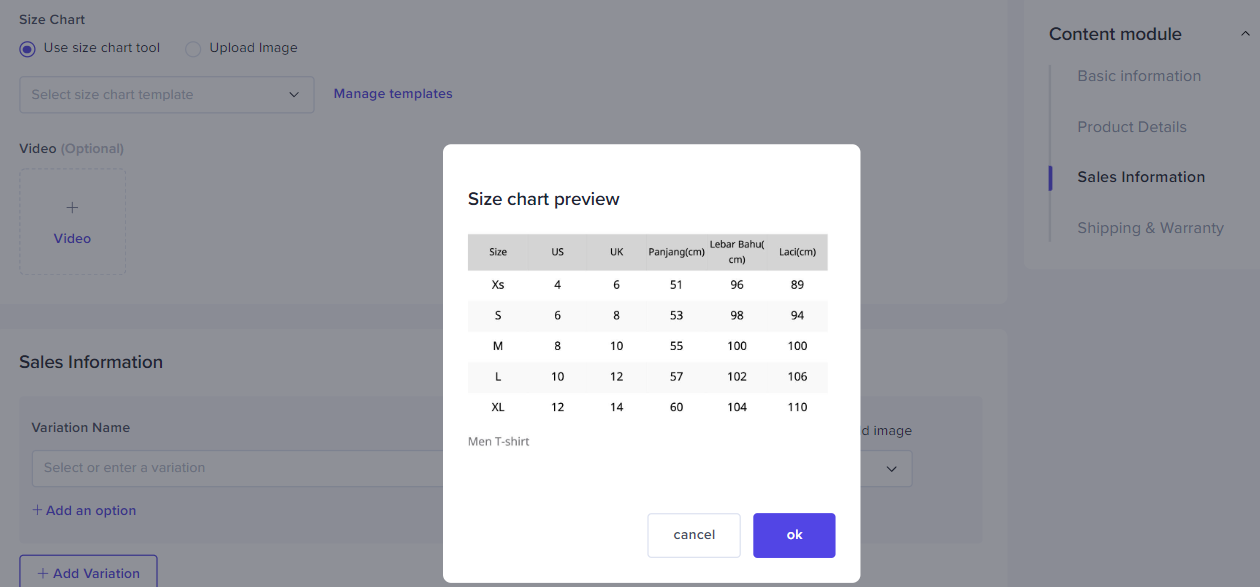
Trong bài viết này, bạn sẽ tìm hiểu về Thông số kỹ thuật biểu đồ kích cỡ của TikTok Shop và một tính năng trong Trung tâm Nhà bán hàng có tên Công cụ biểu đồ kích cỡ để giúp bạn nắm rõ các hướng dẫn, thiết lập mẫu biểu đồ kích cỡ phù hợp với sản phẩm của mình với Công cụ biểu đồ kích cỡ và đạt mức tăng trưởng tối đa.Bằng cách sử dụng mẫu biểu đồ kích cỡ cho một số sản phẩm và danh mục, khách hàng của bạn sẽ có được thông tin rõ ràng hơn trước khi đặt hàng. Nhờ đó, khách hàng của bạn sẽ có trải nghiệm khách hàng tích cự và khiến họ mua thêm hàng từ cửa hàng của bạn trong tương lai.Ví dụ về Biểu đồ kích cỡ sản phẩm như sau: 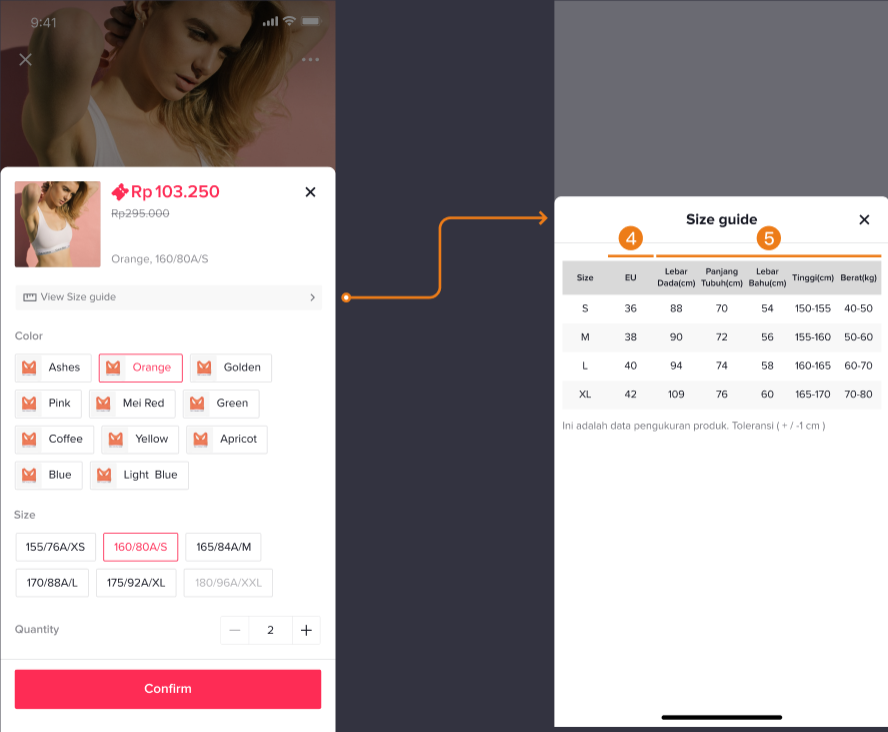








Lợi ích của Công cụ biểu đồ kích cỡ
Hướng dẫn cơ bản
Biểu đồ kích cỡ cho biết thông tin quan trọng về kích cỡ của sản phẩm, chẳng hạn vòng 1, vòng 2, vòng 3, v.v.
Biểu đồ kích cỡ giúp khách hàng đưa ra quyết định mua hàng sáng suốt hơn.
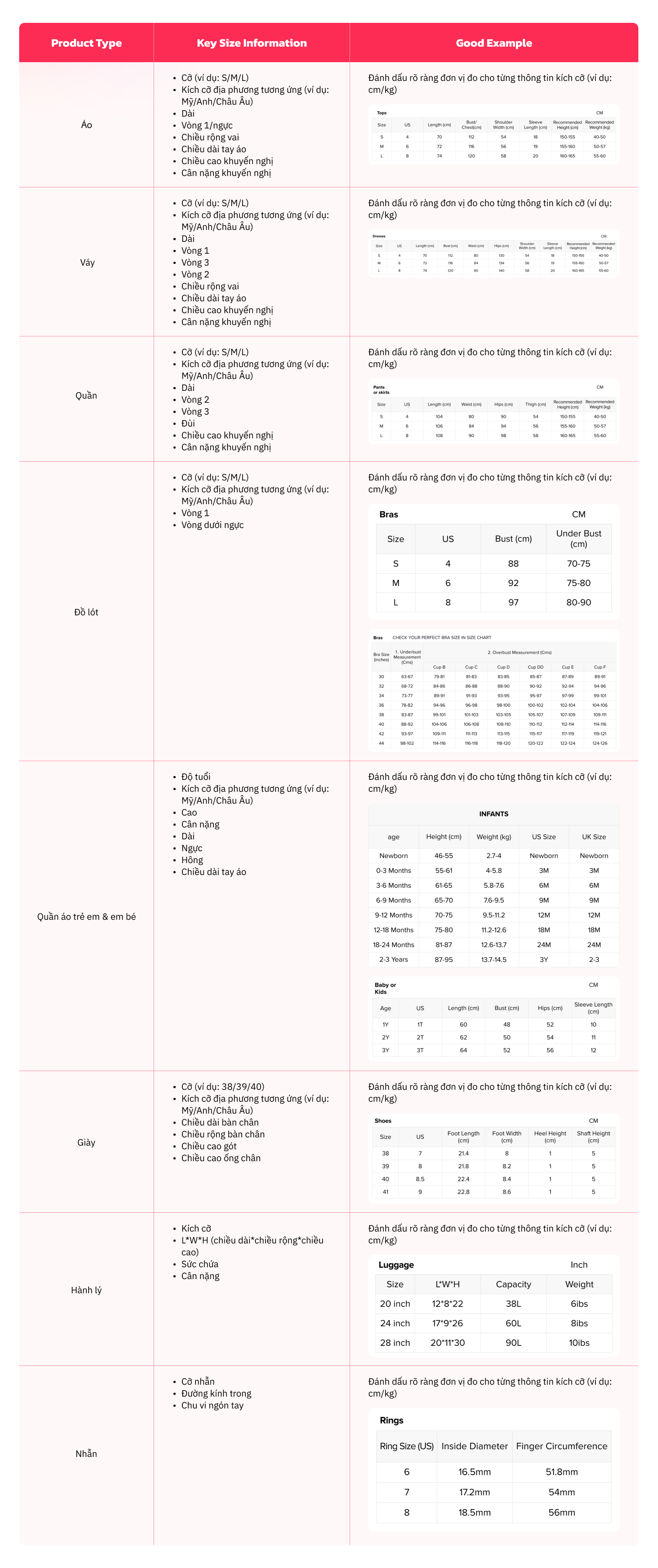
Đối với các loại sản phẩm khác nhau, thông tin về kích cỡ chính khác nhau cũng như các ví dụ rõ ràng được cung cấp bên dưới.
Cách tải lên biểu đồ kích cỡ
Có 2 cách để tải lên biểu đồ kích cỡ, chỉ cần tải lên một hình ảnh có chứa biểu đồ kích cỡ hoặc tạo mẫu trong Trung tâm Nhà bán hàng bằng Công cụ biểu đồ kích cỡ.
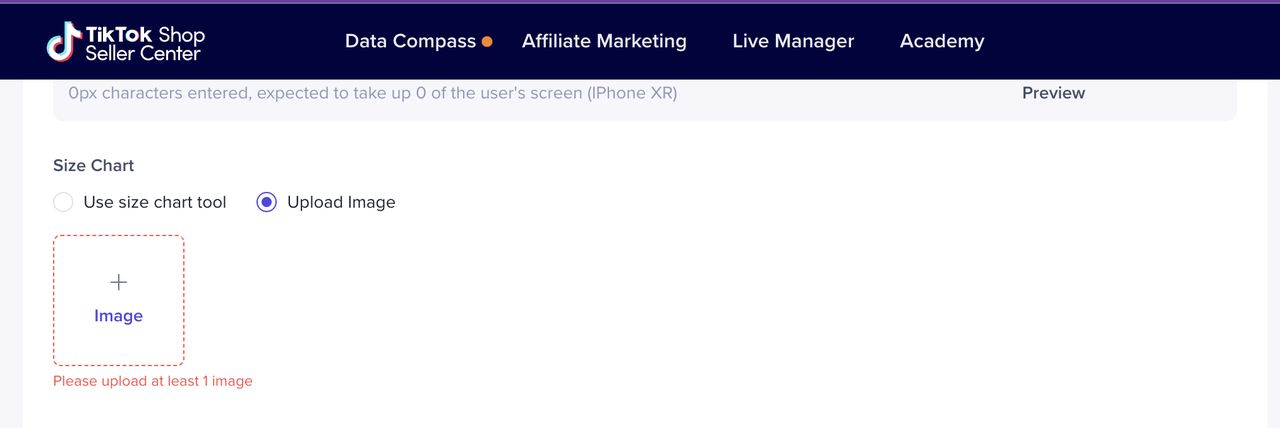
Tải lên ảnh biểu đồ kích cỡ
Mở Trung tâm Nhà bán hàng > Sản phẩm > Quản lý sản phẩm > Thêm sản phẩm mớiChọn Tải ảnh lên.
Biểu đồ kích cỡ phải có định dạng png, jpg hoặc jpeg, với độ phân giải ít nhất 600*600 pixel. Dung lượng tập tin phải dưới 5 MB.
Sử dụng Công cụ biểu đồ kích cỡ
- Mở Trung tâm Nhà bán hàng > Sản phẩm > Quản lý sản phẩm > Thêm sản phẩm mới
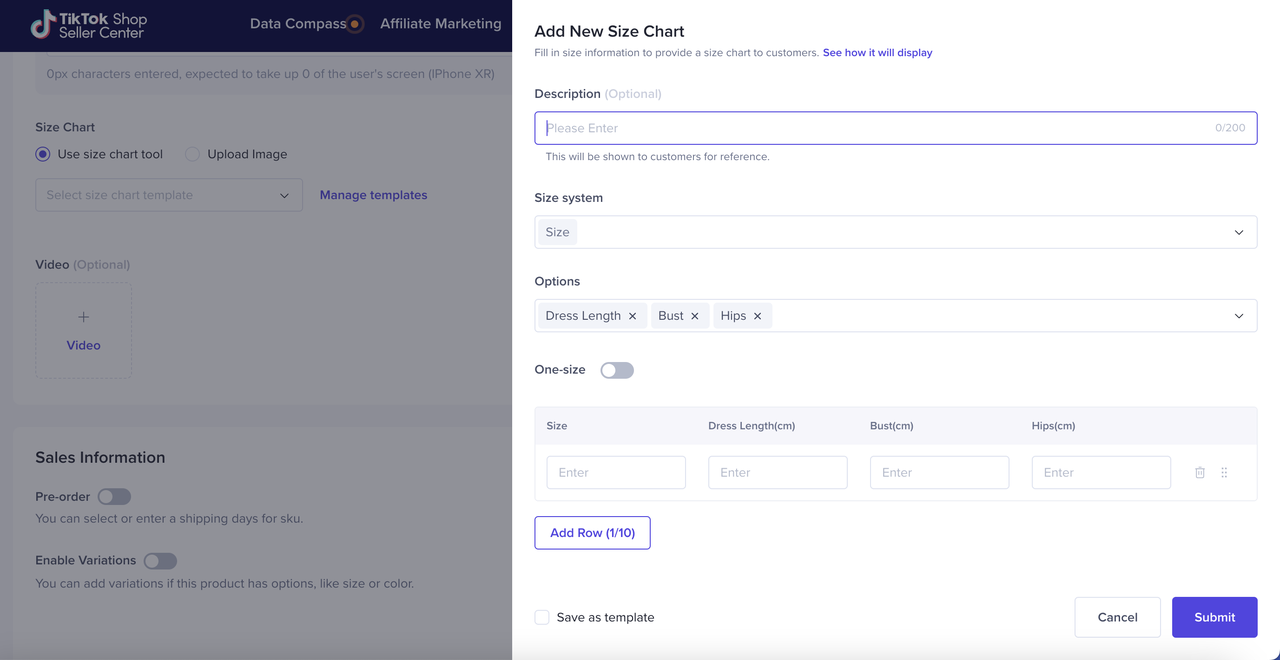
- Chọn Sử dụng Công cụ biểu đồ kích cỡ và nhấp vào Thêm biểu đồ kích cỡ mới
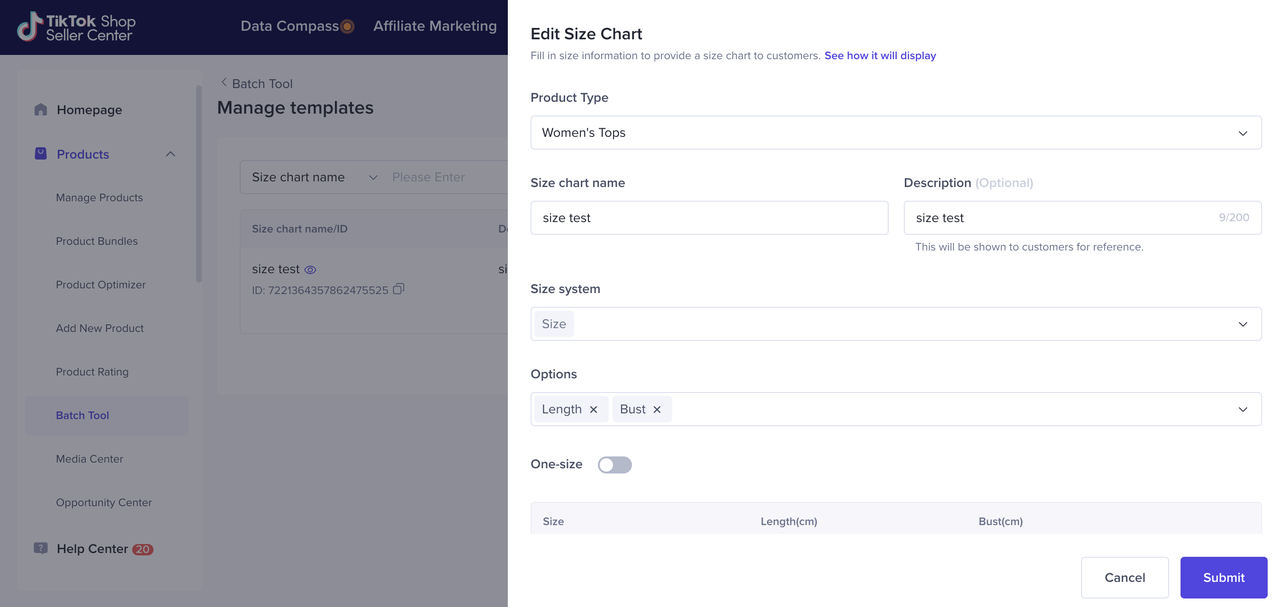
- Điền mô tả kích cỡ. Ví dụ: Biểu đồ kích cỡ trang phục
- Điền vào chi tiết biểu đồ kích cỡ, nhấp vào Lưu làm mẫu (nếu bạn cũng muốn dùng biểu đồ kích cỡ này cho sản phẩm khác) rồi nhấp vào Gửi.
- Sau khi nhấp vào Gửi, bản xem trước biểu đồ kích cỡ bạn vừa tạo sẽ bật lên.
Tải lên biểu đồ kích cỡ hàng loạt
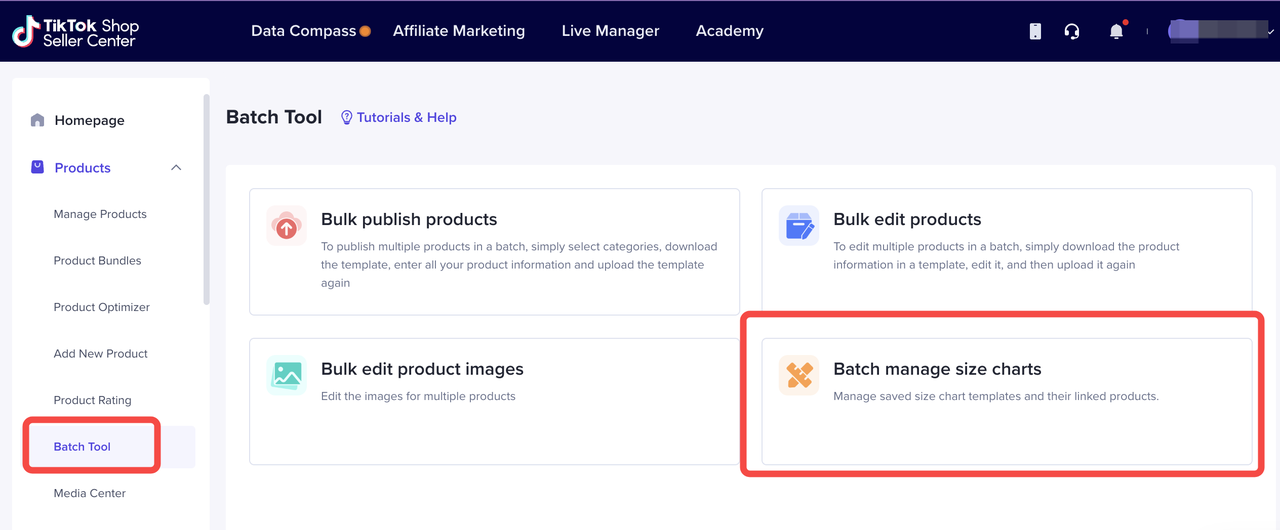
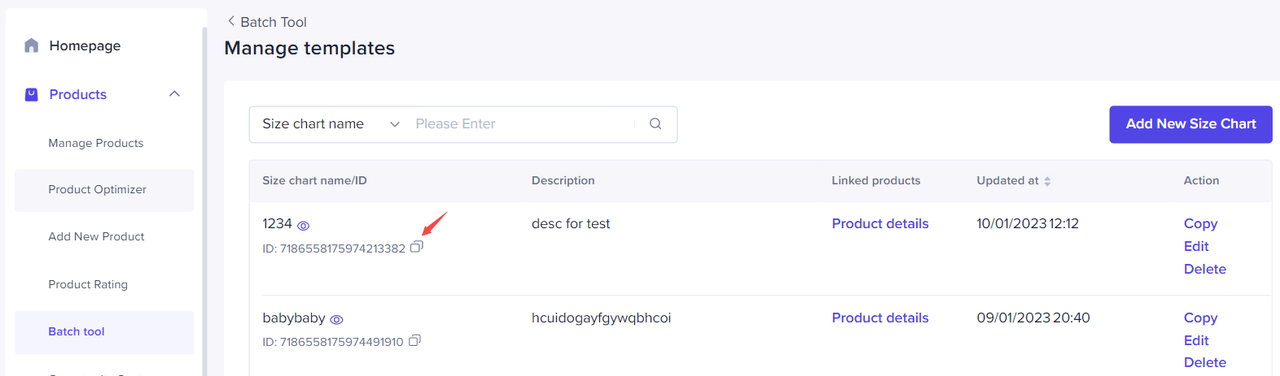
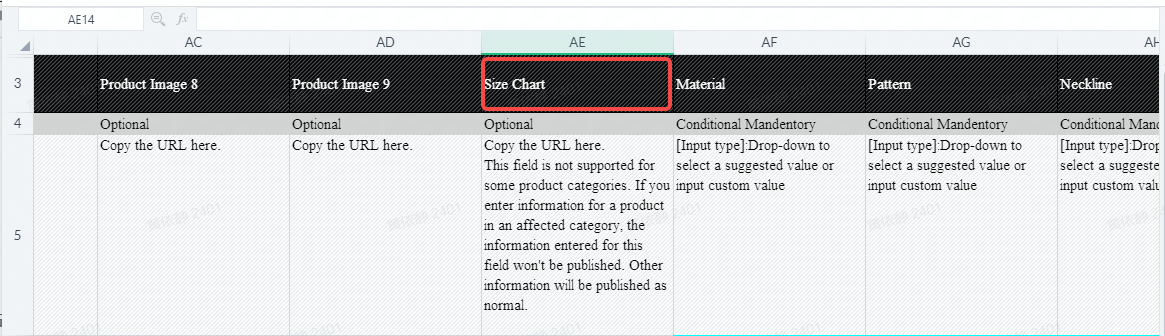
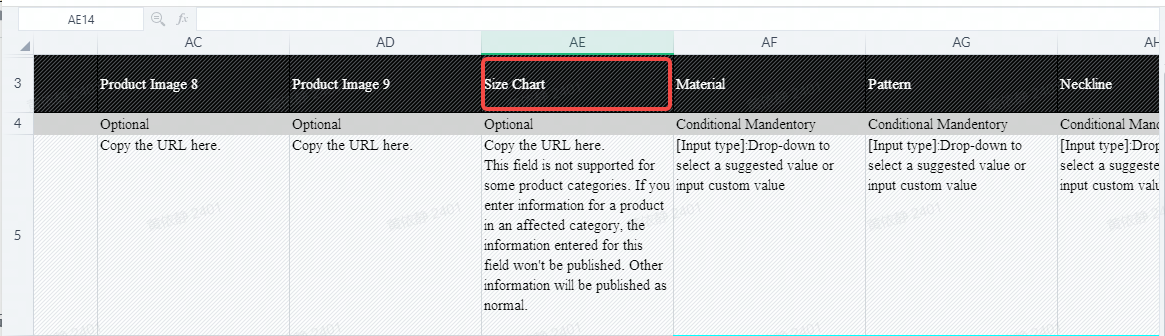
Nếu đang tải sản phẩm lên hàng loạt, bạn cũng có thể quản lý biểu đồ kích cỡ hàng loạt qua Công cụ hàng loạt. Sao chép ID mẫu biểu đồ kích cỡ và dán vào cột tương ứng trong bảng tính Excel.
Câu hỏi thường gặp
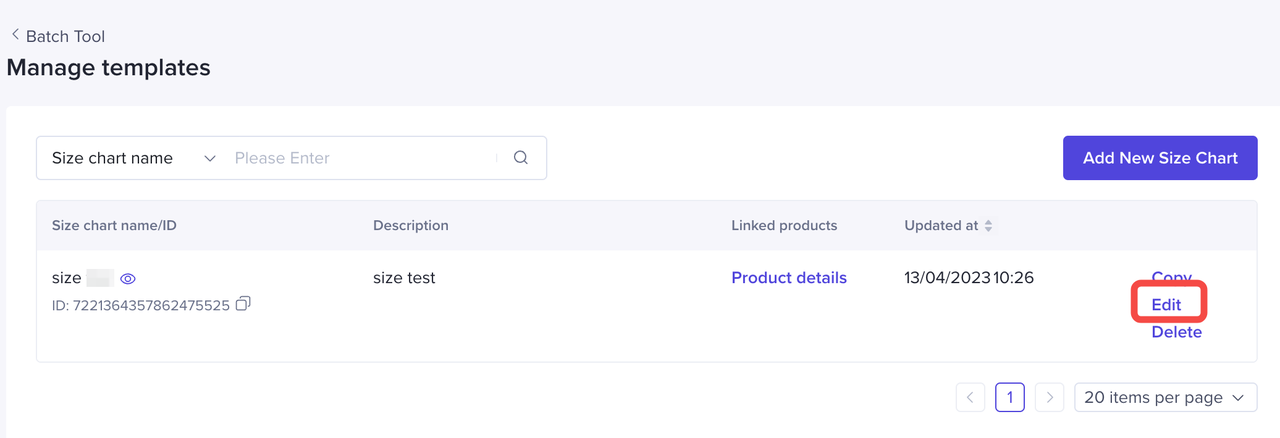
Có. Bạn có thể chỉnh sửa mẫu hiện có thông qua Quản lý biểu đồ kích cỡ hàng loạt > Quản lý mẫu > nhấp vào Chỉnh sửa
- Nhà bán hàng có thể chỉnh sửa Mẫu biểu đồ kích cỡ hiện có không?
Những người bán quần áo/giày dép/túi/nhẫn phải điền thông tin biểu đồ kích cỡ theo kích cỡ thực tế của sản phẩm. Nhà bán hàng không được phép tải lên hình ảnh của biểu đồ kích cỡ sản phẩm không thực tế, để tránh trường hợp người dùng hiểu lầm. TikTok Shop sẽ xử lý hành vi vi phạm theo Điều khoản dịch vụ cho nhà bán hàng.
Có. Nhà bán hàng nên tải lên Biểu đồ kích cỡ trong phần Mô tả sản phẩm, Biểu đồ kích cỡ sản phẩm và Hình ảnh sản phẩm
- Nếu nhà bán hàng cung cấp biểu đồ kích cỡ không chính xác cho sản phẩm của họ thì sao?
- Nhà bán hàng có thể tải lên Biểu đồ kích cỡ trong phần Mô tả sản phẩm không?
Tổng quan
Mục đích và cơ sở
Để giúp người dùng đưa ra quyết định mua hàng sáng suốt hơn, TikTok Shop đã cung cấp chức năng tải lên biểu đồ kích cỡ cho một số danh mục. Bài viết này được lập công thức như một biểu đồ kích cỡ giúp người bán lập biểu đồ kích cỡ chất lượng, đồng thời tạo ra trải nghiệm nền tảng tích cực cho cả người dùng và người bán.
Phạm vi áp dụng
Các quy tắc này áp dụng cho sản phẩm quần áo, giày dép, hành lý và phụ kiện trang sức.
Tiêu chuẩn cơ bản
Quy cách thông tin biểu đồ kích cỡ
Biểu đồ kích cỡ là tài liệu phản ánh các số đo cho phạm vi kích cỡ sản phẩm của bạn. Biểu đồ này bao gồm một số thông tin về kích cỡ quan trọng của sản phẩm, chẳng hạn vòng 1, vòng 2, vòng 3, v.v. Biểu đồ kích cỡ có thể giúp người dùng đưa ra quyết định mua hàng sáng suốt hơn.
Đối với các loại sản phẩm khác nhau, đề xuất thông tin về kích cỡ chính khác nhau cũng như các ví dụ rõ ràng về biểu đồ kích cỡ sẽ được cung cấp bên dưới.
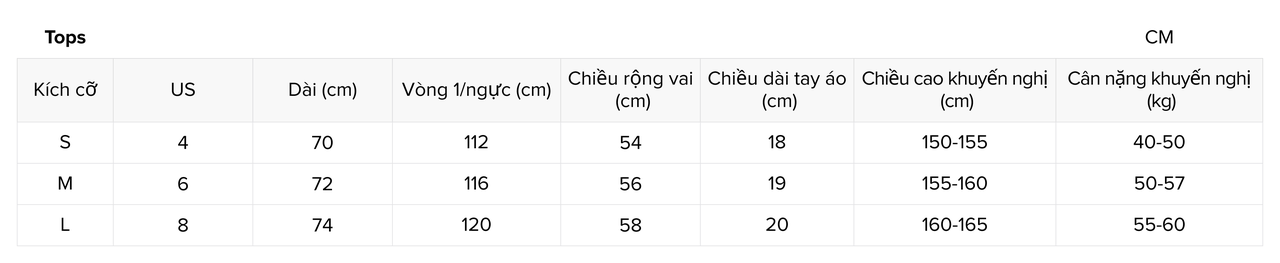
Loại sản phẩm: Áo
Thông tin kích cỡ chính:
Lưu ý: Vui lòng đánh dấu rõ ràng đơn vị đo cho từng thông tin kích cỡ (chẳng hạn như cm/kg)
Ví dụ về biểu đồ kích cỡ rõ ràng
- Kích cỡ sản phẩm (ví dụ: S/M/L)
- Kích cỡ địa phương tương ứng (ví dụ: Mỹ/Anh/Châu Âu)
- Dài
- Vòng 1/ngực
- Chiều rộng vai
- Chiều dài tay áo
- Chiều cao khuyến nghị
- Cân nặng khuyến nghị
Loại sản phẩm: Váy
Thông tin kích cỡ chính:
Lưu ý: Vui lòng đánh dấu rõ ràng đơn vị đo cho từng thông tin kích cỡ (chẳng hạn như cm/kg)
Ví dụ về biểu đồ kích cỡ rõ ràng
- Kích cỡ sản phẩm (ví dụ: S/M/L)
- Kích cỡ địa phương tương ứng (ví dụ: Mỹ/Anh/Châu Âu)
- Chiều dài quần áo
- Vòng 1
- Chu vi hông
- Vòng eo
- Chiều rộng vai
- Chiều dài tay áo
- Chiều cao khuyến nghị
- Cân nặng khuyến nghị
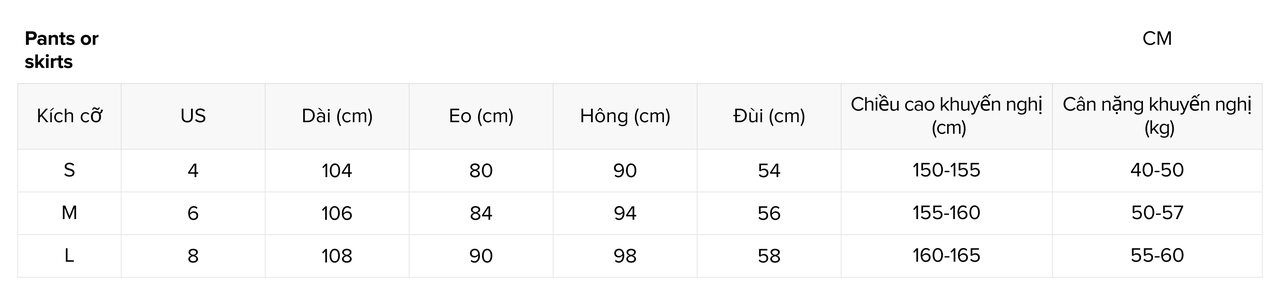
Loại sản phẩm: Quần
Thông tin kích cỡ chính:
Lưu ý: Vui lòng đánh dấu rõ ràng đơn vị đo cho từng thông tin kích cỡ (chẳng hạn như cm/kg)
Ví dụ về biểu đồ kích cỡ rõ ràng
- Kích cỡ sản phẩm (ví dụ: S/M/L)
- Kích cỡ địa phương tương ứng (ví dụ: Mỹ/Anh/Châu Âu)
- Chiều dài (quần hoặc chân váy)
- Eo
- Hông
- Đùi
- Chiều cao khuyến nghị
- Cân nặng khuyến nghị
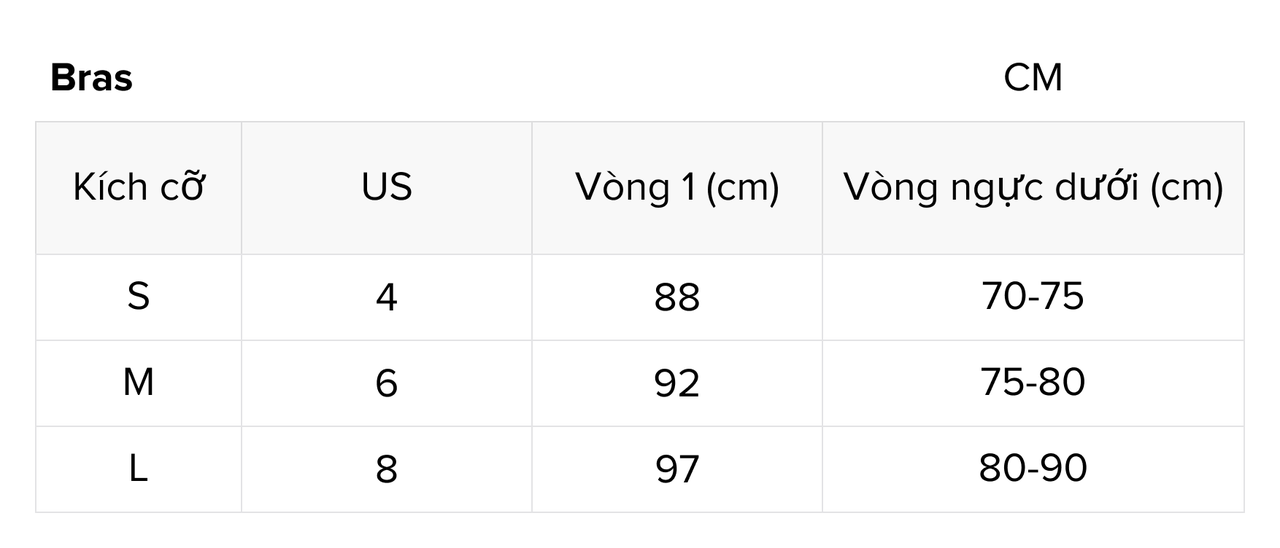
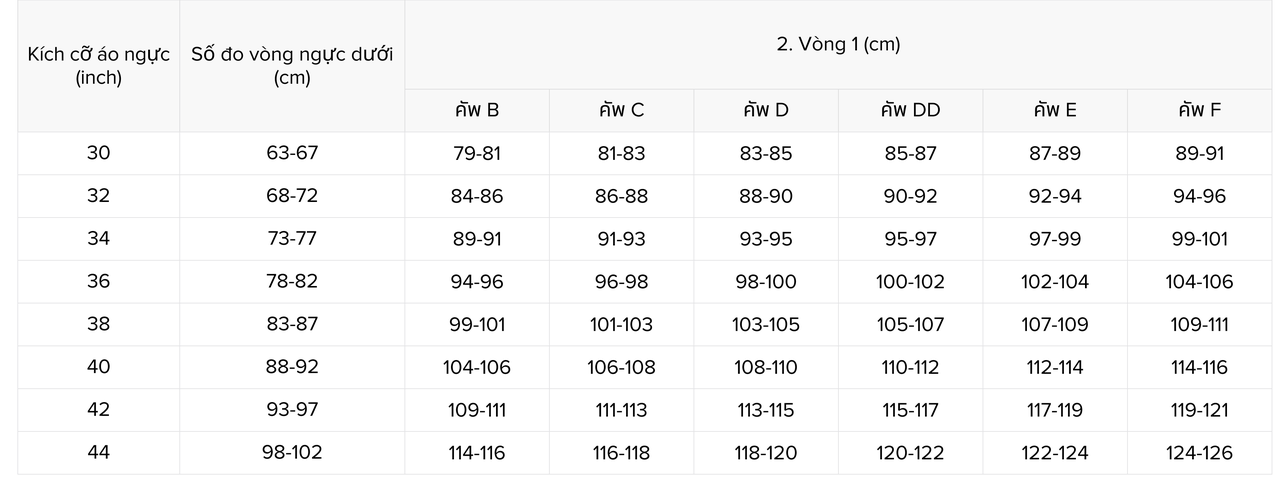
Loại sản phẩm: ĐỒ LÓT
Thông tin kích cỡ chính:
Lưu ý: Vui lòng đánh dấu rõ ràng đơn vị đo cho từng thông tin kích cỡ (chẳng hạn như cm/kg)
Ví dụ về biểu đồ kích cỡ rõ ràng
- Kích cỡ sản phẩm (ví dụ: S/M/L)
- Kích cỡ địa phương tương ứng (ví dụ: Mỹ/Anh/Châu Âu)
- Vòng 1 (số đo thân)
- Vòng ngực dưới (số đo thân)
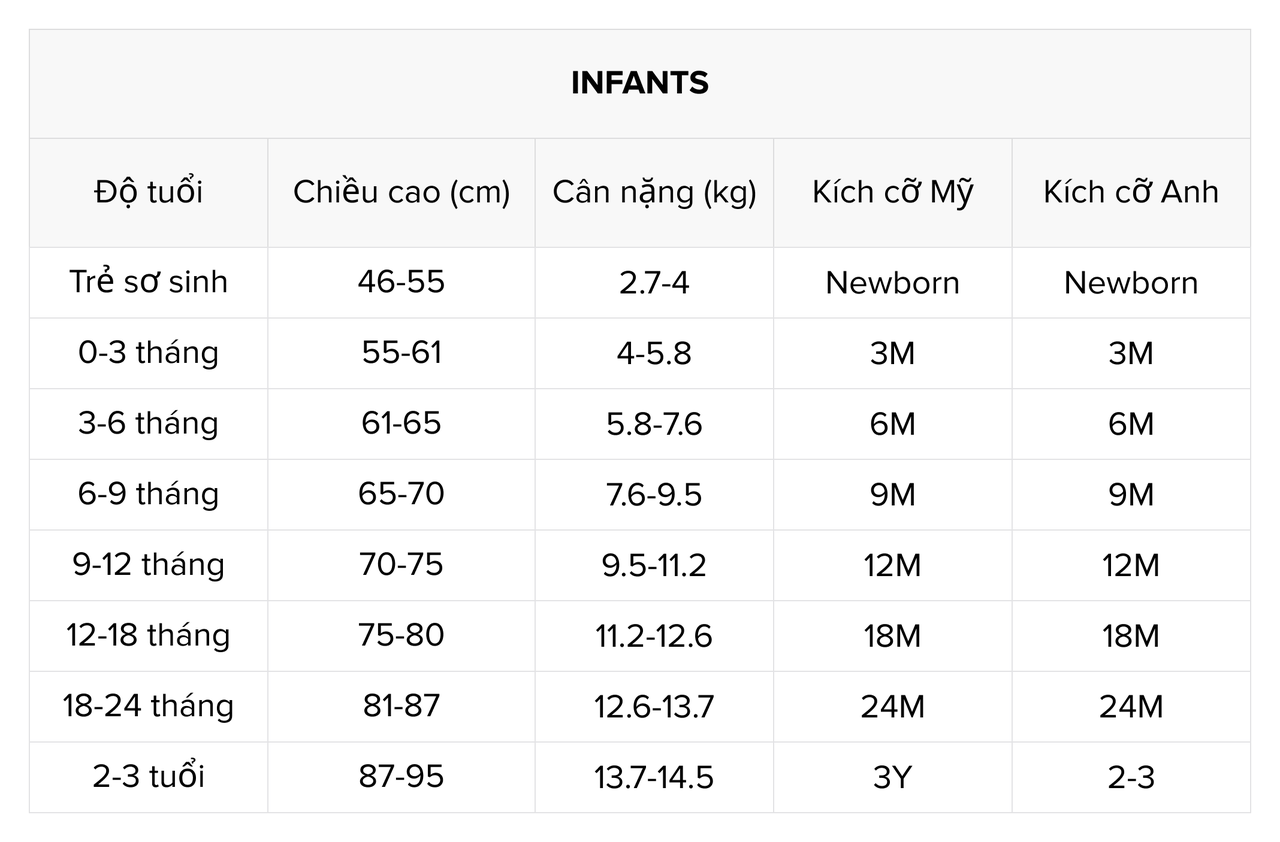
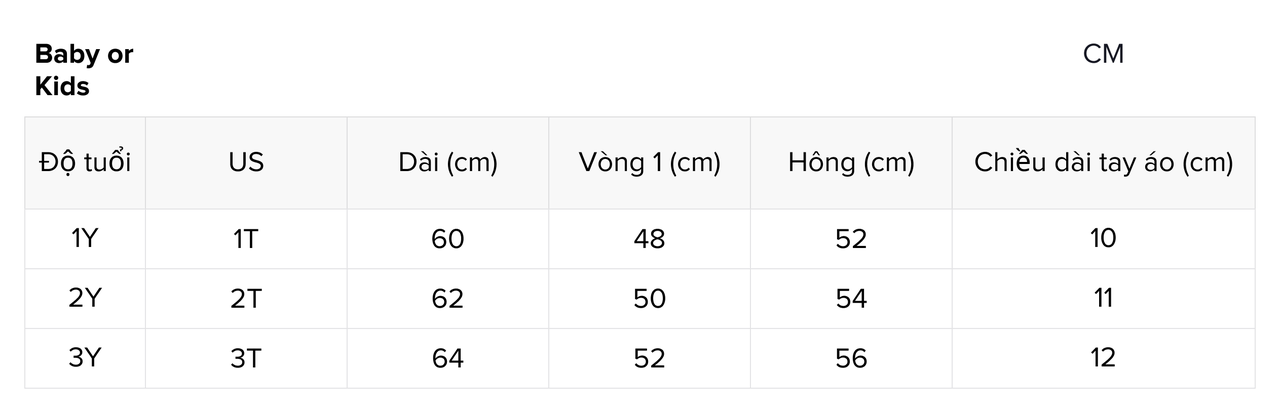
Loại sản phẩm: Trang phục trẻ em
Thông tin kích cỡ chính:
Lưu ý: Vui lòng đánh dấu rõ ràng đơn vị đo cho từng thông tin kích cỡ (chẳng hạn như cm/kg)
Ví dụ về biểu đồ kích cỡ rõ ràng
- Độ tuổi
- Kích cỡ địa phương tương ứng (ví dụ: Mỹ/Anh/Châu Âu)
- Chiều cao
- Cân nặng
- Dài
- Vòng 1
- Hông
- Chiều dài tay áo
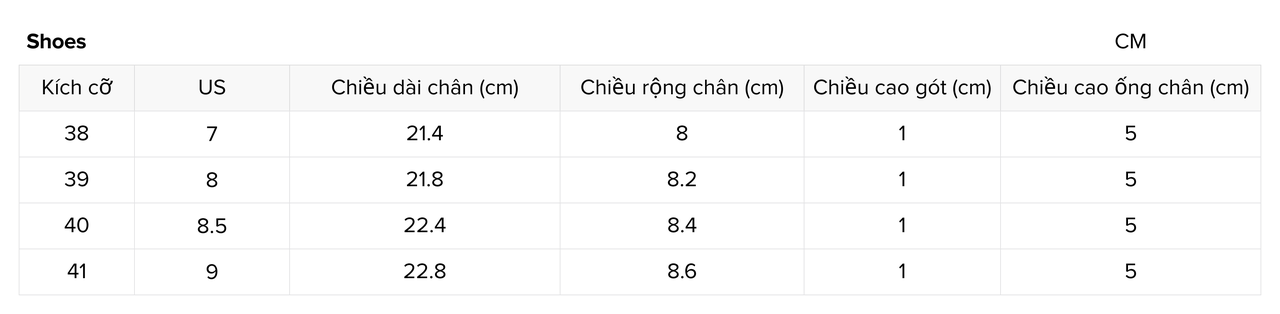
Loại sản phẩm: Giày
Thông tin kích cỡ chính:
Lưu ý: Vui lòng đánh dấu rõ ràng đơn vị đo cho từng thông tin kích cỡ (chẳng hạn như cm/kg)
Ví dụ về biểu đồ kích cỡ rõ ràng
- Kích cỡ giày (ví dụ: 38/39/40)
- Kích cỡ địa phương tương ứng (ví dụ: Mỹ/Anh/Châu Âu)
- Chiều dài chân
- Chiều rộng chân
- Chiều cao gót
- Chiều cao ống chân
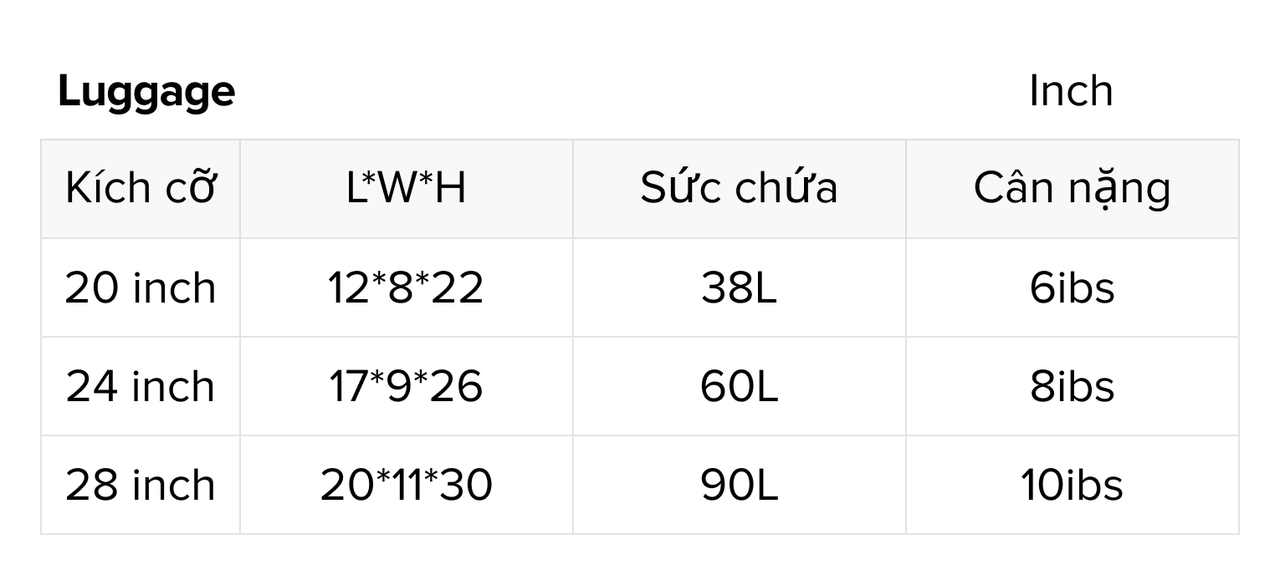
Loại sản phẩm: Hành lý
Thông tin kích cỡ chính:
Lưu ý: Vui lòng đánh dấu rõ ràng đơn vị đo cho từng thông tin kích cỡ (chẳng hạn như cm/kg)
Ví dụ về biểu đồ kích cỡ rõ ràng
- Kích cỡ
- Dài
- Rộng
- Cao
- Sức chứa
- Cân nặng
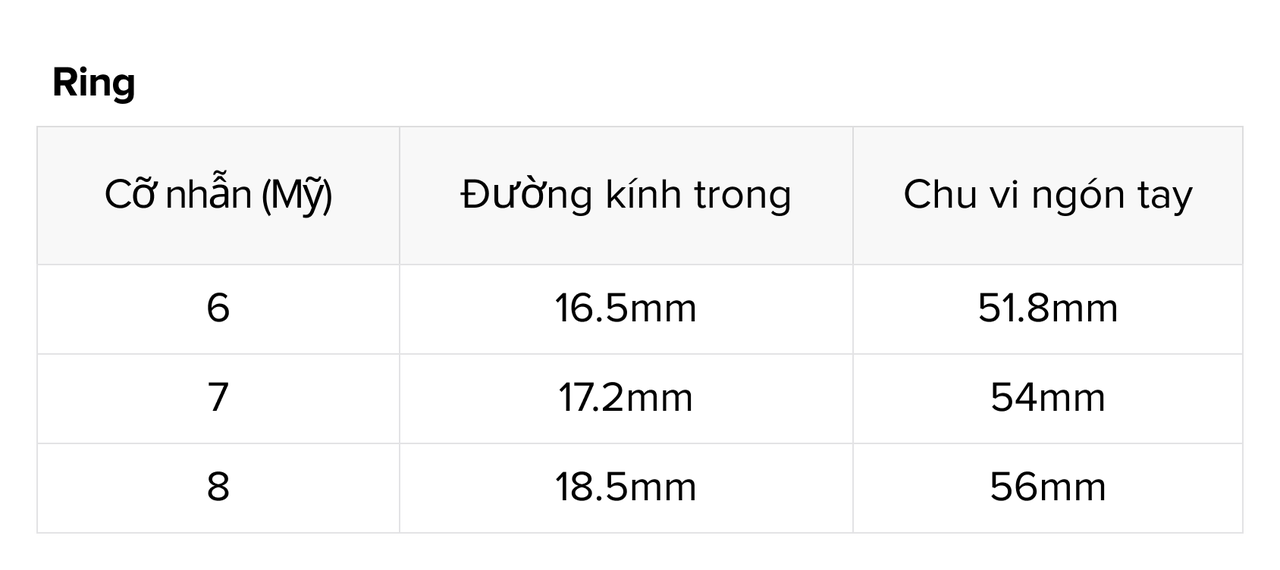
Loại sản phẩm: Nhẫn
Thông tin kích cỡ chính:
Lưu ý: Vui lòng đánh dấu rõ ràng đơn vị đo cho từng thông tin kích cỡ (chẳng hạn như mm)
Ví dụ về biểu đồ kích cỡ rõ ràng
- Cỡ nhẫn
- Đường kính trong
- Chu vi ngón tay
Tính năng tải lên thông tin biểu đồ kích cỡ
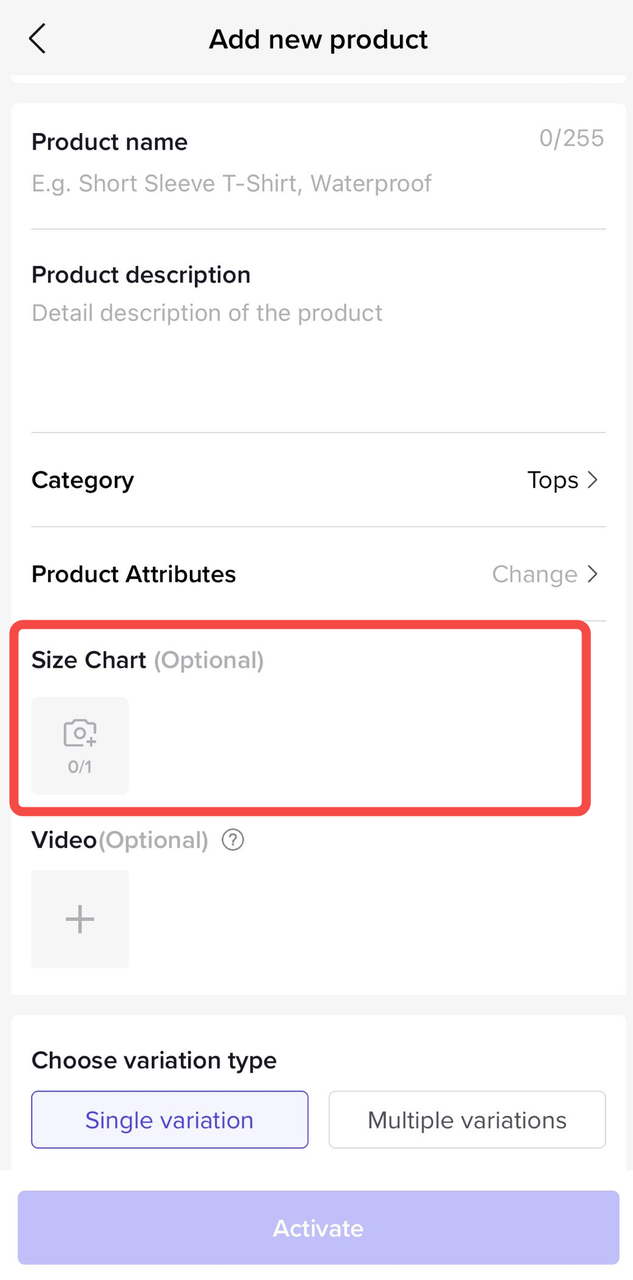
TikTok Shop đã cung cấp cho người bán mục tải lên biểu đồ kích cỡ cho một số danh mục. Người bán nên tham khảo quy cách thông tin biểu đồ kích cỡ này để lập biểu đồ kích cỡ và tải lên mục tải lên biểu đồ kích cỡ.
Yêu cầu khi tải lên biểu đồ kích cỡ
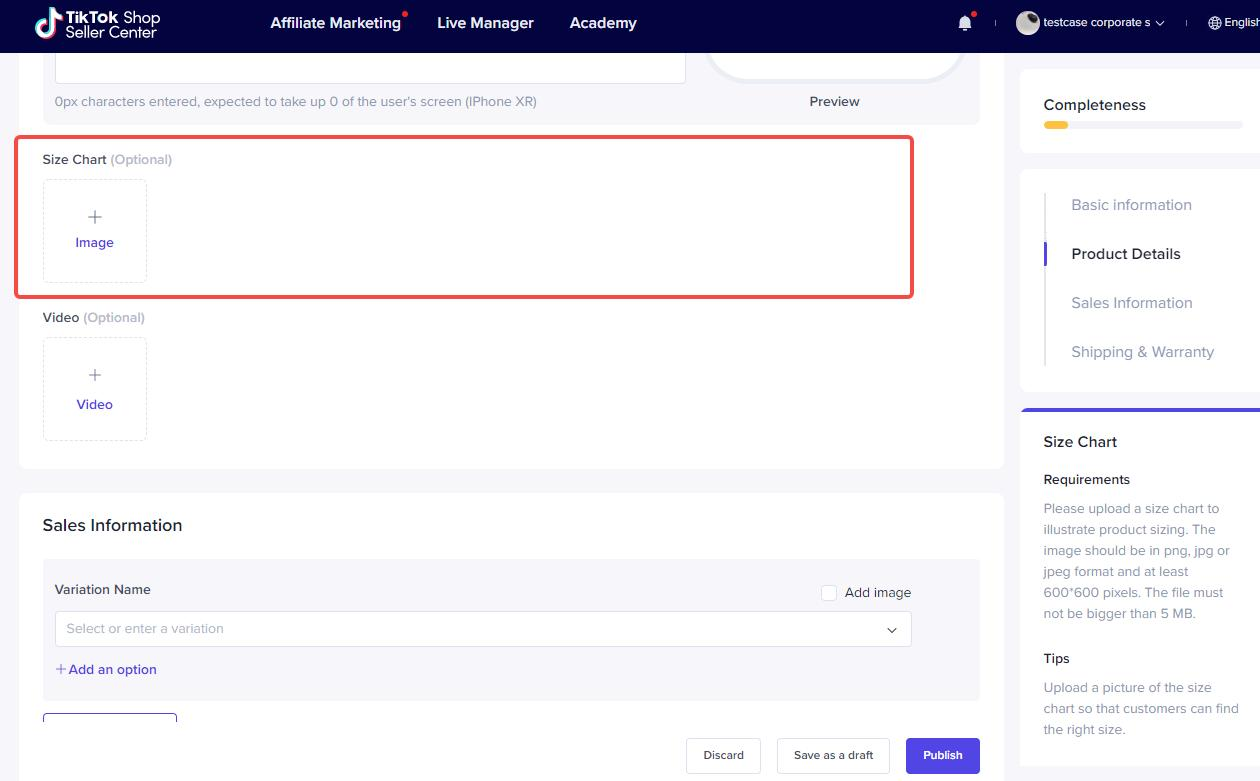
Biểu đồ kích cỡ phải có định dạng png, jpg hoặc jpeg, với độ phân giải ít nhất 600*600 pixel và dung lượng tập tin không được quá 5 MB .
Mục tải lên biểu đồ kích cỡ của mỗi đầu
Hình 1. Xem trước mục tải lên bảng kích cỡ (máy tính)
Hình 2. Xem trước đường dẫn vào mục tải lên biểu đồ kích cỡ (ỨNG DỤNG Seller)
Hình 3. Đường dẫn vào mục tải lên biểu đồ kích cỡ (Công cụ hàng loạt)
Số đo vi phạm quy tắc
Những người bán sản phẩm quần áo/giày dép/túi/nhẫn phải điền thông tin về biểu đồ kích cỡ giống với kích cỡ thực tế của sản phẩm, đồng thời không được phép tải lên ảnh của bảng kích cỡ sản phẩm không thực tế để tránh người dùng hiểu lầm. Đối với hành vi vi phạm, nền tảng sẽ xử lý theo “Điều khoản dịch vụ người bán của cửa hàng TikTok”, “Quy cách phát hành sản phẩm” và các quy tắc liên quan khác.