

Introduction of Holiday Mode
12/31/2024
When should you enable Holiday Mode?
Suppose you are unable to manage new orders because of holidays, unforeseen events, bad weather, the pandemic, etc. In that case, you can enable Holiday Mode to prevent incoming orders to avoid your store's performance metrics to be affected.As Holiday Mode will affect buyers who want to place orders, please read these instructions carefully before enabling it.What happens when I enable Holiday Mode?
1 Consumers cannot place orders
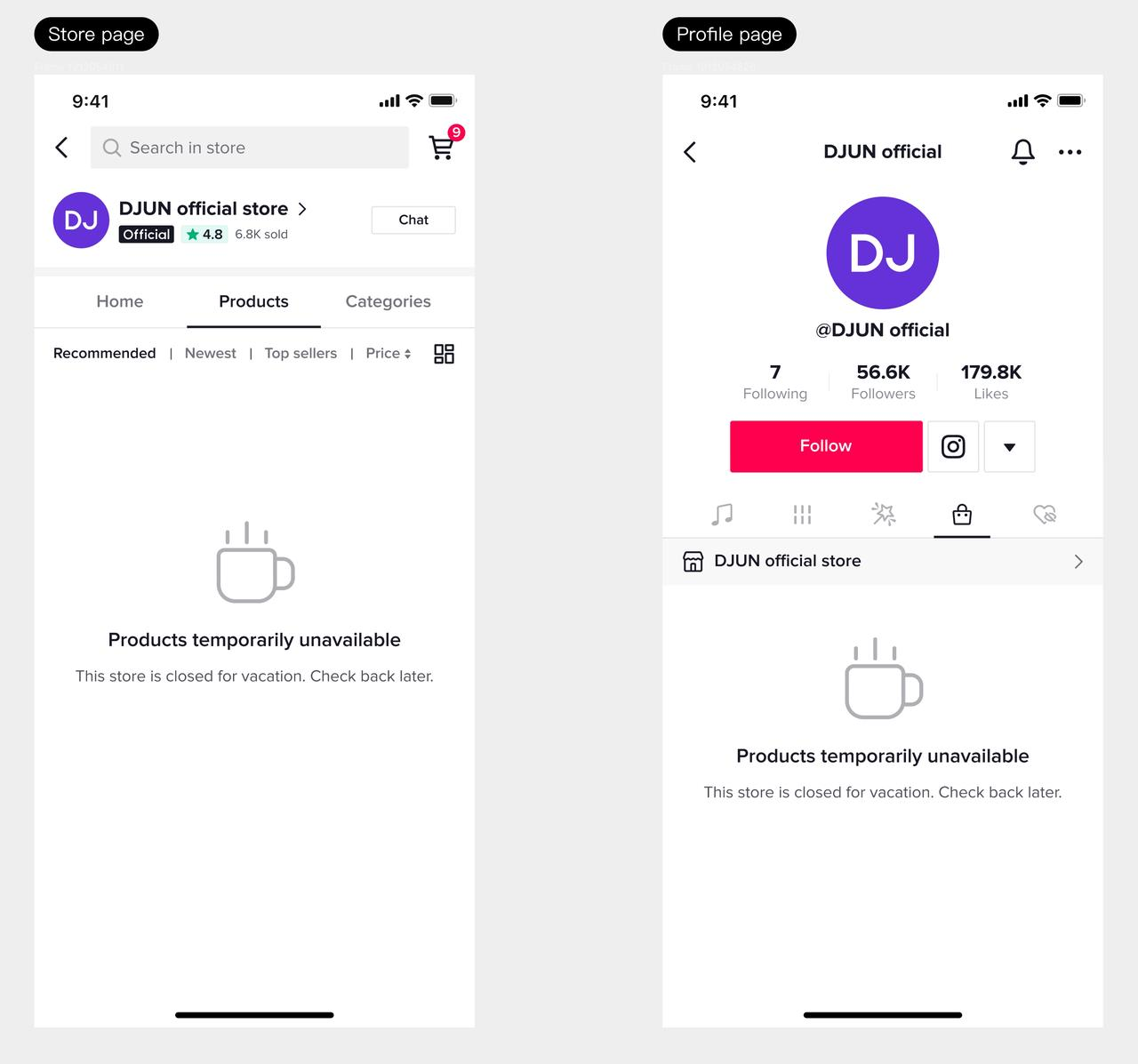
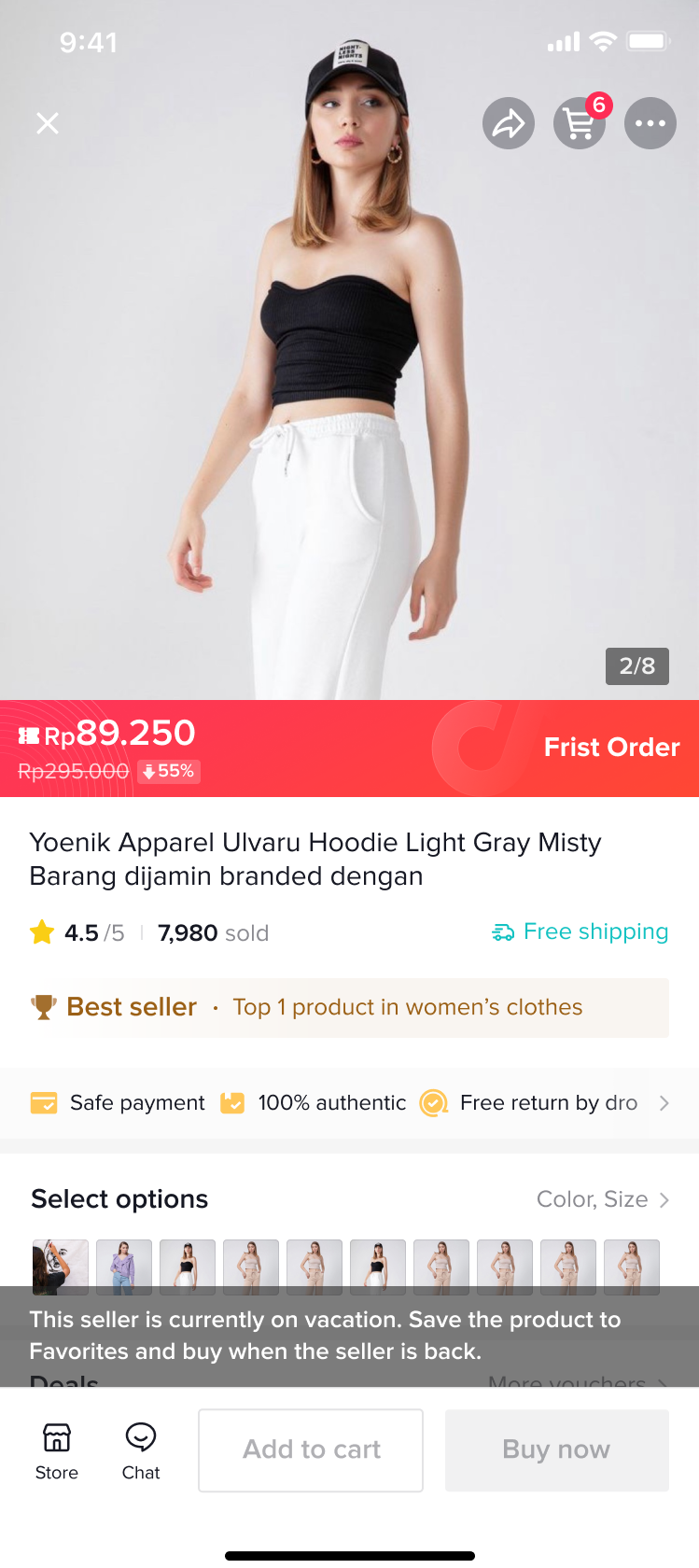
When Holiday Mode is turned on, there will be a notification on the store page that the seller is on vacation. All warehouses corresponding to the store will be in Holiday Mode, inventory will be cleared, and products will be displayed in the "sold out" state and cannot be purchased. (Note that when the product is still in stock in your FBT (fulfilled by TikTok Shop) warehouse, the platform will not display the notice to ensure consumers' positive shopping experience. Products in FBT warehouses can still be sold.)| The display on the store page | The notification on the order placing page |
 |  |
2 IM automatic reply
If you receive a new message during the holiday, the system will automatically reply to the consumer with the content you have set.3 Changes to performance assessment during the holiday
During the holiday, the platform will use different rules to assess the store's performance. For more details, please refer to [TikTok Shop Seller Performance Evaluation Policy4 Reduced store traffic
Your store traffic will decrease during the holiday.【Note】
- Holiday Mode does not apply to current orders. You must still ship orders on time and provide aftersales services for historical orders. Consumers' aftersales requests will be automatically approved if the seller does not process them within 48 hours. Therefore, please pay attention to consumers' after-sales demands during the holidays and process them promptly.
How can I turn on Holiday Mode?
If you’d like to switch your shop to Holiday Mode while you’re gone, visit the Holiday Mode Settings page on Seller Center, and follow these steps:Step 1
Go to the Account Settings page and choose “Holiday Mode.”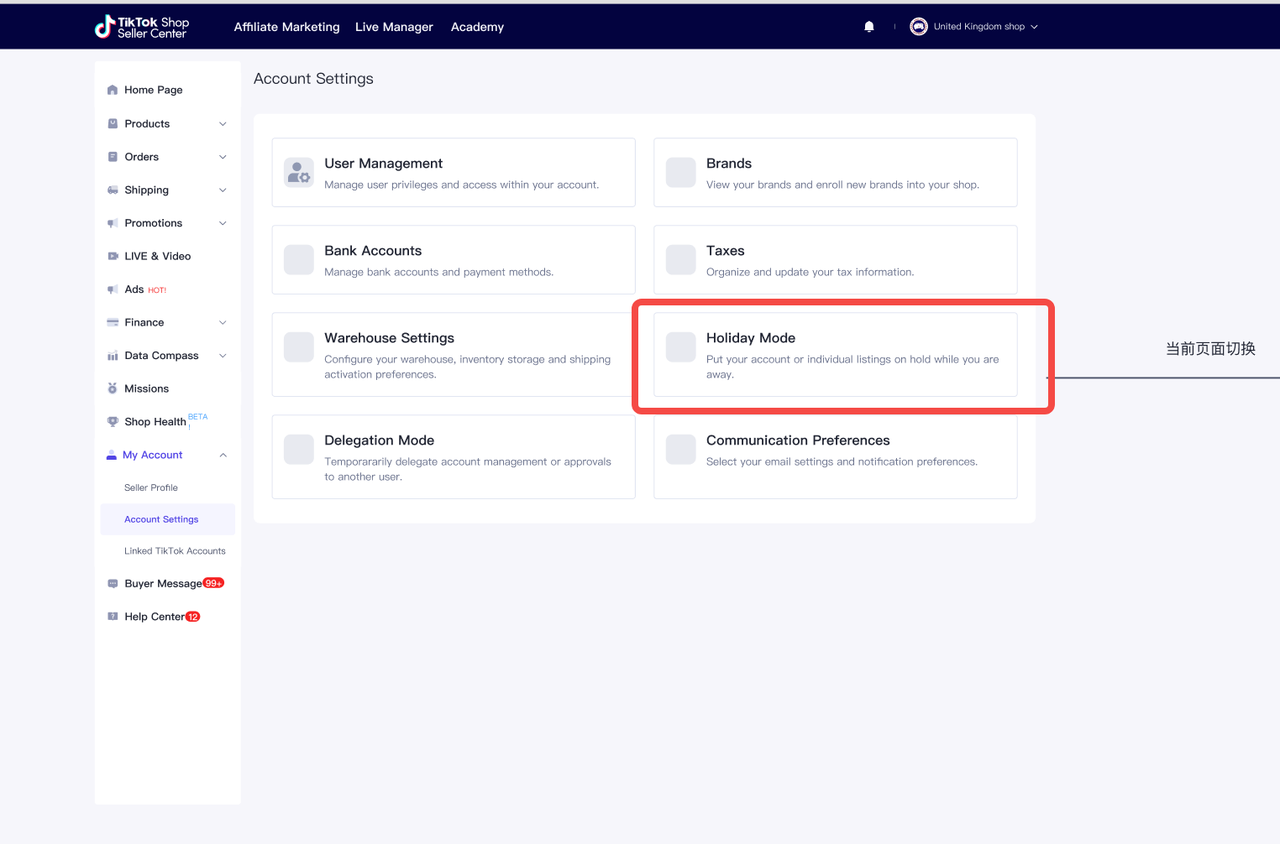
Step 2
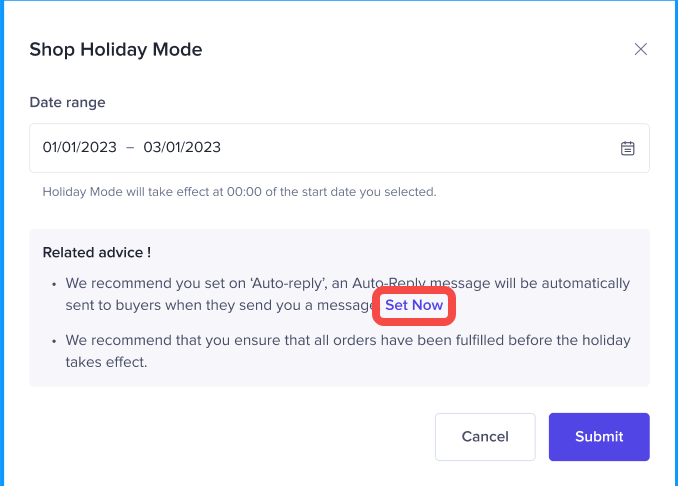
Turn on holiday mode and set the date range of your holiday. It is also recommended that you turn on IM automatic reply. A good reply should contain essential information that buyers want to know about:- The date range of the holiday
- When you can respond to messages

Note
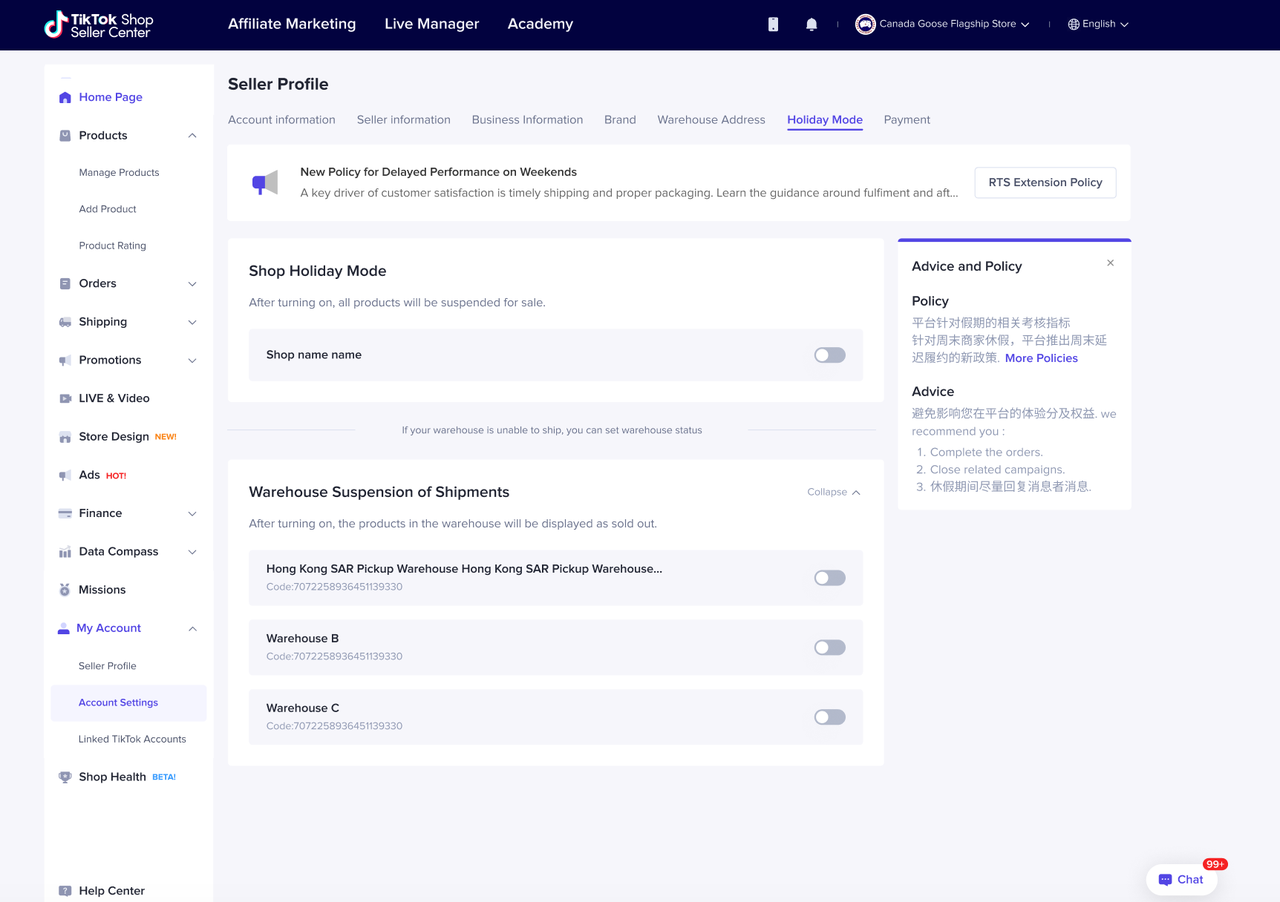
If you have multiple warehouses, you can apply Holiday Mode to the store, which means all your warehouses will be in Holiday Mode. Otherwise, you can set specific warehouses as in Holiday Mode.The way to configure warehouse-dimension Holiday Mode is similar. You can click "More" and turn on the list of warehouses, select the targeted warehouses, and turn on Holiday Mode.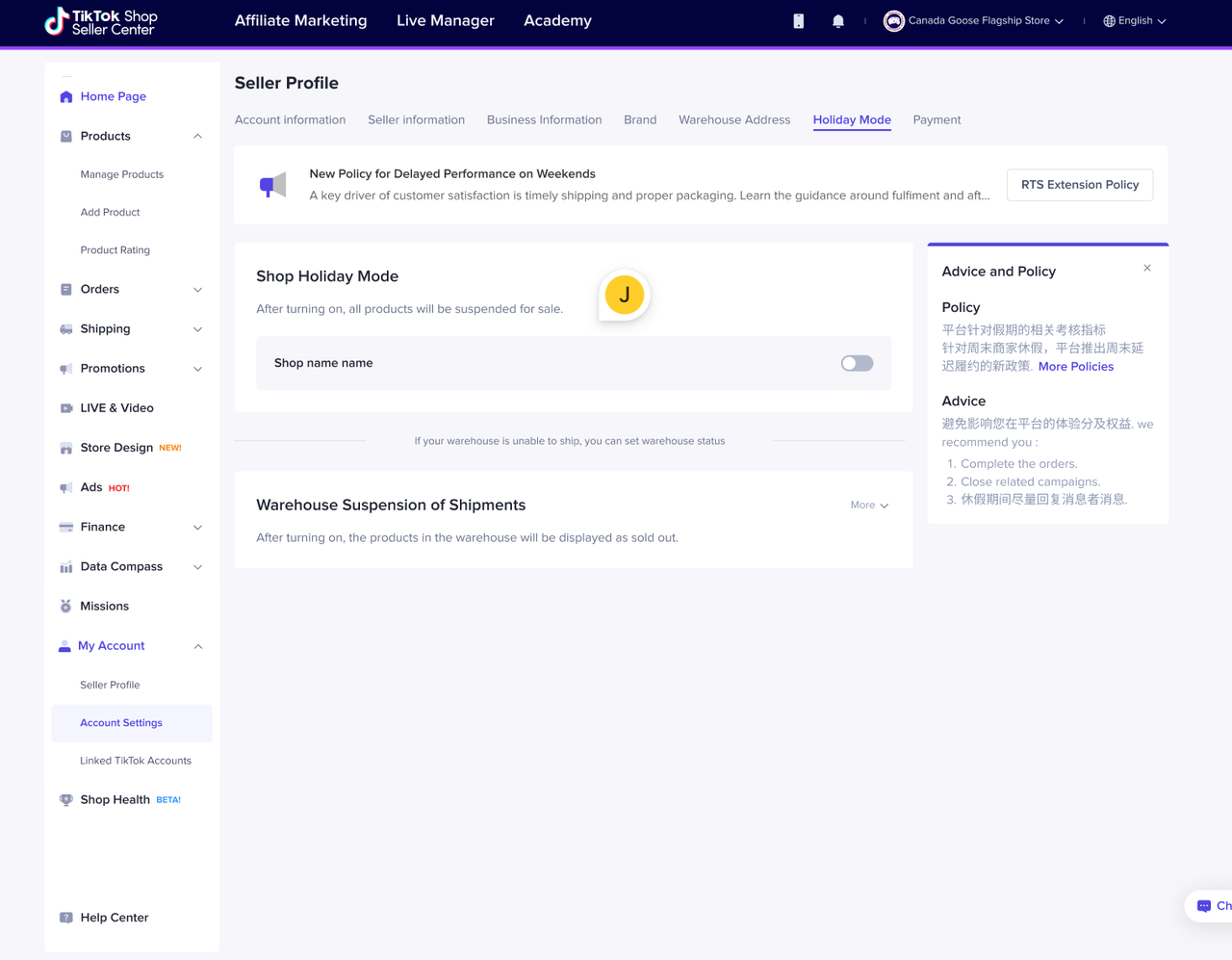
How to turn off Holiday Mode
If you want to end Holiday Mode, toggle the button to have it switched off after confirmation.- Within 1 hour after turning off Holiday Mode, the number of items in the inventory will return to the previous level, and buyers will be able to place new orders.
FAQ
- How long does it take to turn on/off Holiday Mode?
You may also be interested in

Seller Sharing - Underme Vietnam
Underme Vietnam specializes in providing sporty lingerie for women on the TikTok Shop platform. Desp…

Shop Ownership Change Process
Note: You will only be able to change ownership from to individual to corporate/household sellers or…
Delegation Mode
This article informs what happens, why it helps, and what you need to do (one time) so your Account…

Violation Points & Milestones for Sellers
What are Violation Points? Violation Points are points issued to sellers who breach our policies an…

How can I change my login email address or phone number asso…
To update your email address/phone number, please follow the steps below: Login to your TikTok Shop…

【Video】Homepage - All you need to check
Find your daily important information and action needed items on homepage. 2.1 Let's Start Your Busi…
Scam Prevention: Cash on Delivery (COD) Scam Orders
Scam Prevention - Cash on Delivery (COD) Scam Orders TikTok Shop strives to provide a shopping exper…
TikTok e-commerce short video music selection guide
For the purpose of upholding music copyright law, we recommend that everyone uses music with commerc…
Adjustment Period for New Shops
New shops are subject to a adjustment period during which some functions are restricted. These restr…

Seller Sharing - Socomo Shop
Socomo is a brand specializing in Korean-style women's fashion, a rising star with a commendable tra…