

Chương Trình Flash Sale Deal Chớp Nhoáng
08/01/2025
Kính gửi Nhà bán hàng
Chúng tôi xin giới thiệu Flash Sale Deal Chớp Nhoáng đến với bạn, đây là chương trình tiếp thị giúp tăng cường hiển thị, cải thiện tỷ lệ chuyển đổi và giúp Nhà bán hàng tăng trưởng doanh số.
Thông qua tham gia các chiến dịch Flash Sale Deal Chớp Nhoáng, Nhà bán hàng sẽ có thể tận dụng tối đa các ưu đãi từ nền tảng và giá FlashSale sẽ hiển thị trên Toàn Bộ TikTok Shop . Đúng vậy! Điều này có nghĩa rằng các sản phẩm của bạn sẽ được hiển thị với mức giá cạnh tranh nhất ở cả FlashSale, Trang Mua sắm , LIVE, Video ngắn!!!Hãy tham gia ngay để cải thiện khả năng hiển thị và tăng tỷ lệ chuyển đổi sản phẩm!
Phí dịch vụ Flash Sale Deal Chớp Nhoáng
Từ ngày 17 tháng 2 năm 2025, Phí dịch vụ Flash Sale sẽ được tính cho tất cả các đơn hàng đã giao thành công đối với những nhà bán hàng đã đăng ký chương trình.
Đơn hàng đã giao thành công được định nghĩa là đơn hàng đã được giao và người mua đã nhận hàng thành công, bao gồm:
Đơn hàng có bị tính phí dịch vụ hay không tùy thuộc vào việc các mặt hàng có được vận chuyển hay không:
- Đơn hàng đã giao, hoàn thành mà không có yêu cầu hậu mãi
- Đơn hàng đã giao, sau đó người mua yêu cầu Trả hàng và Hoàn tiền
- Khi sản phẩm chưa được vận chuyển và người tiêu dùng hủy đơn hàng hoặc không thanh toán đơn hàng trực tuyến, phí dịch vụ sẽ không được tính;
- Khi sản phẩm đã được giao và người tiêu dùng trả lại hàng, phí dịch vụ sẽ được tính vì chi phí vận chuyển đã phát sinh.
Làm thế nào để tham gia chương trình?
Cách 1: Đăng ký qua Trung tâm Nhà bán hàng:
- Bước 1: Trung tâm Nhà bán hàng > Chiến dịch
- Flash Sale
- Deal Chớp Nhoáng
- Bước 2: Đọc Chi tiết chiến dịch và Đồng ý với các điều khoản và điều kiện
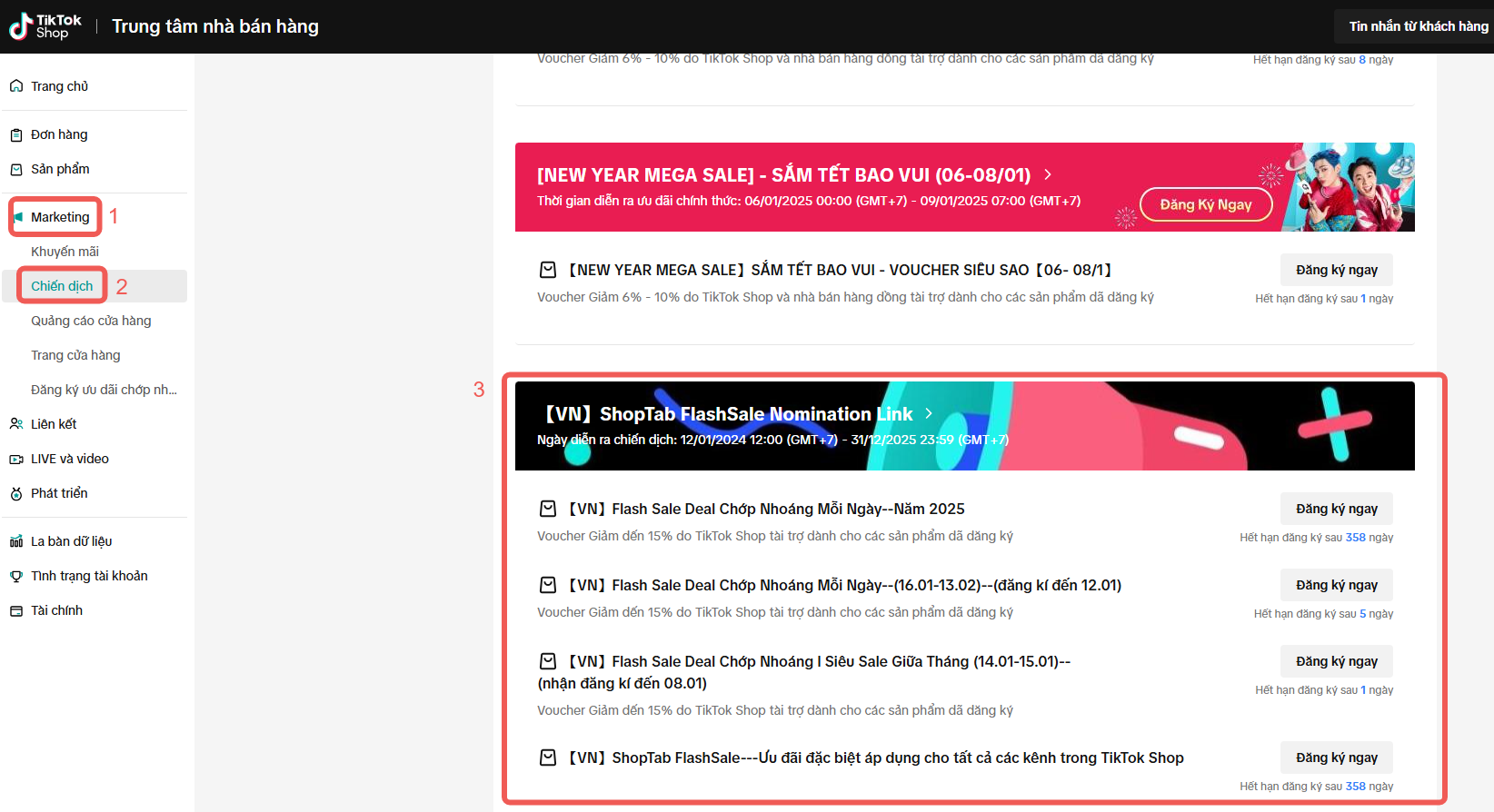
*Đây là tài khoản kiểm tra với dữ liệu giả và chỉ để tham khảo. Giao diện và tính năng thực tế có thể sẽ khác.
Lưu ý: Sau khi bạn đăng ký và qua được khâu xét duyệt của chúng tôi, chỉ những sản phẩm đạt được các tiêu chí của nền tảng sẽ được hiển thị trong các phiên Flash Sales và nhận được các hỗ trợ và lợi ích tương ứng.
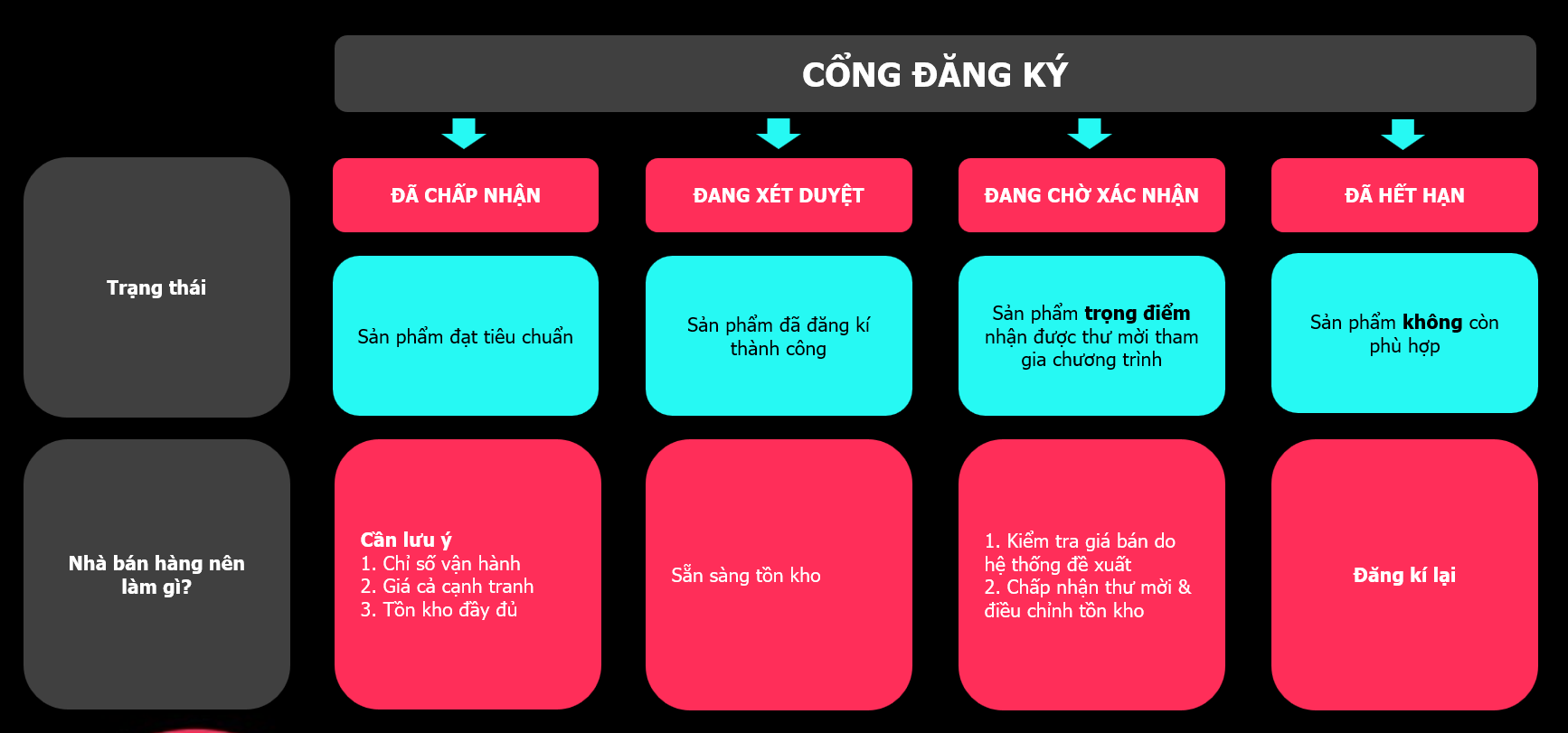
Nhà bán hàng có thể tham khảo các tiêu chí sau để gia tăng tỷ suất tham dự chương trình:
- Nhà bán hàng có chỉ số vận hành tốt, căn cứ vào các chỉ số sau:
- Điểm vi phạm thấp hơn 24 và không có vi phạm đặc biệt nghiêm trọng
- Chỉ số Xếp hạng cửa hàng tốt (Vd: > 4.0 điểm)
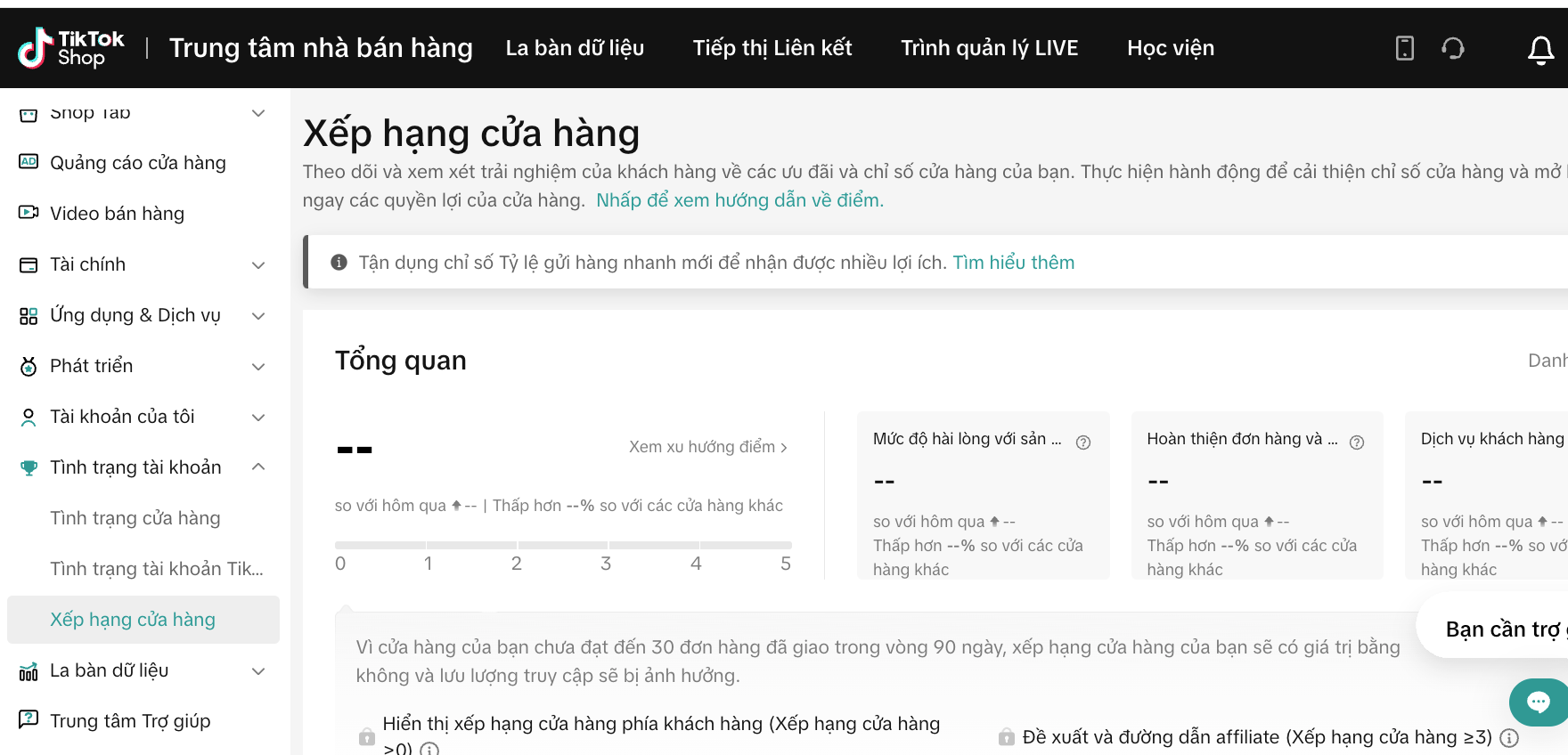 *Đây là tài khoản kiểm tra với dữ liệu giả và chỉ để tham khảo. Giao diện và tính năng thực tế có thể sẽ khác.
- Nhà bán hàng đăng kí với giá Flash Sale cạnh tranh (dựa trên lịch sử giá bán của sản phẩm trong 30 ngày gần nhất, hệ thống Flash Sale sẽ đề xuất với Nhà bán hàng giá tham dự chương trình phù hợp).
- Lịch sử bán hàng tốt (tối thiểu >1 để đăng kí tham dự. Ngoài ra, tuỳ theo tính chất từng chương trình, nền tảng sẽ chọn ra các sản phẩm cạnh tranh nhất thông qua doanh số bán hàng 30 ngày gần nhất đủ điều kiện tham dự Flash Sale).
Cách 2
: Bạn cũng có thể đăng ký qua liên kết đăng ký do Người quản lý tài khoản gửi cho bạn.
Cách 3: Nhà bán hàng có thể click vào đường dẫn [ Thông Tin Cổng Đăng Ký Flash Sale ]
này để luôn cập nhật được các cổng đăng kí Flash Sale Deal Chớp Nhoáng mới nhất mà nền tảng đang vận hành.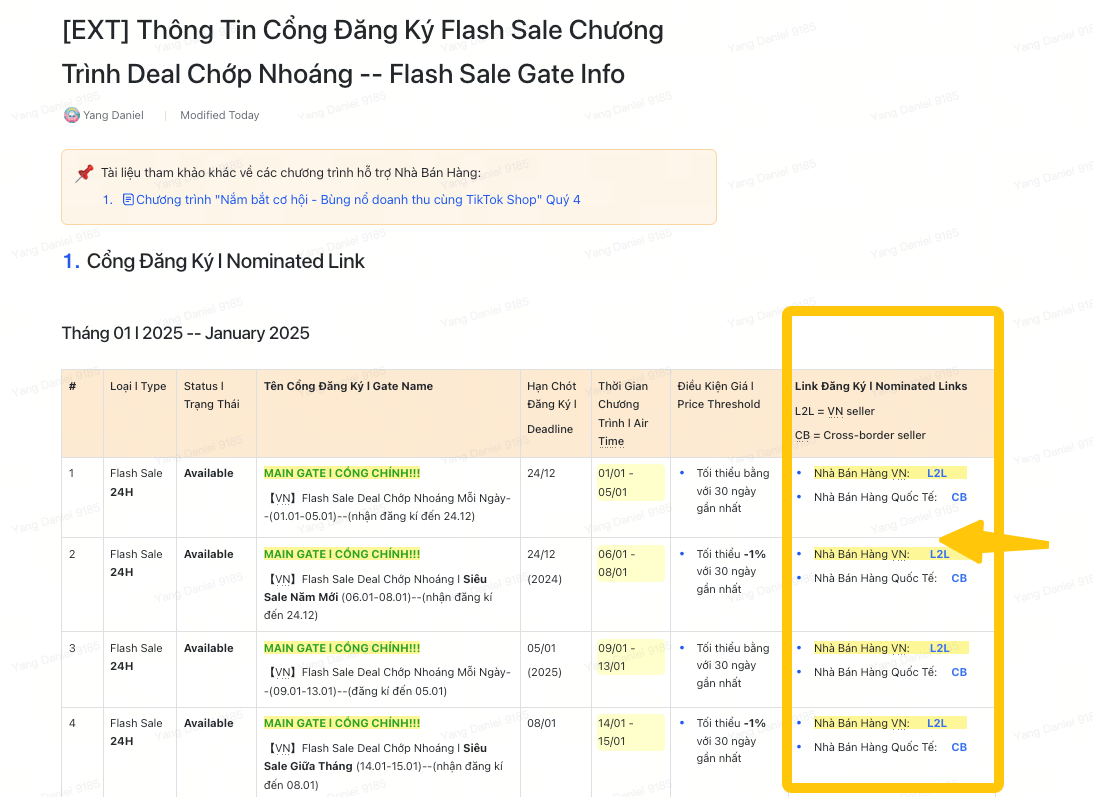 *Đây là tài khoản kiểm tra với dữ liệu giả và chỉ để tham khảo. Giao diện và tính năng thực tế có thể sẽ khác.
Làm thế nào để kiểm tra hóa đơn?
Trung tâm Nhà bán hàng > Tài chính > Lịch sử quyết toán > Xem chi tiết
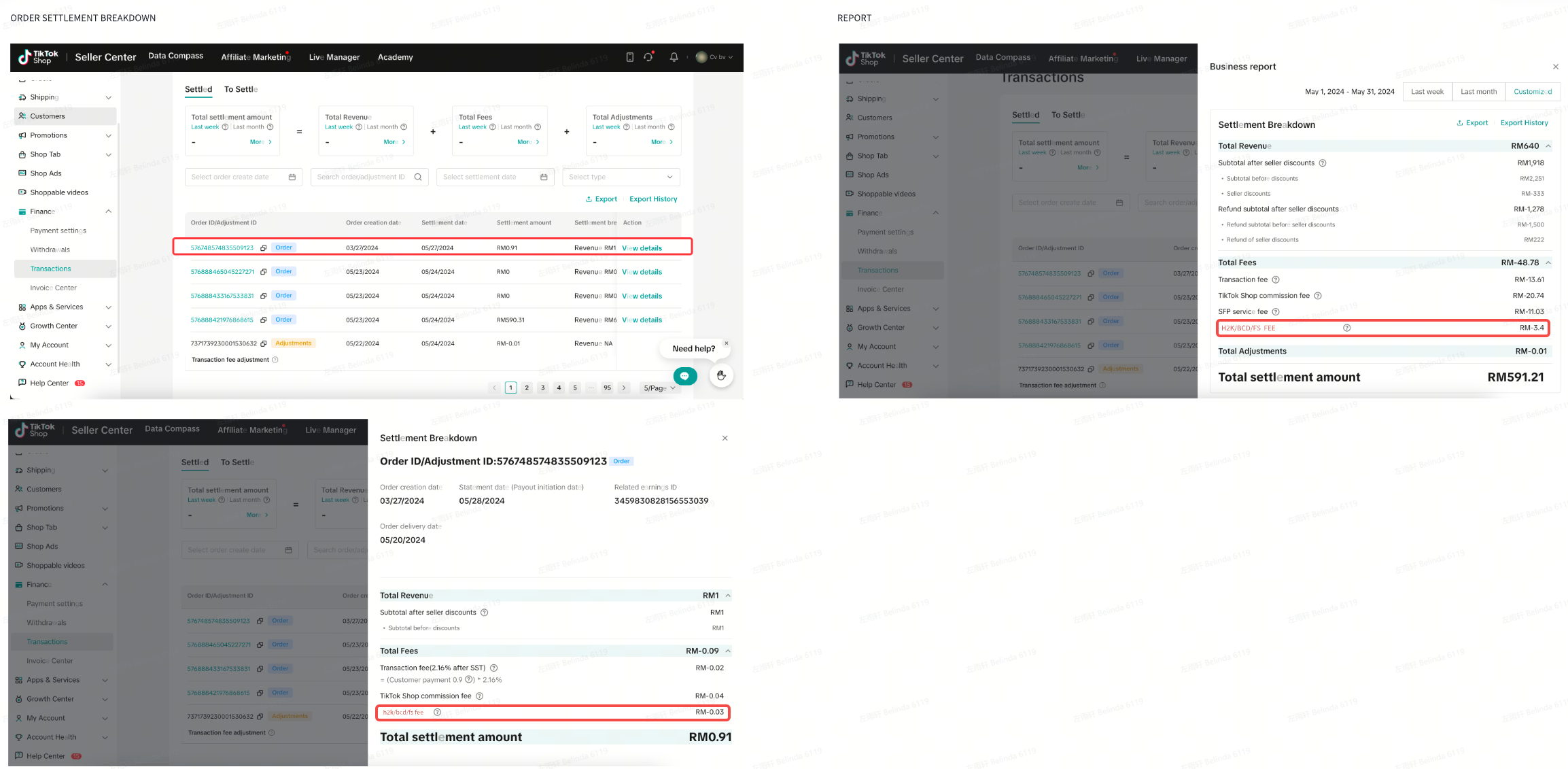
*Đây là tài khoản kiểm tra với dữ liệu giả và chỉ để tham khảo. Giao diện và tính năng thực tế có thể sẽ khác.
Làm thế nào để ngừng tham gia Flash Sale Deal Chớp Nhoáng?
Với các sản phẩm đủ tiêu chuẩn và lên lịch các phiên Flash Sale, bạn nên duy trì vì chương trình sẽ giúp bạn tăng doanh số. Tuy nhiên, nếu vẫn muốn ngừng tham gia, bạn có thể liên hệ với AM (Quản lý ngành hàng) của mình để được trợ giúp đỡ.Ngoài ra, Nhà bán hàng có thể ngừng tham gia bằng thực hiện các thao tác sau:
Bước 1: Nhấp vào Lịch sử Đăng ký (Registration Record) trên trang Chi tiết Chiến dịch (Campaign Details)Bước 2: Nhấp vào Rút lui (Withdraw) tại cột Hành động (Action) để đăng ký ngừng tham gia chương trình
Bước 3: Chờ yêu cầu của bạn được duyệt. Trạng thái đăng ký chiến dịch sẽ thay đổi từ Chấp thuận (Approved) hoặc Đình chỉ (Suspended) sang Rút lui đang được đánh giá (Withdraw Under Review). Thông thường sau 1 ngày (tối đa 2 ngày), hệ thống sẽ ghi nhận yêu cầu ngừng tham gia và tự động huỷ đăng ký của Nhà bán hàng cho các phiên Flash Sale còn lại trên cổng đăng kí tương ứng.
Xin lưu ý:
- Nhãn Flash Sale Deal Chớp Nhoáng sẽ không còn được thêm vào sản phẩm của bạn nữa.
- Hiển thị phiên Flash Sale đếm ngược mặc định của hệ thống sẽ không hiển thị trên sản phẩm của bạn nữa.
- Các trợ giá đặc biệt từ nền tảng dành riêng cho các sản phẩm tham dự chương trình Flash Sale sẽ không còn được áp dụng cho sản phẩm của bạn nữa.
- Đối với đơn hàng có hiển thị Flash Sale được xử lý trước khi bạn rời chương trình, phí dịch vụ sẽ được tính như bình thường.
- Đối với đơn hàng được đặt sau khi bạn rời khỏi, phí dịch vụ sẽ không bị tính vào đơn hàng đó.
PreviousGiới Thiệu Chương Trình Chứng Nhận Chuyên Gia Đào Tạo TikTok ShopNext Lịch Làm Việc Của Đơn Vị Vận Chuyển Dịp Tết Nguyên Đán 2025
You may also be interested in

Chiến Dịch LIVE
Bài viết này hướng dẫn bạn cách sử dụng Chiến dịch LIVE để tăng lưu lượng truy cập và tỷ lệ chuyển đ…
Chiến Dịch Đồng Tài Trợ
Bài viết này hướng dẫn bạn cách sử dụng các Chiến dịch đồng tài trợ để tăng doanh số bán hàng của cử…
Chiến dịch Sản phẩm
Bài viết này sẽ hướng dẫn bạn cách tham gia các chiến dịch sản phẩm trên nền tảng để…
Voucher Extra Program
This article teaches you what Voucher Extra are, how it works, as well as how the Voucher Extra Prog…
Thứ 6 Extra - Voucher thả ga - ELHA & HL
Mục tiêu chiến dịch Một ngày sale nhằm tạo ra trải nghiệm mua sắm tập trung và tương tác cho các thư…

Thứ 6 Extra - Voucher thả ga - FMCG & FA Campaign
Mục tiêu chiến dịch Một ngày sale nhằm tạo ra trải nghiệm mua sắm tập trung và tương tác cho các thư…
Đăng ký Chiến dịch Một lần nhấp
Người bán tốn nhiều thời gian và phải làm đi làm lại thao tác đăng ký sản phẩm trên nhiều chiến dịch…
Video 5: Data Tracking
Video 4.1: How to Create Your own Promotions
Video 3.2: How to win in TikTok Shop Promotional Activities…