

Tax Information Required for TikTok Shop Creators
09/26/2025
In compliance with Vietnam's anti–money laundering regulations, TikTok Shop creators are required to provide tax information for verification during onboarding and at the commission withdrawal stage.
Reminder: Double-check that your documents are clear and match the details you provided during submission.
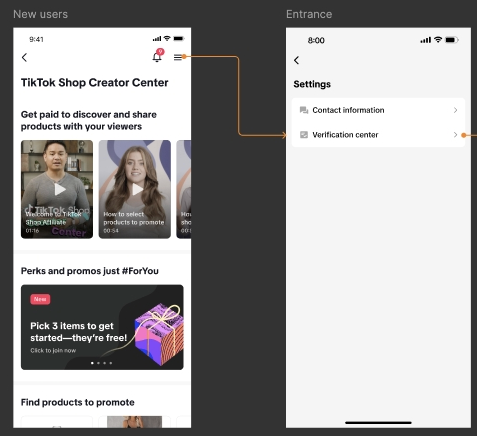 If you have any questions or encounter issues with submission, you can get support in the TikTok app:
Required Tax Information
TikTok Shop creators will be required to submit the following information:
- Full Name (as per National ID/Passport)
- National ID Number (12 digits)/equivalent of Tax code number
Reminder: Double-check that your documents are clear and match the details you provided during submission.
How to Submit Your Tax Information
You may be asked to submit your tax information when attempting to withdraw your commission.
Alternatively, you may also proactively submit this information by taking the following steps:- TikTok Shop Creator Centre > Settings > Verification Center
- Go to TikTok Studio
- Under Profile, click on TikTok Shop for Creator
- Scroll to the bottom and tap on Help Center
- Start a chat or submit a help ticket
Frequently Asked Questions (FAQs)
How can I check my tax information submission status?
Go to TikTok Shop Creator Centre > Settings > Verification Center to view your status.
What if I submitted the wrong Tax Code?
You can update your details anytime in Creator Verification Center:
TikTok Creator Center > Menu (top right) > Verification Center.
TikTok Creator Center > Menu (top right) > Verification Center.
Anda mungkin juga tertarik

How to Apply as an Affiliate Creator on TikTok Shop
In this article, we will guide you on how to join as an Affiliate Creator. We have two types of Affi…
Becoming a TikTok Shop Creator - Requirements & Application…
You may only monetise your content when promoting products on TikTok Shop if you meet certain criter…

【video】TikTok account positioning and original account IP cr…
01. What is the definition of account IP? 02. Why do we need to position the TikTok account? 03. How…
Seller-Creator Unbinding Criteria
What are the Seller-Creator Unbinding Criteria? The Seller-Creator Unbinding Criteria applies to Mer…
Creator Age Verification
We've moved! Click here to view the Tax Information Required for TikTok Shop Creators.
Seller-Creator Unbinding Criteria
What are the Seller-Creator Unbinding Criteria? These criteria determine whether a TikTok Shop offic…