

【Video】Data Overview-Where to find the income composition of the store?
12/13/2022
1、Background
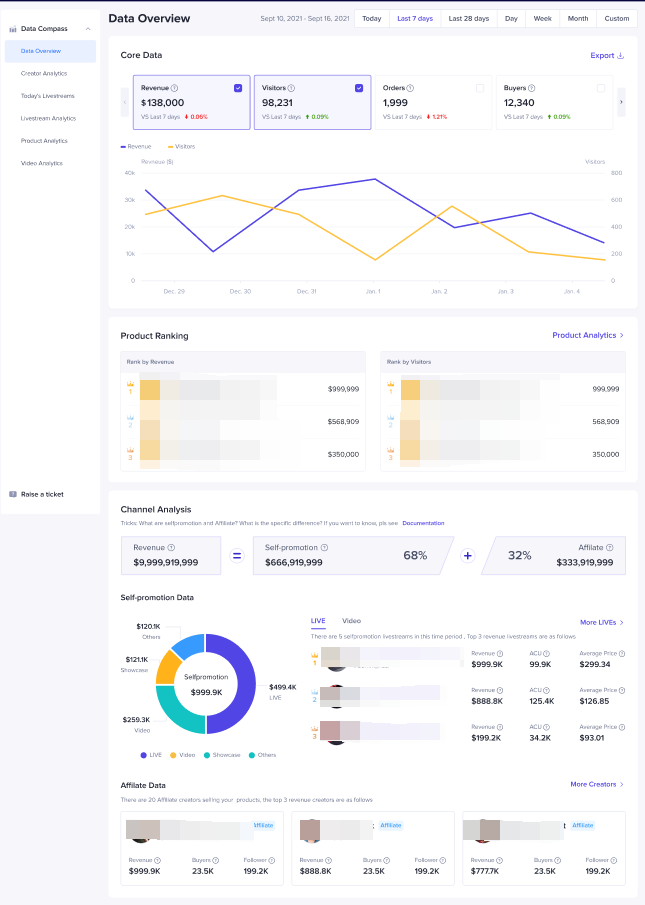
❓ still can't distinguish the proportion of revenue from their own live/videos ❓❓ still don't know which creators have brought the most revenue to the store ❓❓ are you still adding up the revenue one by one after downloading the data every day ❓❓ still don't know where to find the source composition of the store's revenue ❓Data compass gives you the most intuitive analysis of the composition of store transactions, directly telling you the proportion of livestream, videos and showcase revenue of store, quickly understanding the TOP 3 revenue products and creators, helping users save the time of downloading and summarizing data, and making the revenue source of the store more intuitive and transparent!Entrance:【Data Compass】-【Data Overview】/【Homepage】-【Data Overview】
- Next, we will introduce in detail:
- 🔥 How to use Data Overview?
- 🔥 Difference between owned media revenue data and alliance data
- 🔥 Core function of data overview
- 🔥 Detailed introduction of each modules
2、 Data Overview Applied Scenarios
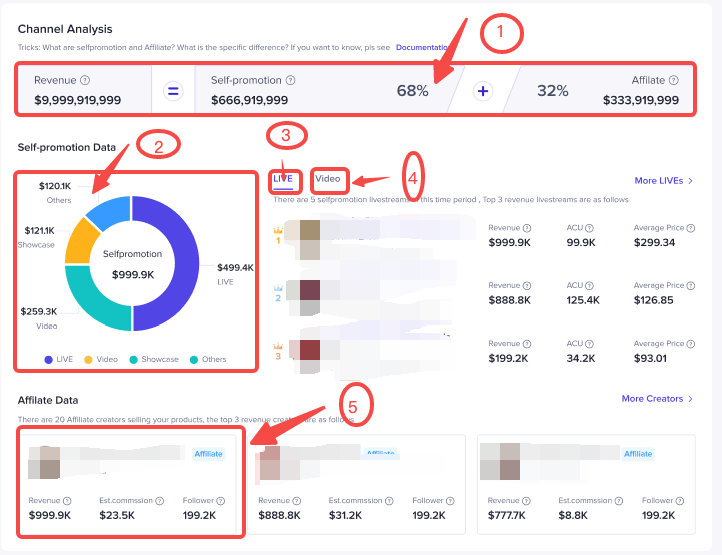
🔥 🔥 Dismantling Revenue Proportion of Owned media revenue and Alliance Income
- Intuitively understand the percentages of the revenue sold by the store and its affiliate, understand the advantage from owned media revenue and alliance separately, and adjust the subsequent store cooperation strategy.
🔥 🔥 Display Stores' Income Proportion of livestream/video/showcase
- The figure shows the proportion of livestream, video, showcase and other channels' revenue sold by the store itself, so as to quickly understand the composition and growth rate of livestream/video in the store and help the store to formulate subsequent livestream/video investment strategies.
🔥 🔥 Understand the TOP products/self-operated video/creators
- Quickly find the products, videos and creators that contribute the most to the store's GMV, continue to promote the excellent goods, copy the recent outstanding videos, and strengthen the follow-up cooperation with the good creators.
🔥 🔥 Quickly find the recently launched livestream and enter the live screen
- Provide live data of the TOP3 recent livestreams or the TOP3 historical revenue livestream r, and support clicking on the title/profile photo to enter the live screen.
3、Core Functions
📣Core data
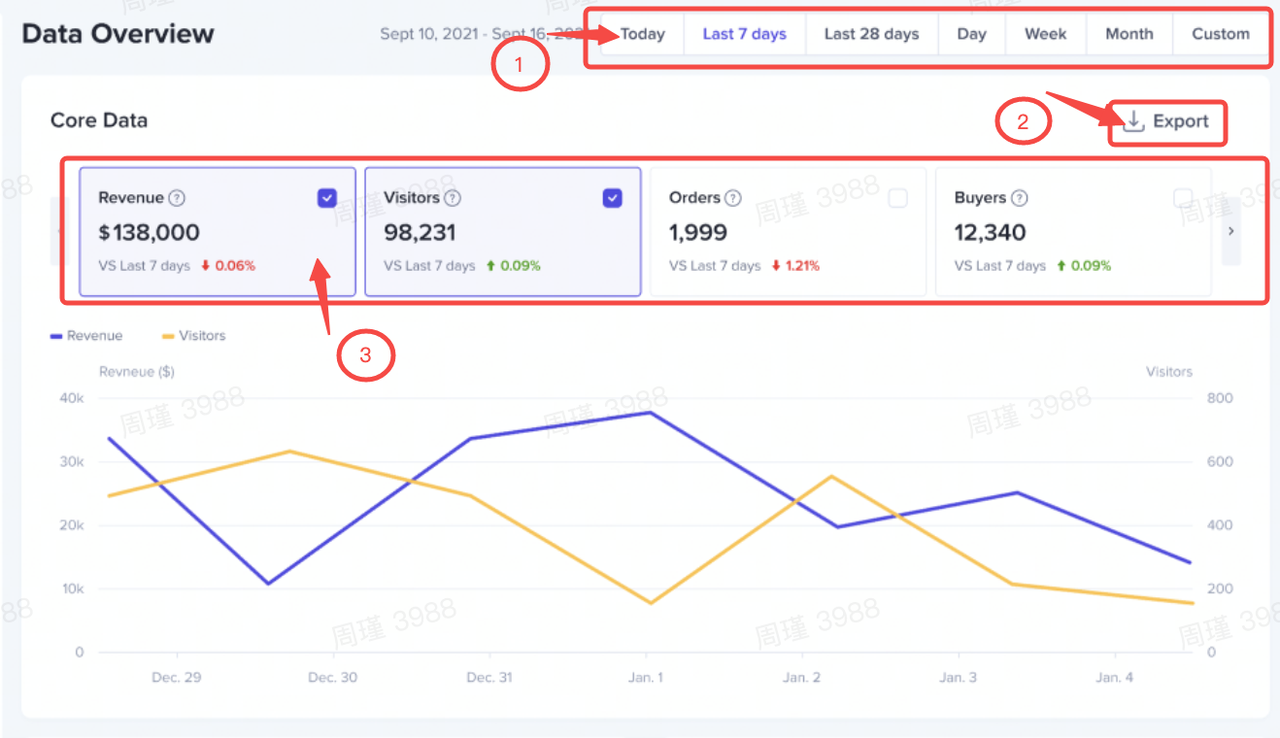
- Display store transaction, traffic, conversion, refund data and performance trends, support downloading data for analysis;
📣TOP Product
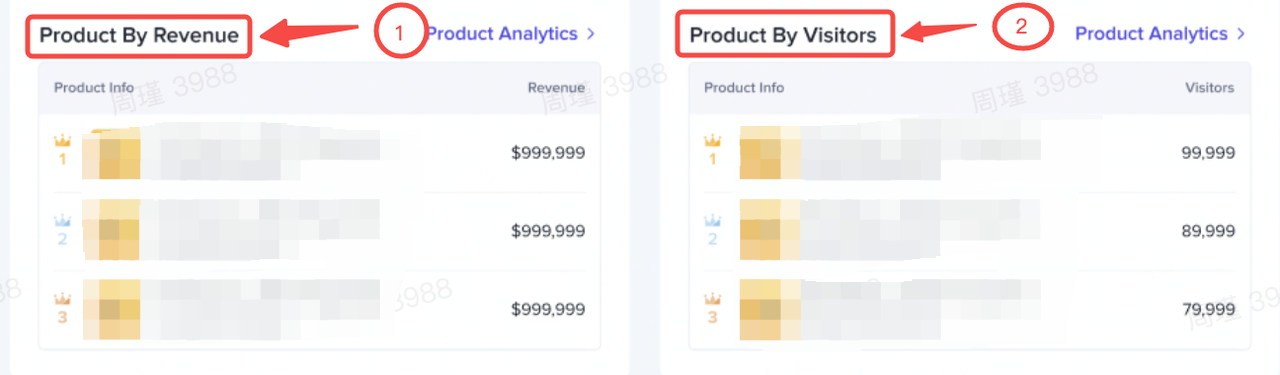
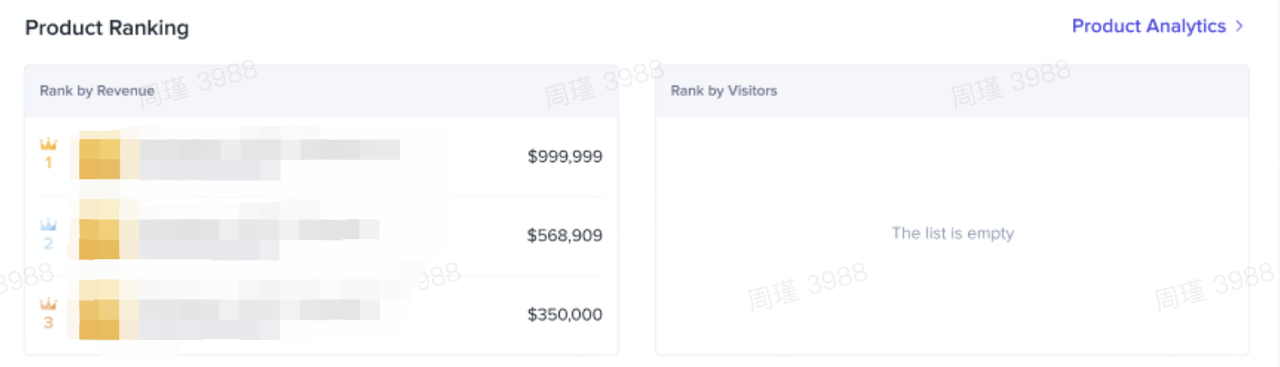
- Show the ranking of TOP3 transactions/visits, and support quick jump to commodity analysis to see more commodity performance;
📣Revenue Analytics
- Divide store transactions into owned media revenue and affiliate revenue:
- Owned media revenue : display the revenue composition of live/video/showcase/other channels, as well as the data overview of the TOP3 recent/revenue livestream room & TOP3 revenue video, support jump directly into live screen, today live and video analysis to view detailed data;
- Affiliate data : show to the TOP3 revenue creators, can jump directly to creator analysis to view detailed data.
4、Difference from Owned media revenue & Affiliate
❓ ❓ What is Owned media revenue?
During e-commerce operation on TTS, the seller has his own Official Account and can also bind a company or partner TikTok account, This type of TikTok account has 0 commission promotion relationship with your store. This account is called your Marketing Accounts. In day-to-day operations, sellers use Official Accounts or Marketing Accounts to sell products, which is called owned media revenue, and GMV will be counted as owned media revenue GMV, i.e. owned media revenue Data.❓ ❓ What is Affiliate?
Sellers cooperate with some creators on TikTok to sell products . Those creators are Affiliate accounts. The GMV generated by Affiliate accounts will be counted as Affiliate Data. Once Affiliate account produces GMV for the seller, the seller should pay a commission to the creator.5、Detail introduction of functions
Core Data
Detail introduction | Product display (test account, virtual data, subject to product) |
|  |
TOP products
Detail introduction | Product display (test account, virtual data, subject to product) |
|   |
Revenue Analytics
Detail introduction | Product display (test account, virtual data, subject to product) |
|  |
Q&A
Why do Official / Marketing Accounts appear in affiliate data?
- If the seller uses an Official Account or Marketing Account to sell products with the Affiliate Product Selection Center, the GMV generated will be counted as Affiliate data. Although products sold are in their own stores, through the Affiliate Product Selection method, the commission settlement is used, this only counts as Affiliate Data.
Why are the indicators displayed in the core data different, when the selected time ranges are different?
- Select [Today]
- revenue, visitors, orders, buyers
- Select [last 7 days, last 28 days, natural day, natural week, natural month]:
- revenue, visitors, orders, buyers, unit sales, product impressions, product clicks, conversion rate,refunds, products
- Select [Custom Time Frame]:
- revenue, orders, unit sales, product impressions, product clicks, refunds
Why can't I export data when I choose TODAY?
- Currently, it is not supported to export today's real-time data, you can download the data next day.