

Semi Accelerated Partnership Program (Semi APP)
1. Program overview
Semi Accelerated Partnership Program (Semi APP) is a growth acceleration model for merchants with strong supply but weak operations. Semi provides managed front-end sales and marketing operations, so sellers can move from "able to supply" to "able to operate stably".
2. Project positioning
- Platform perspective: build a repeatable supply growth capability by helping targeted merchants operate more stably through Semi in-house operations.
- Merchant perspective: sellers subscribe to Semi service, save operation-team setup cost, improve marketing money efficiency, and accelerate the path toward higher tier.
3. Workflow & collaboration model
3.1 Give & Take
Take from seller | Give from Semi |
Semi bundle fee charged by second category, , with 2 service modes:
| Campaign registration, shop center/shop tab registration, ads promotion support, subsidy/voucher setting, creator matchmaking |
Seller authorizes Semi to operate promotion/marketing tasks | Semi provides batch operating capability to drive merchant upgrades through Semi services. |
Store operations | What seller do | What Semi do (Standard) | What Semi do (Basic) | Seller operation suggestion | Support needed from Seller |
| Product listing online&offline with PDP design | ✔ | We encourage seller to upload Semi hunting products | High quality PDP | ||
| Original price/discount price setting | ✔ | We encourage seller to set discount/flash sales price | Set competitive price | ||
| Platform voucher/subsidy | ✔ | ✔ | / | ||
| Campaign/shoptab resources register | ✔ | ✔ | DO Not register from seller side | Price competitive to increase semi register successful rate | |
| Ads promotion | ✔ | We encourage sellers to run ads if sellers margin is higher than Semi standard bundle fee | Standard: Semi bundle fee is designed to cover category average margin level. If sellers has better margin and good creatives, we encourage seller to invest further from ads to drive better salesBasic: N/A (Ads promotion is excluded) | ||
| Creator open plan/target plan setting | ✔ | Set CMS at least benchmarking category average level | Semi prior competitive and stable CMS setting sellers | ||
| Creator samples | ✔ | Send creator sample on time | Semi prior sellers with quick response to send creator samples | ||
| Creator matchmaking | ✔ | ✔ | We encourage sellers to try if they have ops team or plan to build ops team | / | |
| Self sale content (Live + Short video) | We encourage sellers to try if they have ops team or plan to build ops team | / | |||
| Order fullfilment/customer service/aftersales service | ✔ | Maintain healthy SES>=3.5 | Semi prior sellers with SES>3 |
3.2. Semi bundle fee reference
First category | Second category | Standard Bundle Fee | Basic Bundle Fee |
Electronics | Audio & Accessories | 20% | 10% |
Electronics | Large & Home Appliances | 16% | 10% |
Electronics | Kitchen Appliances | 16% | 10% |
Electronics | CACL & Smart Devices | 20% | 15% |
Electronics | Phone Devices | 12% | 6% |
Fashion | Womenswear & Underwear | 12% | 6% |
Fashion | Menswear & Underwear | 12% | 6% |
Fashion | Sports & Outdoor | 12% | 10% |
Fashion | Shoes | 16% | 6% |
Fashion | Fashion Accessories | 16% | 6% |
Fashion | Luggage & Bags | 16% | 6% |
Grocery | Food & Beverages | 16% | 10% |
Grocery | Home Care | 16% | 6% |
Grocery | Book & Stationary | 16% | 6% |
Health, Beauty & Personal Care | Personal Care | 20% | 10% |
Health, Beauty & Personal Care | Skincare | 20% | 10% |
Health, Beauty & Personal Care | Makeup | 20% | 10% |
Health, Beauty & Personal Care | Health | 25% | 10% |
Health, Beauty & Personal Care | Perfume | 16% | 10% |
Home & Living | Home Improvement & Supplies | 16% | 6% |
Home & Living | Automotive & Motorcycle & Outdoors & Hardware | 16% | 10% |
Home & Living | Textiles & Soft Furnishings & Furniture | 16% | 10% |
Home & Living | Kitchenware | 12% | 6% |
Home & Living | Pet Supplies | 16% | 6% |
Home & Living | Collectibles & Toys | 16% | 10% |
Mom & Babies | Baby & Maternity | 25% | 15% |
Mom & Babies | Kids' Fashion | 12% | 6% |
Mom & Babies | Toys & Hobbies | 12% | 6% |
Semi will reinvest the bundle fee to cover platform vouchers/subsidy, ads promotion and campaign/shoptab resources, which means comparing with self-operated POP, sellers can save VXP cost, ads promotion cost and partial operation team labor cost.
4. How to register for Semi APP
4.1. Subscription review criteria
A seller can be submitted for semi-review only when all mandatory criteria are met:
- PID>=10
- AHR > 150
- L30D HPO% < 7%
- L30D OOS <= 20%
- Latest-day open plan rate > 40%
4.2. Registration guidance
To register for Semi APP, simply sign up through the link or follow the instructions below; enter the requested details and the Program Team will reach out with the outcome of your registration.Step 1. Search for "Semi Accelerated Partnership Program"To register for Semi APP on Seller Center, click Marketing -> Program -> Search for "Semi Accelerated Partnership Program (Semi APP)" and click Register to proceed with your registration.
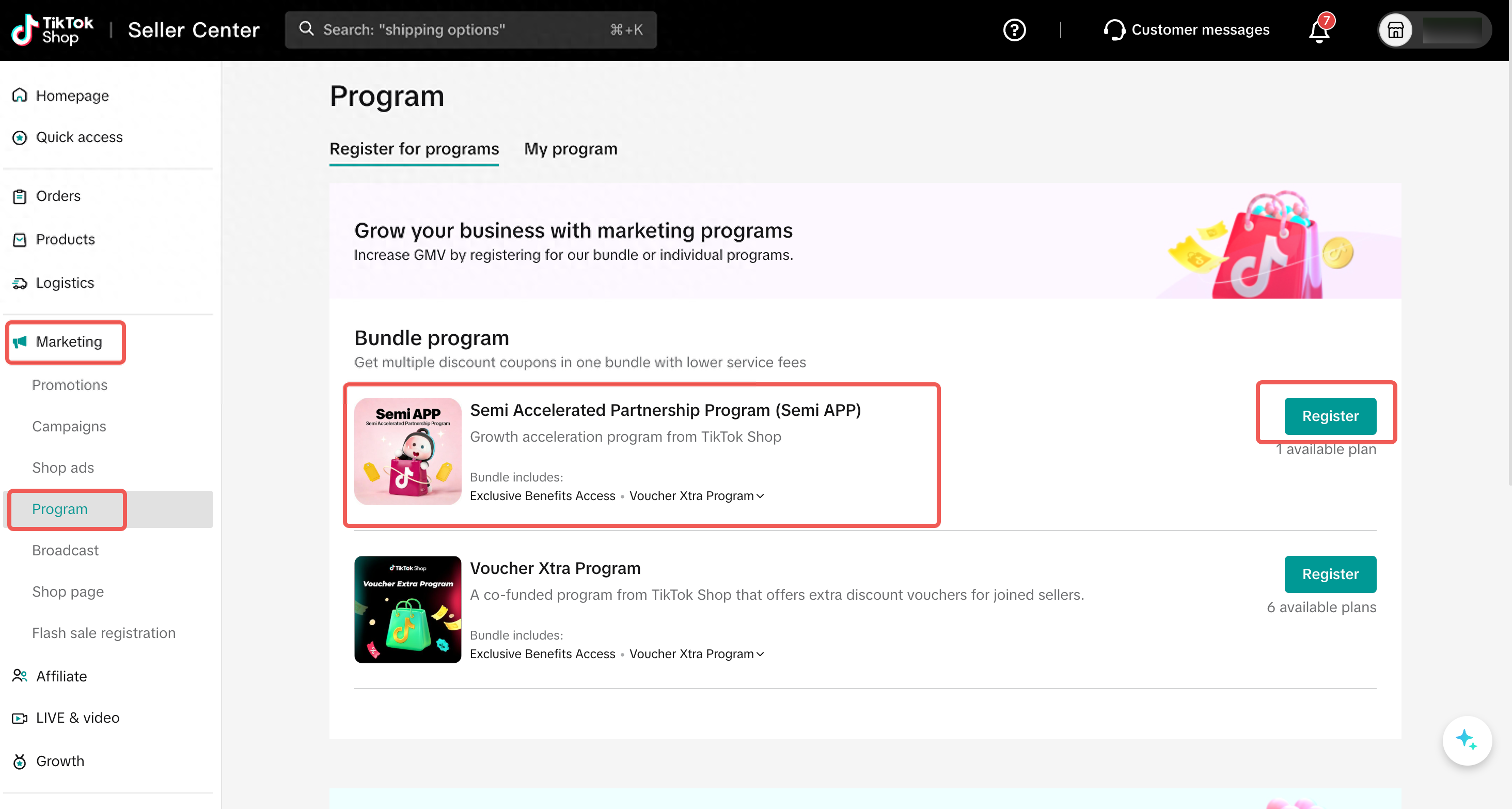

- After registration, sellers can check their registration status on the same detail page
- Under Review: Platform is reviewing, Semi APP service is not LIVE
- Approved: Platform approved, Semi APP service will be LIVE
- Reject: Platform rejected registration
- If the review is rejected, you will get a notification to inform you, with recommendations to apply for other resource packages.
- Withdraw under review: Withdrawal request has been submitted, awaiting approval from the platform
- Expired: The Program has ended or has been removed
- If sellers already have a TikTok Official/Marketing account: [External] VN Semi Ads Authorization Handbook(With TT Account)- Dành cho nhà bán hàng (Có tài khoản TikTok)
- If sellers don't have a TikTok Official/Marketing account: VN Semi Ads Authorization Handbook-External(No TT Account)
5. How to withdraw from Semi APP
5.1. Seller withdraw criteria
- Seller may apply to withdraw in the last two weeks of each quarter.
- Semi reviews subscription criteria and seller performance quarterly.
- Semi may withdraw the bottom 10% performance sellers based on quarterly scores.
- Quarterly score mechanism details should be announced to sellers by the Semi team.
5.2. Withdrawal guidance
On Seller Center, find Marketing > Program > Semi APP Program > ManageIn the right corner choose the 3 dots symbol > WithdrawIf the seller passes the Withdrawal restriction, and gets approval by The Semi Team within max 14 days. The campaign status will then be updated to Expired.
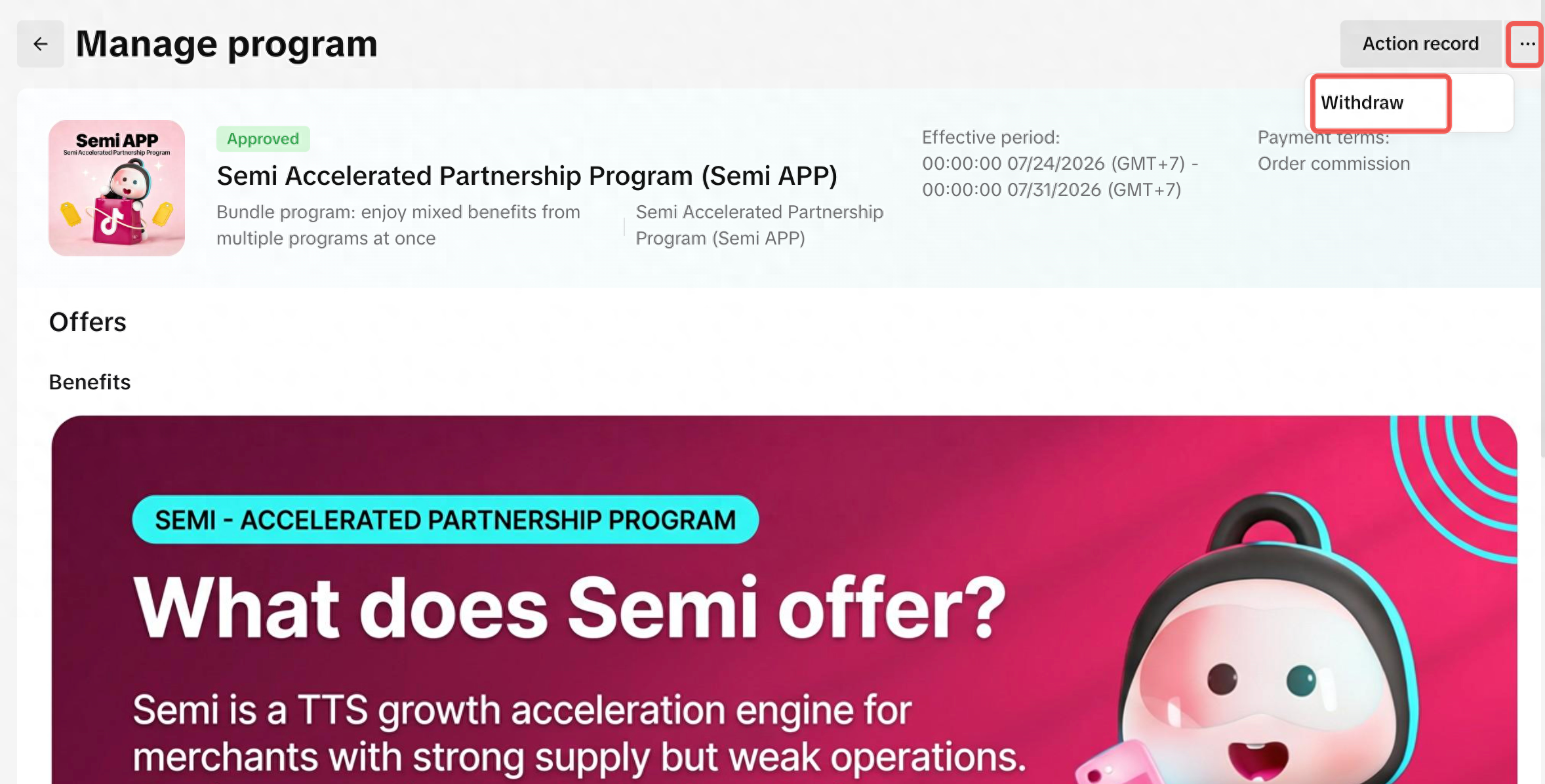
6. FAQ
Question | Answer |
| If sellers are currently enrolled in all shop campaigns within a bundle, are they automatically enrolled into a bundle? Or do sellers have to operate this themselves manually? | If sellers are currently enrolled in all the shop programs but not the bundle, they will not enjoy the bundle discount. Sellers must withdraw from all existing shop programs, and register for the bundle. |
| Can i buy multiple bundles? What if some shop programs overlap? | Sellers can not buy bundles that overlap. Sellers can only be registered into one of each type of shop program. |
What does the seller pay? | A Semi bundle fee by second category, currently 12%-25%, can check the fee table here, plus authorization for Semi to operate selected promotion/marketing activities. |
What does Semi operate? | Promotion operation, campaign/shop resource registration, ads promotion support, platform subsidy/voucher setting, creator matchmaking. |
Can sellers withdraw? | Yes. Sellers can be withdrawn in one of two ways:1. Self-withdrawalAvailable only during the last two weeks of each quarter.EntranceOn Seller Center, find Marketing > Program > Semi APP Program > ManageIn the right corner choose the 3 dots symbol > WithdrawIf the seller passes the Withdrawal restriction, the system will automatically approve the request. The campaign status will then be updated to Expired.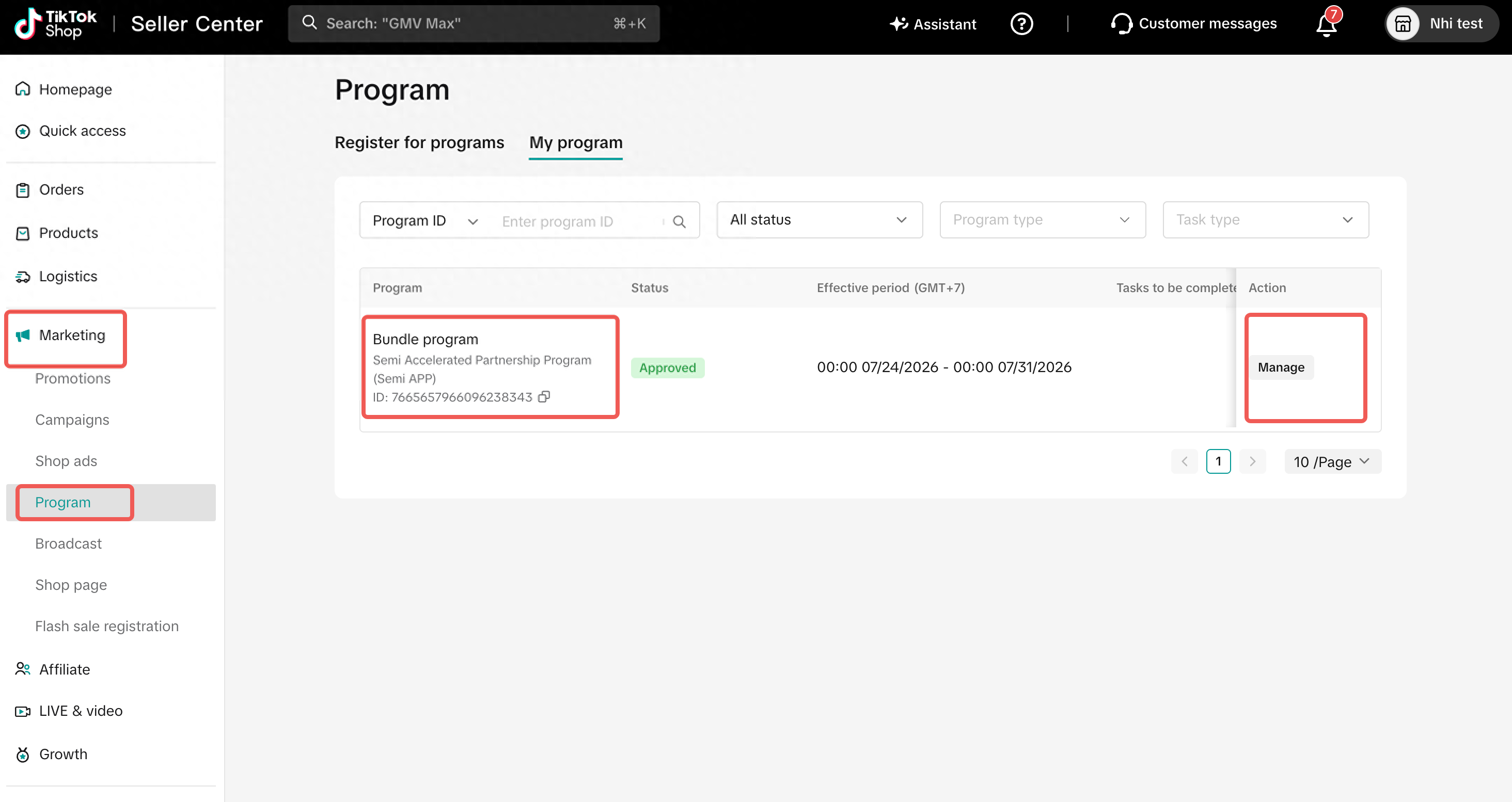 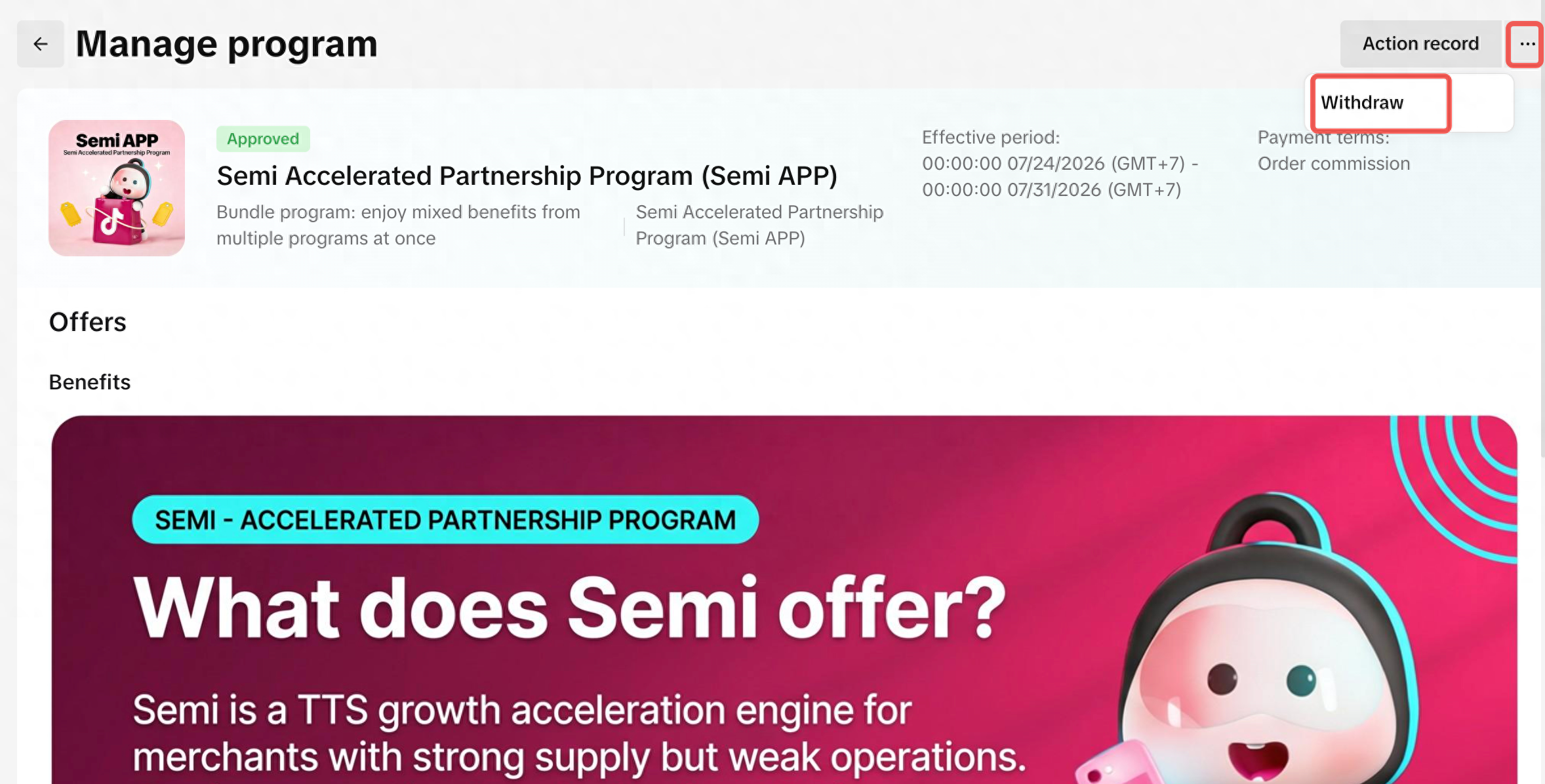
|
What does the seller still own? | Sellers act as independent retailers and remain the owners and operators of their shops. They hold and manage their own inventory, arrange logistics and fulfillment, handle customer service, and remain responsible for inventory availability, inventory condition, delivery performance, customer-facing obligations, product quality, product compliance, and product liabilities. Sellers also retain final decision-making authority over their shop operations, including product listing, product information, pricing, stock management, order fulfillment, customer service handling, and compliance with platform rules and applicable laws. Participation in the Semi Project does not transfer shop ownership, seller obligations, or overall business control to TTS. |
| How to Access Invoices and tax related? | Go to Finance > Invoice Center. Here, sellers can download invoices or export invoice details.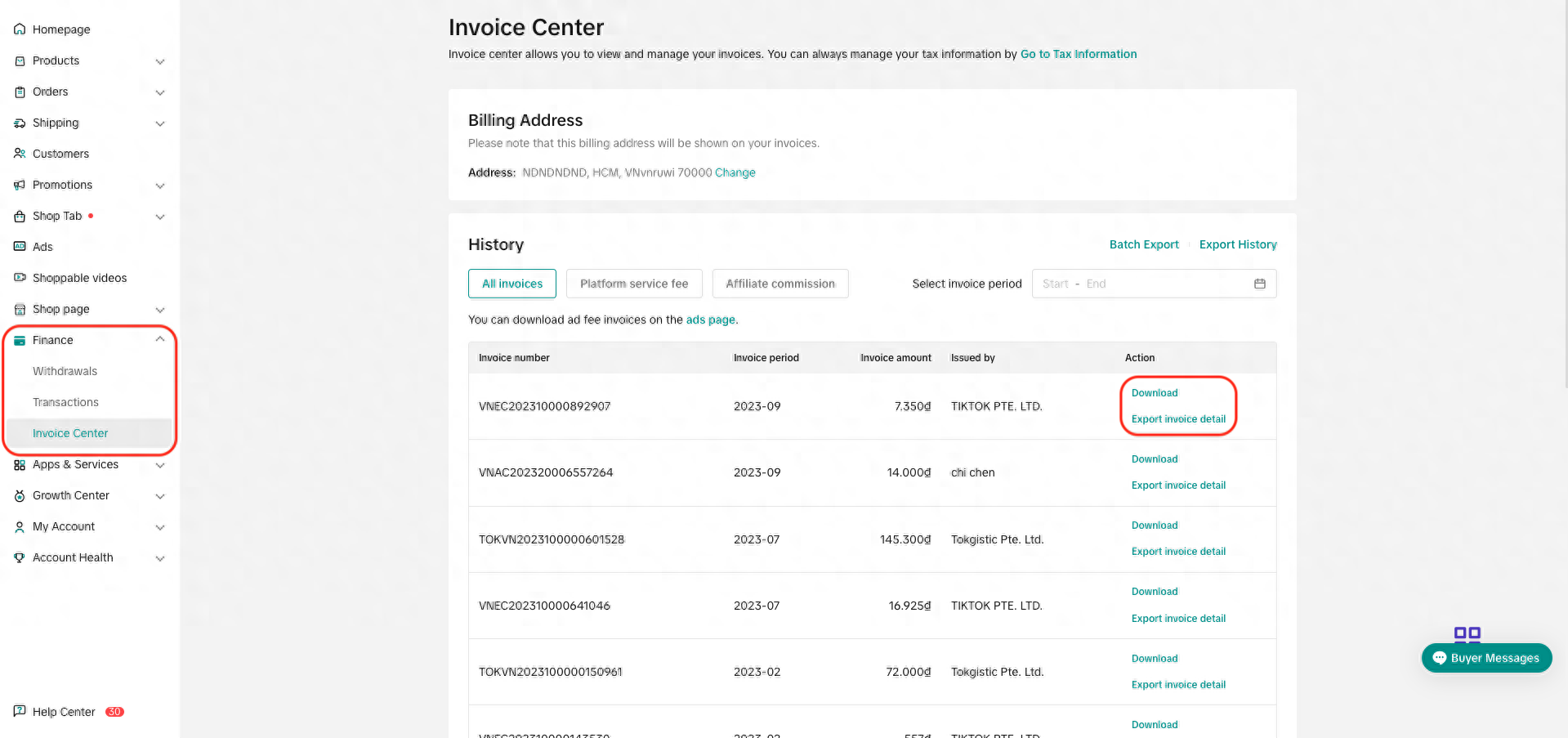 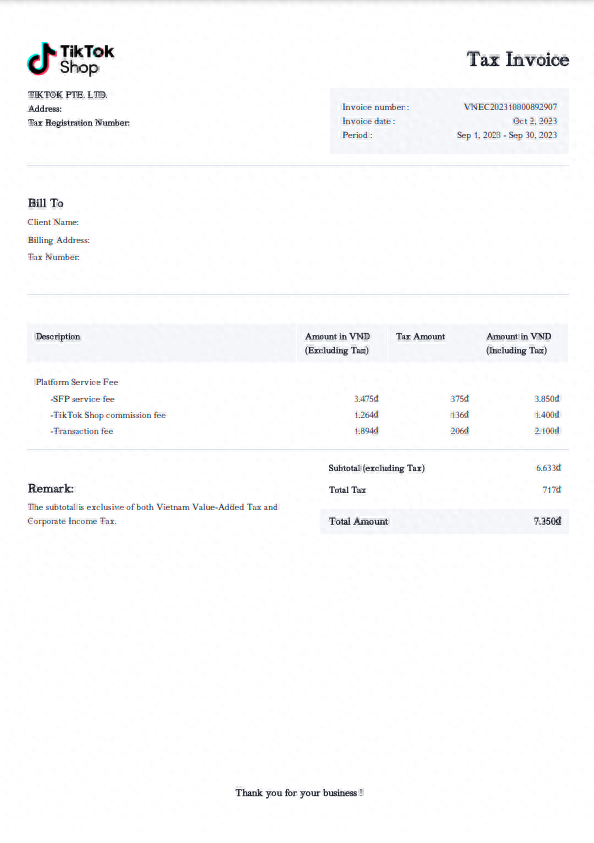 |
| If Semi Runs Internal Ads for sellers, can sellers also run their in-house ads ? | Yes. Internal ad delivery does not conflict with seller self-investment. |
| Seller is working with GBS team, and GBS provides an ads dashboard for them to check market insights and market trends. (https://marketscope.tiktok.com/brand/homepage) So after buying this package, will the seller stop working with GBS? | No, the seller can still work with GBS — there is no conflict with internal ads. |
| Can they still access the dashboard to check market trends? | Yes. TTMS includes 2 parts data,
|
| How do sellers authorize ads for Semi? | Seller with Tiktok Account: [External] VN Semi Ads Authorization Handbook(With TT Account)- Dành cho nhà bán hàng (Có tài khoản TikTok)Seller with no Tiktok Account: VN Semi Ads Authorization Handbook-External(No TT Account) |