

Creators' Affiliate Commission
04/02/2025
In this article, we will guide you on how Creators receive their commission based on the Buyer's actions before checking out an affiliate product.
Furthermore, we will go over how you can calculate, view, and manage your commission.

Note: The actual paid price may be lower than the product price seen in the store because the latter does not include discounts such as platform coupons and merchant coupons. Why didn't I receive any affiliate commission?There is no commission if the following happens:
To learn more about Sellers' settlement periods, please refer to this Policy guide.



Affiliate: Affiliate promotion revenue only
Furthermore, we will go over how you can calculate, view, and manage your commission.
What is Affiliate Commission?
Affiliate commission is the commission you get as a Creator when you cooperate with a merchant to promote their products. You will receive a commission on every item sold through your content.Calculation Rules
Commissions are calculated based on the buyer's actual paid price * the commission rate (Actual paid price = product price - platform coupon - merchant coupon - product tax)Note: The actual paid price may be lower than the product price seen in the store because the latter does not include discounts such as platform coupons and merchant coupons. Why didn't I receive any affiliate commission?There is no commission if the following happens:
- If the buyer cancels the order before receiving the shipment;
- If the buyer refunds the order during the after-sales period.
- If the buyer confirms receipt, but a partial refund occurs during the after-sales period, the creator gets part of the commission.
- If the buyer does not complete the order under the pretext of fraud
| Fund Settlement period of 7 calendar days for customer orders |
| Fund Settlement period of 3 calendar days for customer orders |
| Fund Settlement period of 15 calendar days for customer orders |
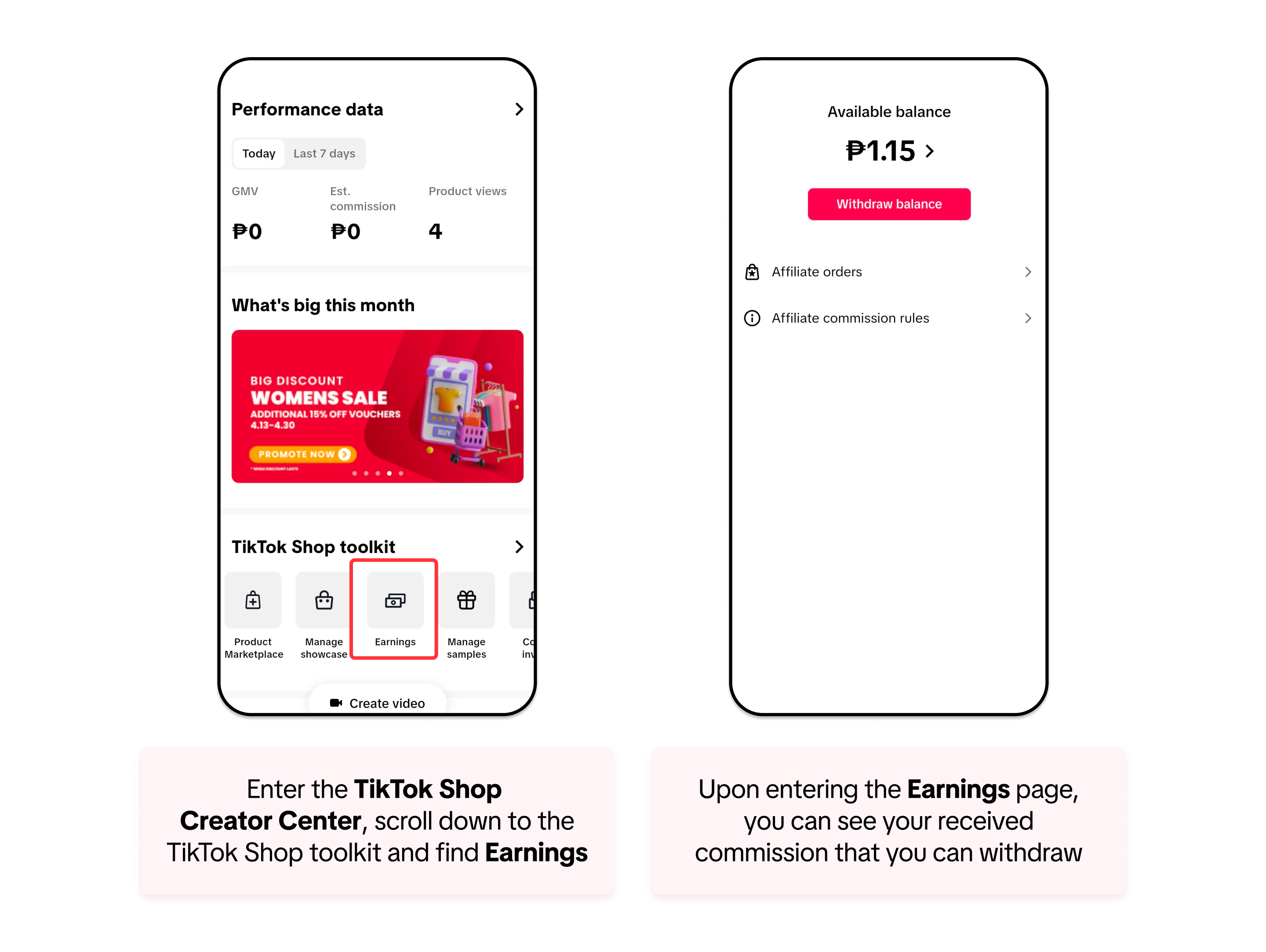
Commission Earnings
To check your available earnings, follow the steps below:Estimated Commission VS Commission
Estimated commission: After the buyer pays for the order, the system will calculate an estimated commission
Actual commission: The actual commission varies depending on the different situations during the after-sales period.
- Estimated commission = actual paid price * the commission rate
- If no refund occurs, the actual commission = the estimated commission
- If a partial refund occurs, the actual commission = (actually paid price - refund amount) * the commission rate
- If a full refund occurs, the actual commission = $0
Commission Scenarios for Eligible Sales
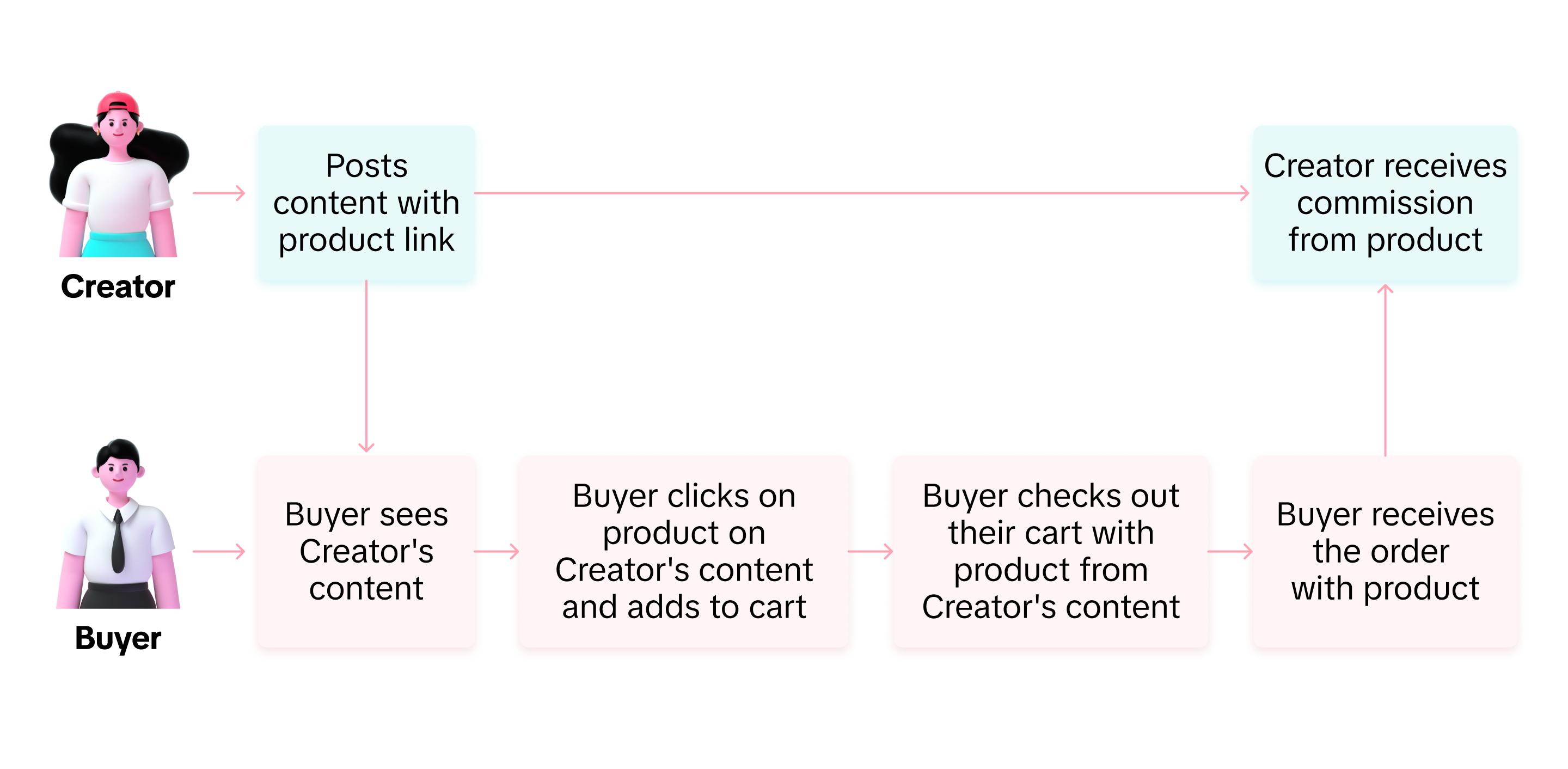
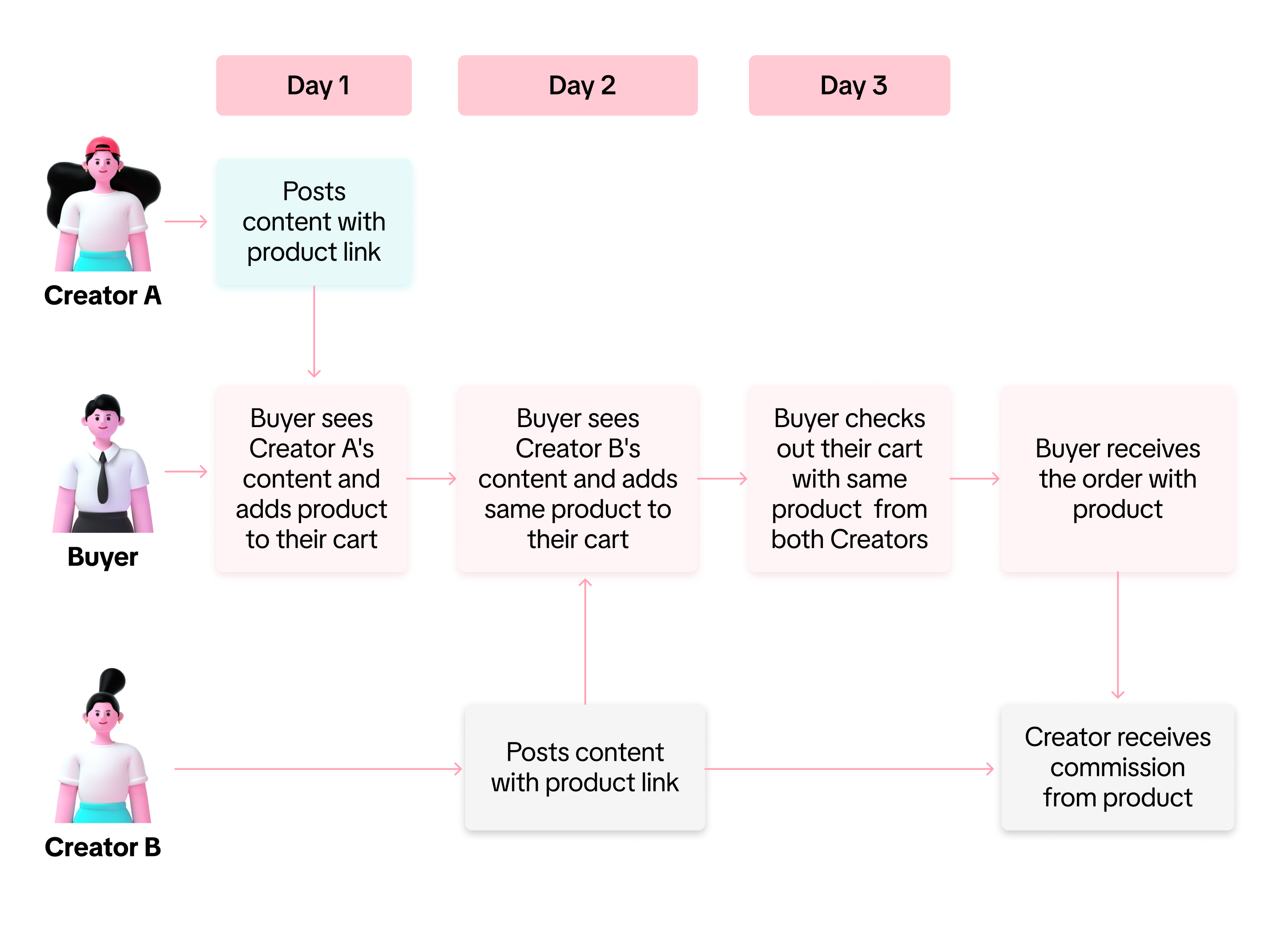
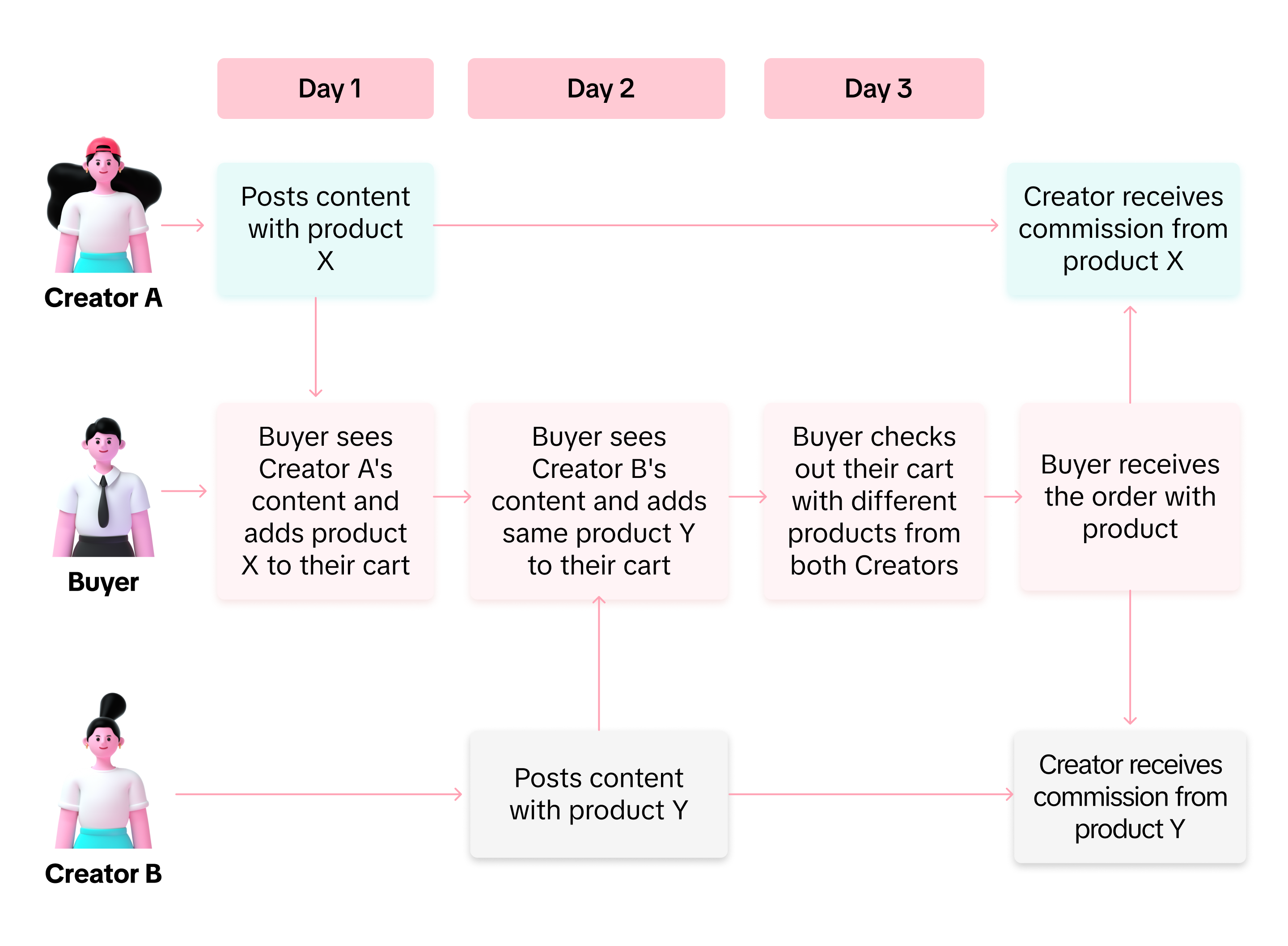
To understand how commission can be linked to a Creator after an eligible sale, we prepared various scenarios for you:Scenario 1: One Buyer, One Creator
Scenario 2: One Buyer, Two Creators with Same Product
Scenario 3: One Buyer, Two Creators with Different Products
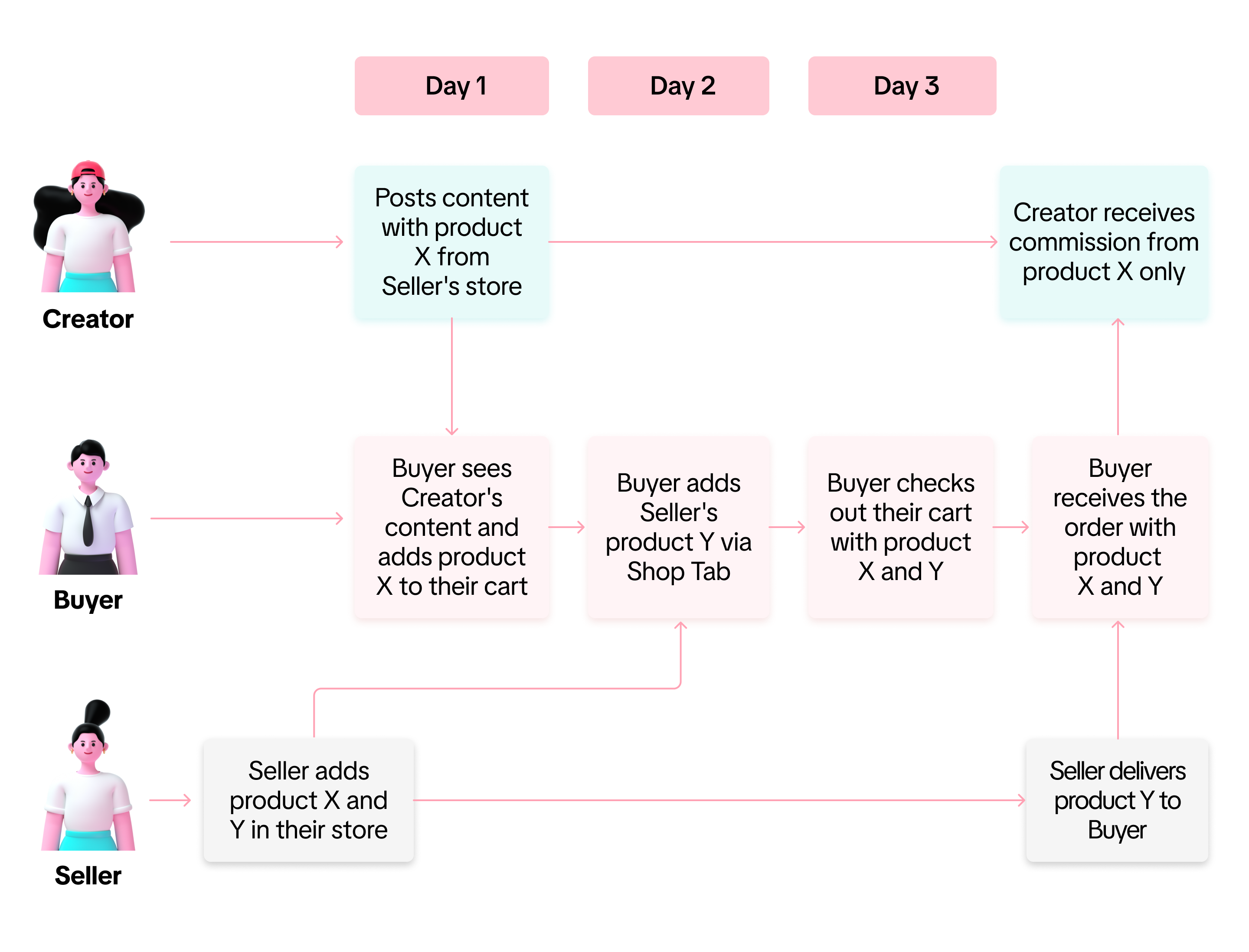
Scenario 4: One Buyer, Two Different Products from Same Seller checked out from Different Pathways
FAQ
- Why is my actual commission $0 on the Not Settled page?
- For all of the orders on the Not Settled page, the commission is $0. Commissions will only be sent after the orders are settled.
- If a buyer clicks on my content, will I be eligible for a commission on any orders they place?
- You can earn a commission if the buyer places an order within 14 days after clicking the product and adding it to their cart.
- Specifically for affiliate links, if the buyer makes the next purchase without first clicking your link, you will not receive a commission.
- Why is the order not showing on the Affiliate Orders page?
- The Affiliate Orders page displays only orders placed through your affiliate channels (LIVE, SV, Showcase, and Affiliate Links). To be eligible for commission, the buyer must place each order by adding the product to the cart through any of those channels you shared. We recommend reviewing the section "Commission Scenarios for Eligible Sales" to better understand how commissions are linked to creators and product sales.
- I saw that some of my affiliate orders have "Direct" and "Indirect" tags. What does this mean?
- Both tags represent the type of commission you receive after promoting a product using Affiliate Links.
- "Direct" means a buyer purchases an affiliate product directly through the affiliate link you shared, while "Indirect" means a buyer purchases an affiliate product through TikTok Shop recommendations after clicking on the link you shared. Learn more about affiliate links here.
- Both tags represent the type of commission you receive after promoting a product using Affiliate Links.
- I am a merchant. How to distinguish the affiliate promotion revenue and the merchant's self-sale revenue?
- In the data compass of the e-commerce centre, you can choose to view All and Affiliate revenue:
Affiliate: Affiliate promotion revenue only