Basic Tax Information
08/15/2025
Starting 1st July, 2025, in compliance with Circular 86/2024/TT-BTC, individual and business household sellers' tax codes will be replaced with the 12-digit personal identification number provided by sellers during the onboarding phase.
 Pursuant to the Law on Value Added Tax No. 48/2024/QH15, effective from 1st July, 2025, the VAT rate applicable to services provided by foreign suppliers without a permanent establishment in Vietnam delivered to organizations and individuals in Vietnam via e-commerce and digital platforms will increase to 10%.
 On 29th September, 2021, the Vietnam Ministry of Finance released Circular 80/2021/TT-BTC, guiding the implementation of the Law on Tax Administration and Government Decree 126/2020/ND-CP, which started taking effect from 1st January, 2022. For the purpose of complying with local tax law updates, TikTok Pte. Ltd. ("TikTok") proceeds the registration for Vietnam tax and becomes responsible for tax filings in Vietnam on fees that TikTok charges for seller's use of the TikTok Shop Platform.
Existing individual and business household sellers' tax codes, if previously submitted, will be replaced with 12-digit personal identification numbers during the onboarding phase.
If sellers have not submitted a personal identification number but have submitted a valid tax code, the tax code will remain.
To update tax information:
- If the seller is a tax registered organisation in Vietnam, please provide your Tax Code to TikTok and once your Tax Code has been verified, the fees that TikTok charges will be VN taxes exclusive. You are responsible for bearing, reporting, and remitting VN Taxes for TikTok in connection to TikTok Service Fees to the Vietnam tax authorities.
- If the seller is not a tax registered organisation in Vietnam or your provided Tax Code has not been verified, the fees that TikTok charges will be the same amount as the fees inclusive of VN Taxes. TikTok will be responsible for reporting and paying Vietnamese Taxes arising from such service fees.
Vietnam Taxes include both Value Added Tax ("VAT" and Corporate Income Tax ("CIT"). Currently, platform fees are subject to tax rates of 10% VAT and 5% CIT.
Tax Calculation Illustration
- If the seller has provided a tax code and the tax code has been verified:
| TikTok Service Fee(inclusive of Vietnam Tax) | 5000 |
| VAT that the seller should withhold and remit on behalf of TikTok | 5000*10%=500 |
| CIT that the seller should withhold and remit on behalf of TikTok | (5000-5000*10%)*5%=225 |
| Total Amount the seller is due to pay TikTok shown on Invoice(Amount exclusive of Vietnam Tax) | Service Fee - VAT - CIT = 5000 - 500 - 225 = 4275 |
| Net payment to TikTok | 4275 |
- If the seller has not provided a tax code or the tax code provided has not been verified:
| TikTok Service Fee(inclusive of Vietnam Tax) | 5000 |
| VAT to be collected by TikTok and remit to tax authority | (5000/(1+10%))*10% = 455 |
| CIT to be collected by TikTok and remit to the tax authority | (5000/(1+10%))*5% = 227 |
| Total Amount the seller is due to pay TikTok shown on Invoice(Amount inclusive of Vietnam Tax) | 5000 |
| Net payment to TikTok | 5000 |
How to provide Tax Code on TikTok Shop?
Individual and Business Household Sellers
New individual and business household sellers' tax codes will be auto-filled with the 12-digit personal identification numbers provided by sellers during the onboarding phase.Existing individual and business household sellers' tax codes, if previously submitted, will be replaced with 12-digit personal identification numbers during the onboarding phase.
If sellers have not submitted a personal identification number but have submitted a valid tax code, the tax code will remain.
To update tax information:
- To update the tax code/personal identification number, sellers need to contact their Account Manager or raise a support ticket to the Help Center.
- To update the billing address, sellers can go to:
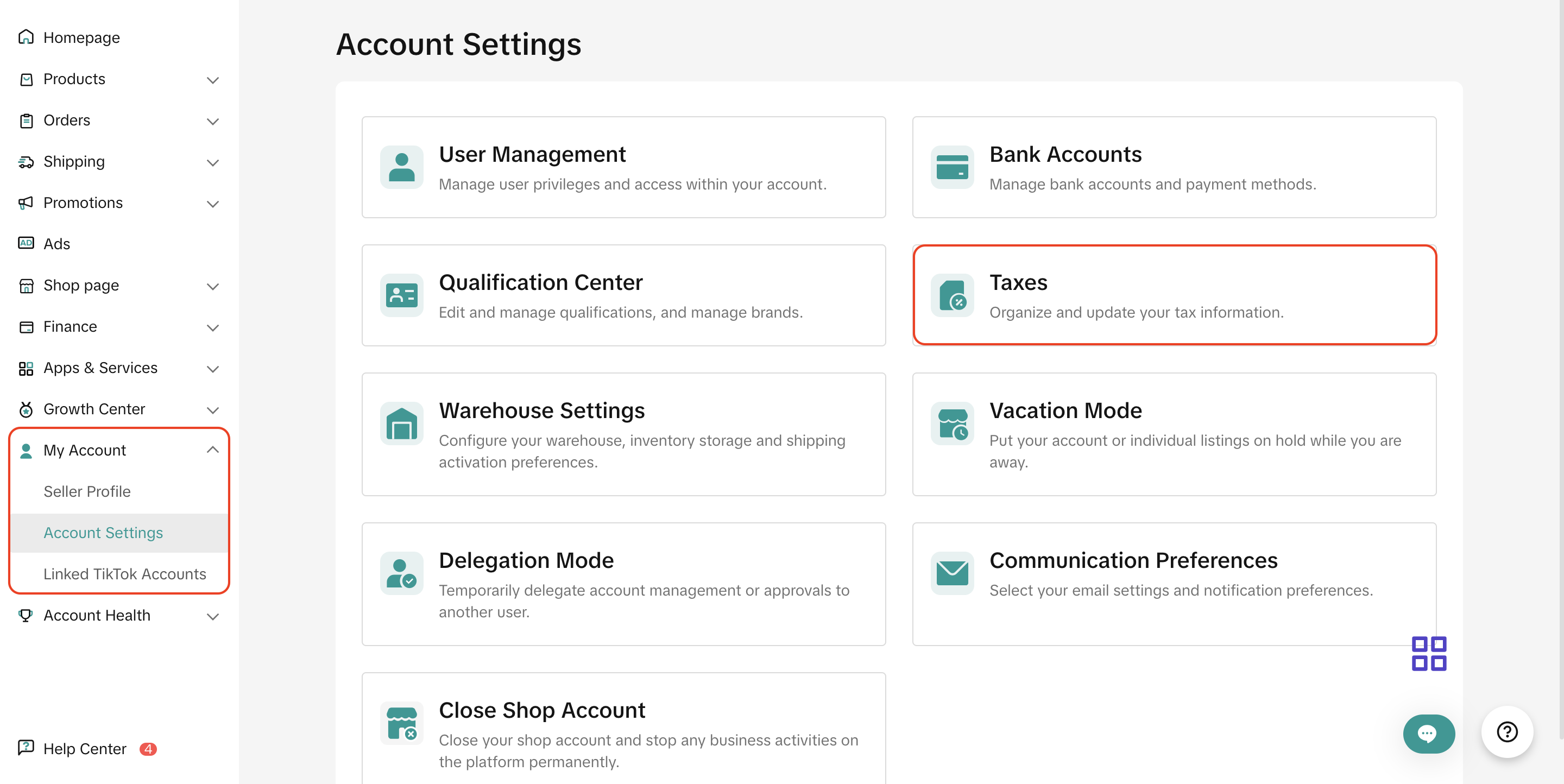
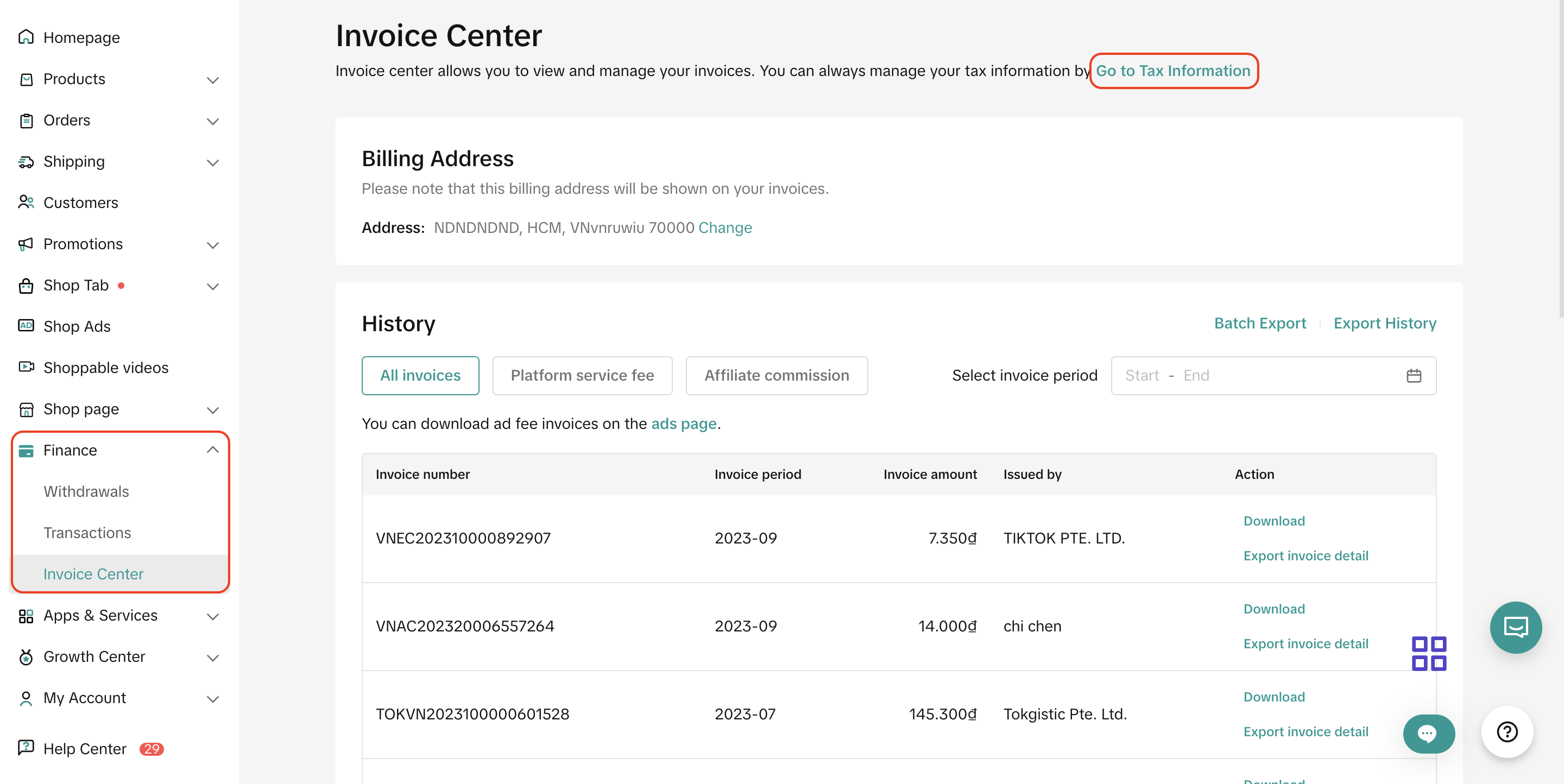
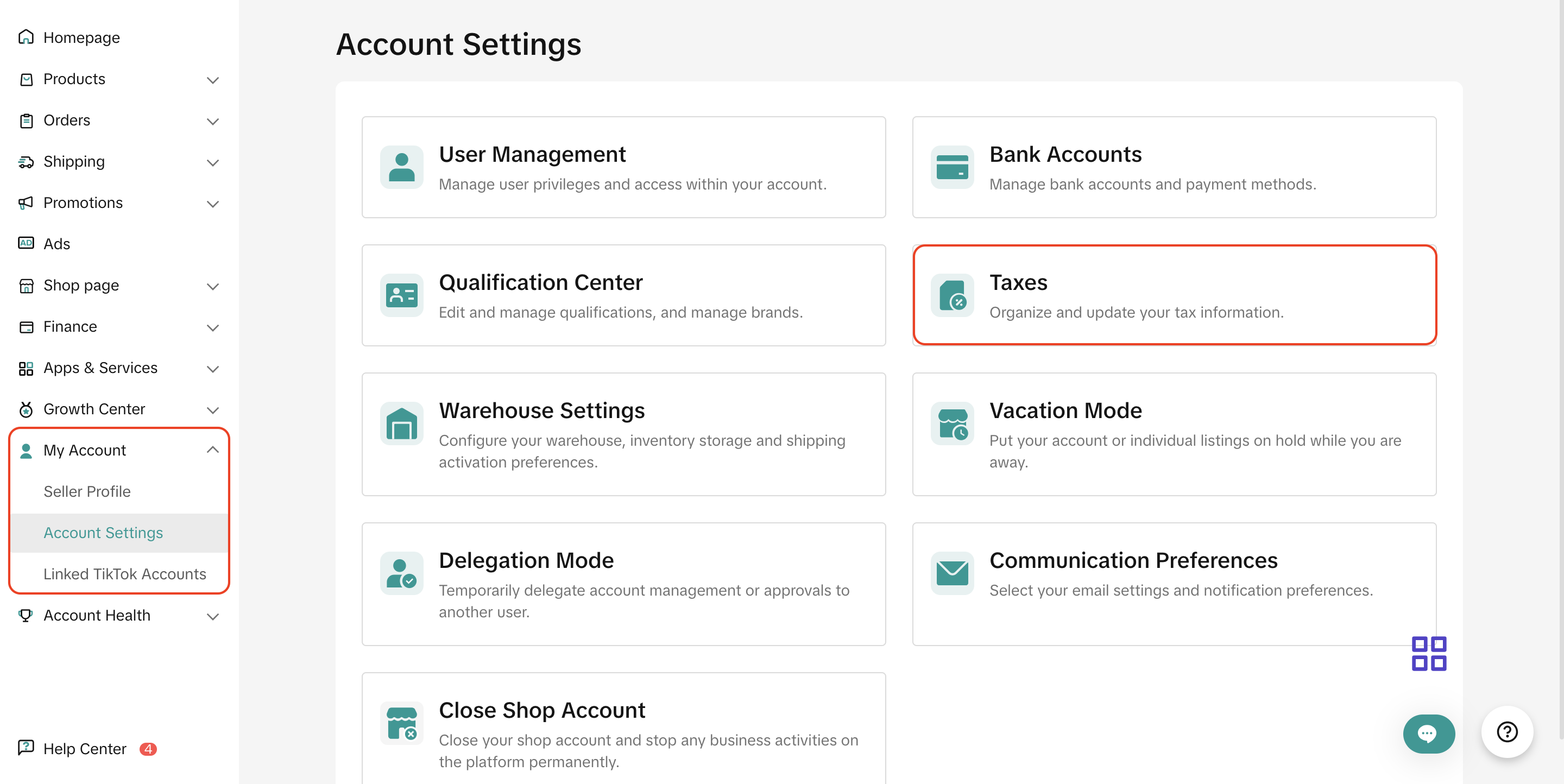
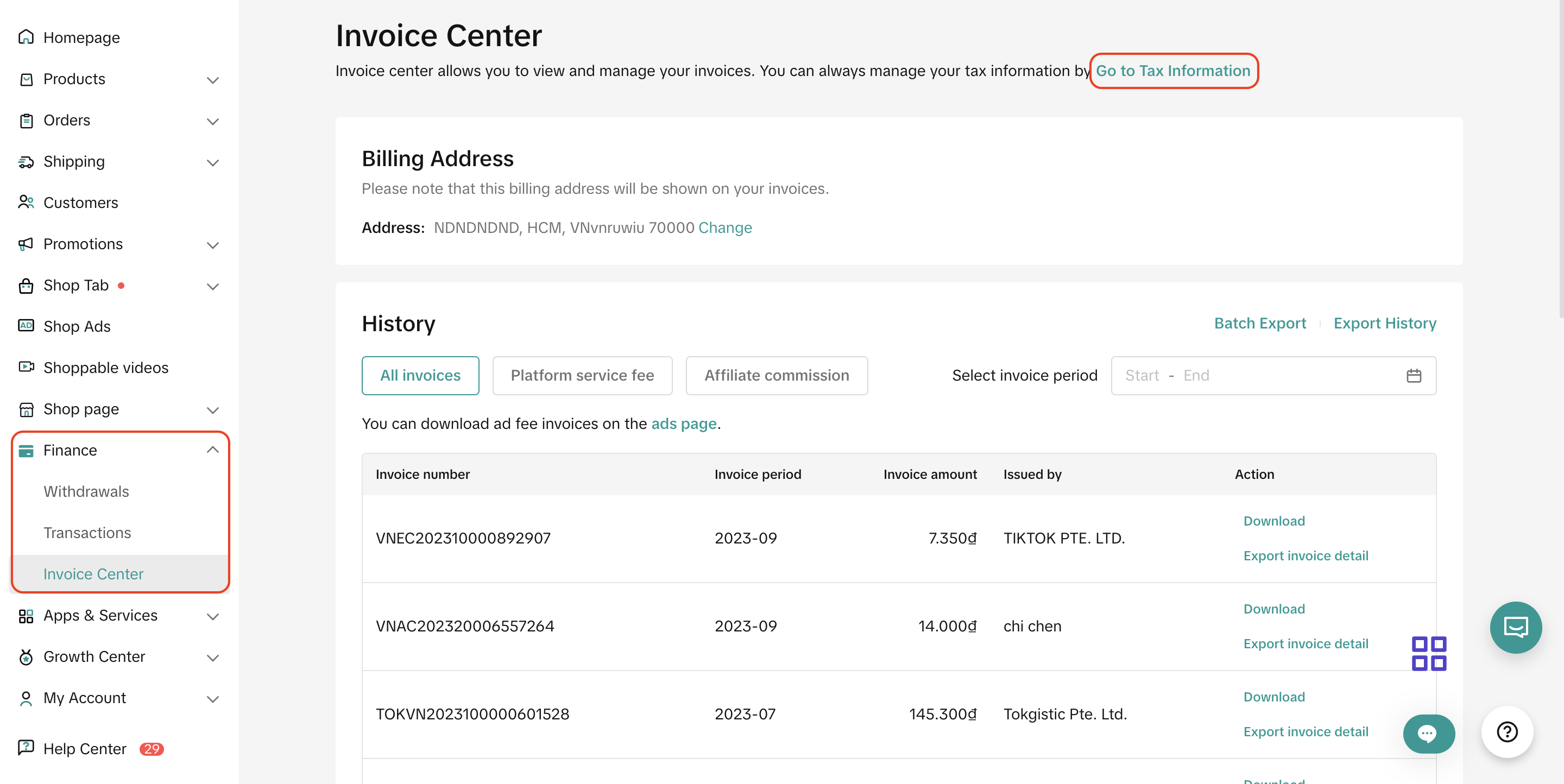
- On PC: TikTok Shop Seller Center > My Account > Account Settings > Taxes or TikTok Shop Seller Center > Finance > Invoice Center and click "Go to tax information"
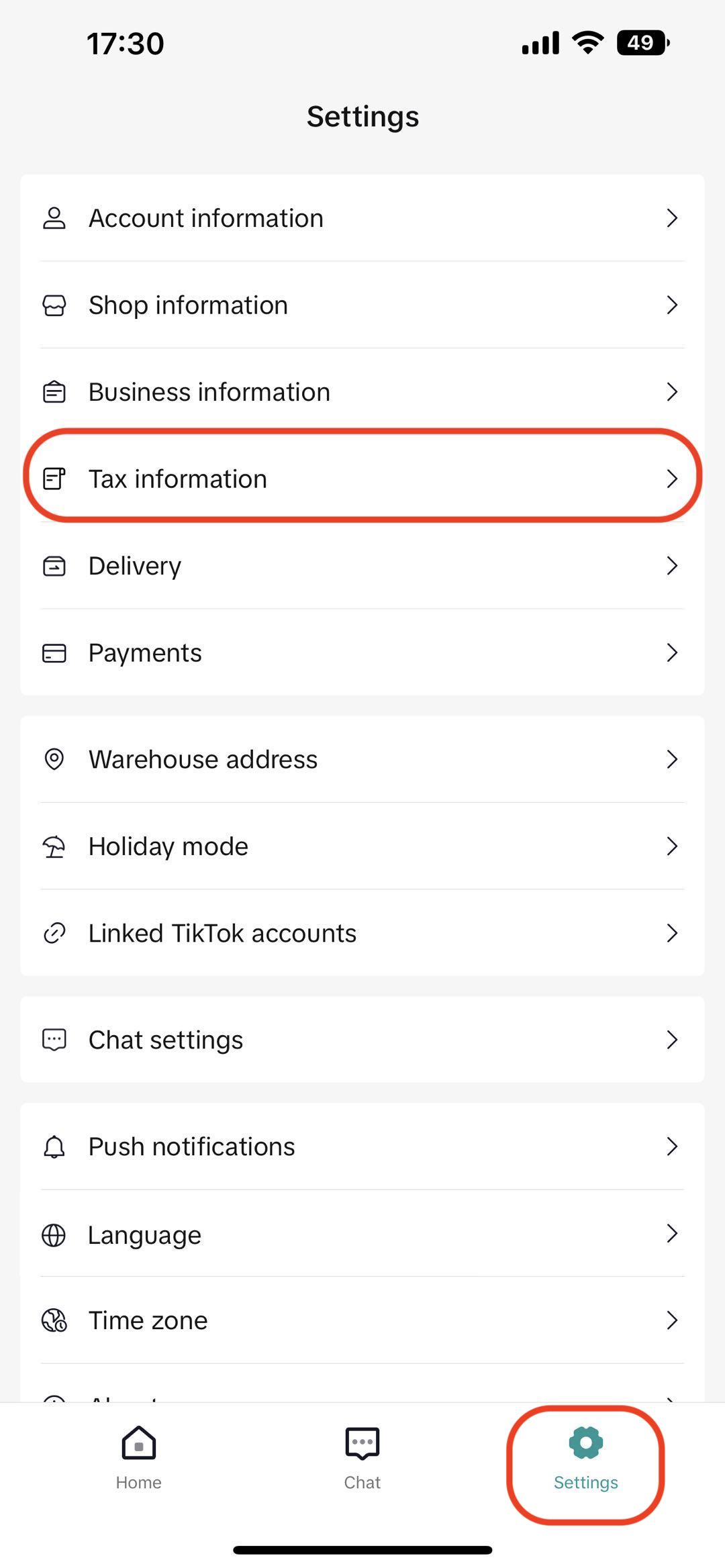
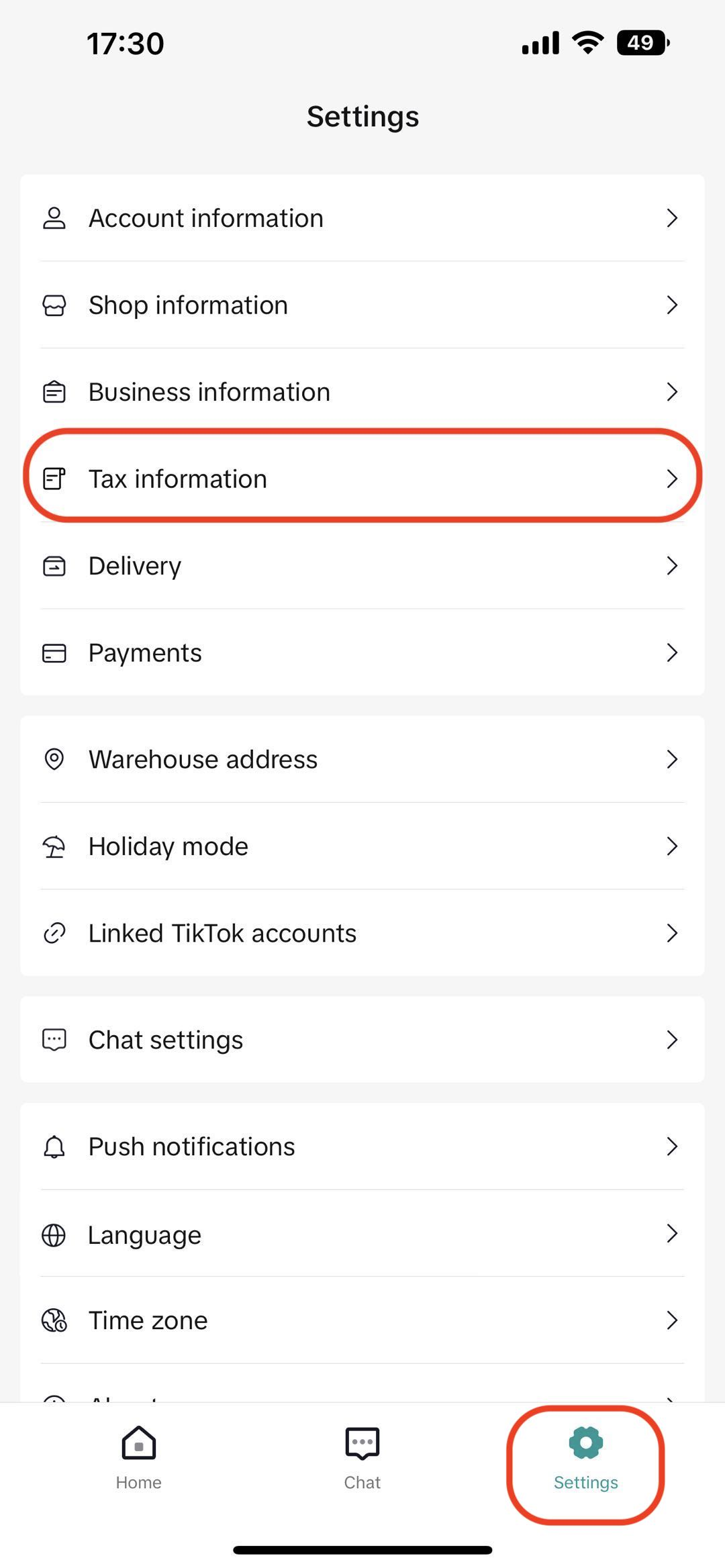
- On app: Settings > Tax information
- On PC: TikTok Shop Seller Center > My Account > Account Settings > Taxes or TikTok Shop Seller Center > Finance > Invoice Center and click "Go to tax information"
Corporate Sellers
- On Seller Center PC, go to TikTok Shop Seller Center > My Account > Account Settings > Taxes or TikTok Shop Seller Center > Finance > Invoice Center to fill in the tax code and billing address
- On the Seller Center Mobile App Settings > Tax information