

[Part 1] How can I create Video Shopping Ads or LIVE Shopping Ads?
12/26/2023
You can also go to TikTok Ads Manager > Campaign > Create. From there, select Product Sales under Advertising Objective followed by TikTok Shop under Product Source.
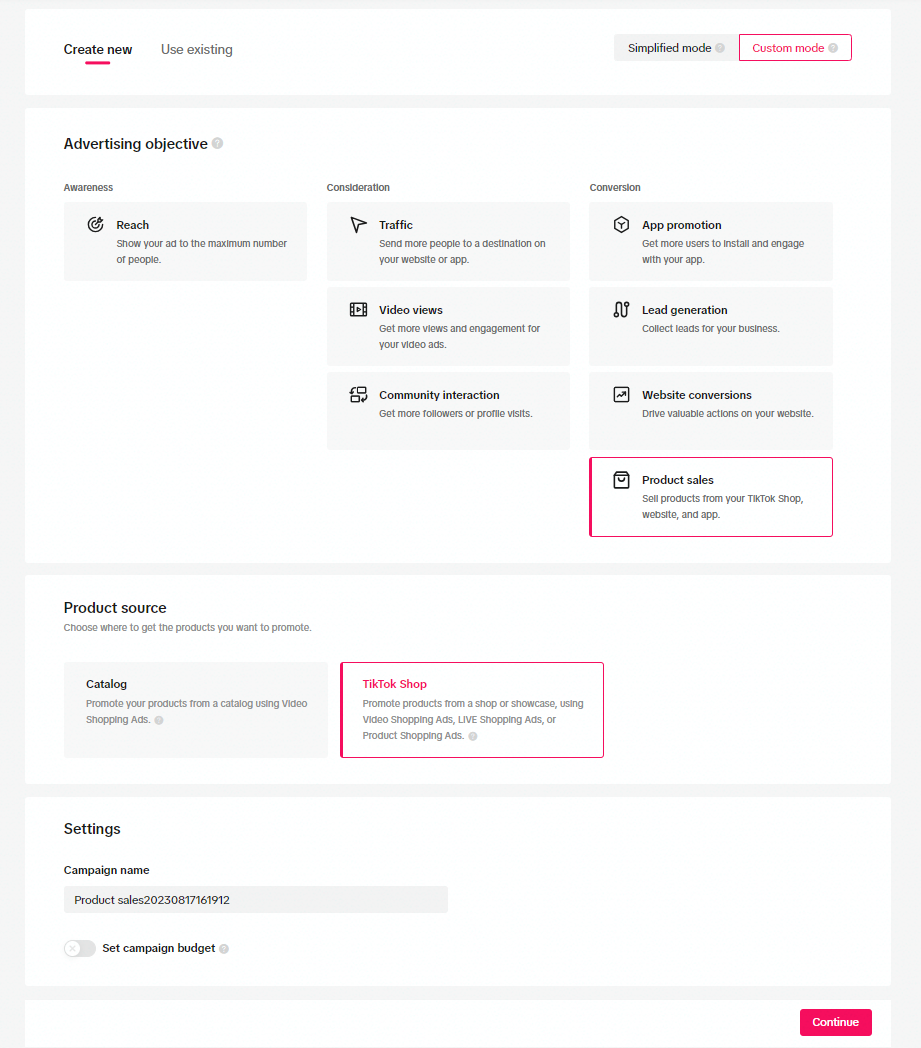 Fill out your desired campaign name and set a campaign budget. (All your ad groups in the campaign will cease once you've reached your daily or lifetime budget limit.)
After you select the Identity for your shopping ad, you will need to input the remaining required ad group settings:
- Placements
- Audience targeting
- Budget and schedule
- Bidding and optimization
You may also be interested in

Affiliate Creatives for Ads (ACA), for Sellers
This guide will focus on affiliate operations, which entail setting up your Shop Ads Commission Rate…
Set Up Video Shopping Ads
Showcase your products to TikTok users through creative video content. Within the ad, your audience…
Set Up Video Shopping Ads
Showcase your products to TikTok users through creative video content. Within the ad, your audience…

What are Video Shopping Ads?
Video Shopping Ads allow customers to purchase promoted products directly from viewed ads. You will…
Selling made simple with Video Shopping Ads
Place irresistibly shoppable videos across the For You page to sell more of your products. Looking f…

About Auto Remix for LIVE GMV Max
Auto Remix feature enhances the Video-to-Live feature of LIVE GMV Max by automatically generating sh…
Set Up Live Ads
Interact in real-time with viewers while promoting your products and store. You can create LIVE shop…
Set Up Live Ads
Interact in real-time with viewers while promoting your products and store. You can create LIVE shop…

High Season Oppotunity
Optimization Roadmap For LIVE GMV Max Ads
This article will guide you through the basic usage and optimization roadmap for running LIVE GMV MA…